
404 when my application attempts to download AIR runtime
Recently, my application has been unable to install the AIR runtime as part of the installation on Windows 10 (despite no changes being made to my application). If AIR is not already installed, this will fail and this message appears:
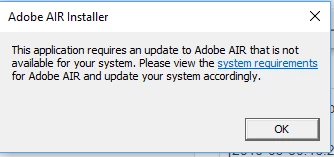
If AIR is installed already, then installation works successfully - this is fine for development but a big hassle for end users.
This is what occurs in the install log:
[2019-05-30:13:26:33] Bootstrapper begin with version 32.0.0.116 on Win x86
[2019-05-30:13:26:33] No installed runtime detected
[2019-05-30:13:26:33] Begin runtime download from https://airdownload.adobe.com/air/3/nai/windows10.0/x86/installer
[2019-05-30:13:26:34] Download failure: 404 not found
[2019-05-30:13:26:36] Bootstrapper end with exit code 14
What's causing this?
Thanks in advance for any help that can be provided.


 AdChoices