


October 12, 2011
Question

Additional Information? Why?

  • October 12, 2011
  • 2 replies
  • 6373 views

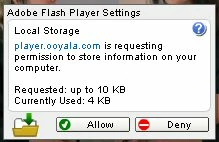
Lately when I am playing some flash player videos I get a fly-out window that asks me for permission to place information on my computer. I press the button “deny”, but this window keeps coming back. It is very annoying. It also shows a name “player.ooyala.com”. Is this a different player than flash? And how can I get rid of these horrible fly-out windows.

Example: I watched a 4-min fashion show video and this request for adding information to my computer showed up 11 times.

I think if I have Flash Player installed it placed all the information onto my computer that is necessary. I do not wish to permit anybody else to invade my computer.

Please help.
This topic has been closed for replies.

2 replies

lisachao
Adobe Employee
Adobe Employee
October 18, 2011

This is the AIR forum.  Can you please repost your question on the Flash Forum for better visibility? 

http://forums.adobe.com/community/flashplayer

Thanks!

-Lisa

Participating Frequently
October 12, 2011

You mentioned that you did not want anybody to invade your computer. But that's exactly why the window is popping up - that is a Flash window - Flash is protecting you from information the video is trying to put on your computer. But Flash doesn't know whether you want to allow or deny that information. So each time the video trys to write information to your computer Flash is seeking your permission for that to happen (or not to happen). It is protecting you.

In other words it's not Flash that is the problem. It's the video you are playing that is the problem. It is the video that is trying to do something that you don't want it to do. And Flash is allowing you to block it from doing that.

Carl