

Dylan K
Participant
March 24, 2017
Question

adl supports retina, air installer does not?

  • March 24, 2017
  • 2 replies
  • 404 views

I'm having an issue that only becomes obvious when I launch the packaged .air file through the AIR installer.

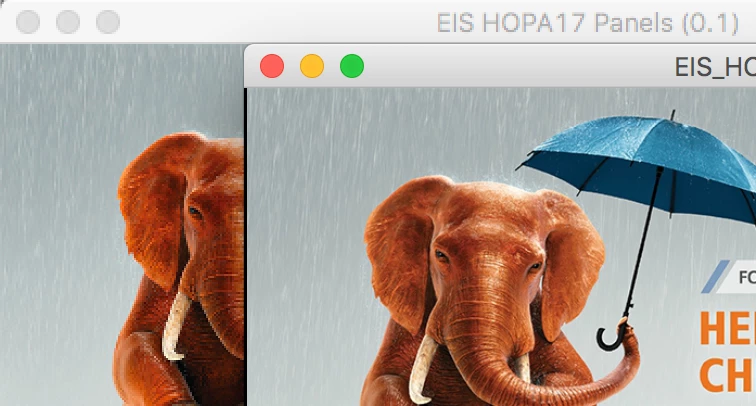
Everything is pixelated.

While I'm working in Adobe Animate and testing with adl, everything is sharp and crisp.

Attached is a screen grab of the application running in AIR (behind / left) vs running through Animate via ADL (front / right)

Did I miss a step somewhere? Or is AIR itself not designed to run on higher density displays?

Forgive me if this is the wrong forum as I think it's more of an issue with AIR itself.

Thanks!

-Dylan

Adobe AIR Installer: 25.0
Adobe AIR SDK 25.0.0.134
Adobe Animate: (2017.1) 16.1.0.86

iMac Retina 5K, OS Sierra (10.12.3)
This topic has been closed for replies.

2 replies

chris.campbell
Community Manager
Community Manager
March 27, 2017

Hi,

Please try adding (or modifying) the following into your app's app-descriptor.xml file:

<requestedDisplayResolution>high</requestedDisplayResolution>

You'll want to be using AIR 23 for hiDPI support on Windows, but Mac retina support has been around much earlier.

Chris

Dylan K
Dylan KAuthor
Participant
March 30, 2017

Here's the noob question. How do I include an app-descriptor.xml file with my Animate CC project?

I was convinced it wasn't the project but something with AIR because of the following screenshot. The AIR installer looks pixelated.

Preran
Community Manager
Community Manager
March 27, 2017

Moving your post to the Adobe AIR forum. The experts here should be able to answer your question.

Thanks,

Preran