
franciscovj
Participant
May 12, 2015
Question

Adobe Air Crashes when installing on Windwos 2012 R2

  • May 12, 2015
  • 2 replies
  • 2704 views

Hi,

I'm asking this question as i have done some research on the web and adobe forums and cant really fin an answer for Adobe Air support on Windows 2012 R2.

Our customers work on an application that has been developed in Adobe Air on their Windows 2003 terminal server environments. Now that Windows 2003 Live is coming to an end we have been migrating them to Windows 2012 R2 however we have encounter with he problem that Adobe Air and the client application crashes.

The first problem starts when installing Adobe Air, after finishing the installation and with setup indication that was installed successfully the attached error appears right away. If i ignore this error and i install the client application it instals ok but after being running for 20 sec it crashes.
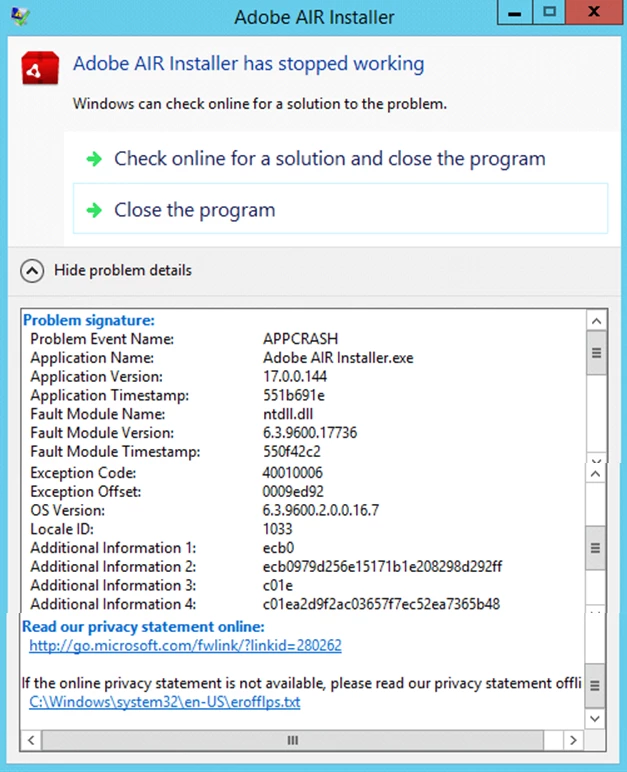
i have tried installed the following:

1. Installed all Microsoft updates for Windows 2012 R2 server as of May 11, 2015

2. Installed adobe air as Domain Administrator

3. Installed adobe air as local Administrator

4. Installed Adobe Air with elevated Administrator Rights under both domain/local Administrator accounts

We have encountered the same issue in all the Windows 2012 R2 environments.

I researched support for Windows 2012 R2 and i could find nothing, the official Tech Aspect Pages for Adobe Air does not mention at All support for windows 2012/2012 R2 ( Adobe AIR | Tech specs | Adobe AIR | System requirements )

We are currently running Windows Server 2012 R2 Standard Build 9600 fully updated and licensed.

The environments are virtual Machine Running on Xen servers ver. 6.5 with Xen Tools installed

We are installing Adobe Air v 17.0.0.144

According to the client application developer it should work but as far as i can see Adobe Air does not seem o be supported so not sure if they assume it works or they have really tested. This is why i'm trying to get more information to at least confirm that Adobe Air is a product that supports Windows 2012 R2 Server

Can anyone please advise if Adobe Air is supported on Windows 2012 R2 environment and if it is, can you help me out to troubleshoot the installation issue to get things going?

Thanks.

This topic has been closed for replies.

2 replies

ridhij4208356012135538
Adobe Employee
Adobe Employee
September 5, 2016

Hi,

We are not observing the behavior mentioned by you. Adobe AIR installs and we can install air apps as well.

Could you share the logs available at C:\Users\<username>\AppData\Local\Adobe\AIR\logs.

Could you also share the AIR app you are using when you observe the crash.

Thanks!

jeffreyk85873874
Participating Frequently
September 8, 2016

I'm not sure if this is relevant but all the servers we've tried running Adobe Air on are virtual - running on Citric Xen Hypervisor 6.2. While Air is crashing on all those servers we don't' observe the problem of the on-metal server - same version of OS - 2012 R2.

Attached is the requested log:

[2016-09-07:09:37:17] Launching subprocess with commandline c:\Program Files (x86)\Common Files\Adobe AIR\Versions\1.0\Resources\Adobe AIR Updater -updatecheck

[2016-09-07:09:41:26] Launching subprocess with commandline c:\Program Files (x86)\Common Files\Adobe AIR\Versions\1.0\Resources\Adobe AIR Updater -updatecheck

[2016-09-07:09:50:37] Runtime Installer begin with version 22.0.0.153 on Windows Server 2012 R2 x86

[2016-09-07:09:50:37] Commandline is: -arp:uninstall

[2016-09-07:09:50:37] Installed runtime (22.0.0.153) located at c:\Program Files (x86)\Common Files\Adobe AIR

[2016-09-07:09:50:39] Relaunching with elevation

[2016-09-07:09:50:39] Launching subprocess with commandline c:\program files (x86)\common files\adobe air\versions\1.0\resources\adobe air updater.exe -eu

[2016-09-07:09:50:39] Runtime Installer begin with version 22.0.0.153 on Windows Server 2012 R2 x86

[2016-09-07:09:50:39] Commandline is: -stdio \\.\pipe\AIR_68344_0 -eu

[2016-09-07:09:50:39] Installed runtime (22.0.0.153) located at c:\Program Files (x86)\Common Files\Adobe AIR

[2016-09-07:09:50:39] Starting runtime uninstall. Uninstalling runtime version 22.0.0.153

[2016-09-07:09:50:39] Reinstalling c:\Program Files (x86)\Common Files\Adobe AIR\Versions\1.0\setup.msi

[2016-09-07:09:50:40] Uninstalling product with GUID {F2E04A40-3EA7-42F8-B7CC-B6E7A39DC150}

[2016-09-07:09:50:41] Runtime Installer end with exit code 0

[2016-09-07:09:50:41] Elevated install completed

[2016-09-07:09:50:41] Runtime Installer end with exit code 0

[2016-09-07:09:51:08] Runtime Installer begin with version 22.0.0.153 on Windows Server 2012 R2 x86

[2016-09-07:09:51:08] Commandline is:

[2016-09-07:09:51:08] No installed runtime detected

[2016-09-07:09:51:22] Relaunching with elevation

[2016-09-07:09:51:22] Launching subprocess with commandline c:\users\admini~1.kil\appdata\local\temp\2\airaf93.tmp\adobe air installer.exe -ei

[2016-09-07:09:51:22] Runtime Installer begin with version 22.0.0.153 on Windows Server 2012 R2 x86

[2016-09-07:09:51:22] Commandline is: -stdio \\.\pipe\AIR_47100_0 -ei

[2016-09-07:09:51:22] No installed runtime detected

[2016-09-07:09:51:22] Starting silent runtime install. Installing runtime version 22.0.0.153

[2016-09-07:09:51:22] Installing msi at c:\users\admini~1.kil\appdata\local\temp\2\airaf93.tmp\setup.msi with guid {F2E04A40-3EA7-42F8-B7CC-B6E7A39DC150}

[2016-09-07:09:51:23] Runtime Installer end with exit code 0

[2016-09-07:09:51:23] Elevated install completed

[2016-09-07:09:51:32] Launching subprocess with commandline c:\Program Files (x86)\Common Files\Adobe AIR\Versions\1.0\Resources\Adobe AIR Updater -installupdatecheck

[2016-09-07:22:04:41] Runtime Installer begin with version 22.0.0.153 on Windows Server 2012 R2 x86

[2016-09-07:22:04:41] Commandline is:

[2016-09-07:22:04:41] Installed runtime (22.0.0.153) located at c:\Program Files (x86)\Common Files\Adobe AIR

[2016-09-07:22:04:44] Launching subprocess with commandline c:\Program Files (x86)\Common Files\Adobe AIR\Versions\1.0\Resources\Adobe AIR Updater -installupdatecheck

[2016-09-07:22:06:16] Runtime Installer begin with version 22.0.0.153 on Windows Server 2012 R2 x86

[2016-09-07:22:06:16] Commandline is:

[2016-09-07:22:06:16] Installed runtime (22.0.0.153) located at c:\Program Files (x86)\Common Files\Adobe AIR

[2016-09-07:22:06:20] Launching subprocess with commandline c:\Program Files (x86)\Common Files\Adobe AIR\Versions\1.0\Resources\Adobe AIR Updater -installupdatecheck

[2016-09-07:22:06:27] Bootstrapper begin with version 3.6.0.5970 on Win x86

[2016-09-07:22:06:27] Installed runtime (22.0.0.153) located at c:\Program Files (x86)\Common Files\Adobe AIR

[2016-09-07:22:06:27] Launching subprocess with commandline "Adobe AIR Application Installer.exe" "C:\Users\ADMINI~1.KIL\AppData\Local\Temp\2\AIREA9F.tmp\ShareFile Enterprise Sync"

[2016-09-07:22:06:27] Application Installer begin with version 22.0.0.153 on Windows Server 2012 R2 x86

[2016-09-07:22:06:27] Commandline is: "C:\Users\ADMINI~1.KIL\AppData\Local\Temp\2\AIREA9F.tmp\ShareFile Enterprise Sync"

[2016-09-07:22:06:27] Installed runtime (22.0.0.153) located at c:\Program Files (x86)\Common Files\Adobe AIR

[2016-09-07:22:06:28] Validating app in folder C:\Users\ADMINI~1.KIL\AppData\Local\Temp\2\AIREA9F.tmp\ShareFile Enterprise Sync

[2016-09-07:22:06:29] Application signature verified

[2016-09-07:22:06:29] Unpackaging/validation complete

[2016-09-07:22:06:29] No app located for appID 'com.sharefile.sfsync.Enterprise' and pubID ''

[2016-09-07:22:06:35] Starting app installation to C:\Program Files (x86)\ShareFile. Installing app com.sharefile.sfsync.Enterprise version 1.4 using the source file at file:///C:/Users/ADMINI~1.KIL/AppData/Local/Temp/2/AIREA9F.tmp/ShareFile%20Enterprise%20Sync

[2016-09-07:22:06:35] Installing msi at C:\Users\ADMINI~1.KIL\AppData\Local\Temp\2\AIREA9F.tmp\ShareFile Enterprise Sync\setup.msi with guid {62F9079C-59B2-C3E7-1AD0-A9FEB22ECCD8}

[2016-09-07:22:06:36] Launching subprocess with commandline C:\Program Files (x86)\ShareFile\ShareFile Enterprise Sync\ShareFile Enterprise Sync.exe

[2016-09-07:22:06:38] Subprocess Application Installer failed (1073807366)

[2016-09-07:22:06:38] Bootstrapper end with exit code 1073807366

[2016-09-07:22:07:15] Runtime Installer begin with version 22.0.0.153 on Windows Server 2012 R2 x86

[2016-09-07:22:07:15] Commandline is: -arp:uninstall

[2016-09-07:22:07:15] Installed runtime (22.0.0.153) located at c:\Program Files (x86)\Common Files\Adobe AIR

[2016-09-07:22:07:21] Relaunching with elevation

[2016-09-07:22:07:21] Launching subprocess with commandline c:\program files (x86)\common files\adobe air\versions\1.0\resources\adobe air updater.exe -eu

[2016-09-07:22:07:22] Runtime Installer begin with version 22.0.0.153 on Windows Server 2012 R2 x86

[2016-09-07:22:07:22] Commandline is: -stdio \\.\pipe\AIR_70032_0 -eu

[2016-09-07:22:07:22] Installed runtime (22.0.0.153) located at c:\Program Files (x86)\Common Files\Adobe AIR

[2016-09-07:22:07:22] Starting runtime uninstall. Uninstalling runtime version 22.0.0.153

[2016-09-07:22:07:22] Reinstalling c:\Program Files (x86)\Common Files\Adobe AIR\Versions\1.0\setup.msi

[2016-09-07:22:07:22] Uninstalling product with GUID {F2E04A40-3EA7-42F8-B7CC-B6E7A39DC150}

[2016-09-07:22:07:23] Runtime Installer end with exit code 0

[2016-09-07:22:07:23] Elevated install completed

[2016-09-07:22:07:23] Runtime Installer end with exit code 0

[2016-09-07:22:07:34] Runtime Installer begin with version 22.0.0.153 on Windows Server 2012 R2 x86

[2016-09-07:22:07:34] Commandline is:

[2016-09-07:22:07:34] No installed runtime detected

[2016-09-07:22:07:36] Relaunching with elevation

[2016-09-07:22:07:36] Launching subprocess with commandline c:\users\admini~1.kil\appdata\local\temp\2\airec21.tmp\adobe air installer.exe -ei

[2016-09-07:22:07:36] Runtime Installer begin with version 22.0.0.153 on Windows Server 2012 R2 x86

[2016-09-07:22:07:36] Commandline is: -stdio \\.\pipe\AIR_54332_0 -ei

[2016-09-07:22:07:36] No installed runtime detected

[2016-09-07:22:07:36] Starting silent runtime install. Installing runtime version 22.0.0.153

[2016-09-07:22:07:36] Installing msi at c:\users\admini~1.kil\appdata\local\temp\2\airec21.tmp\setup.msi with guid {F2E04A40-3EA7-42F8-B7CC-B6E7A39DC150}

[2016-09-07:22:07:37] Runtime Installer end with exit code 0

[2016-09-07:22:07:37] Elevated install completed

[2016-09-07:22:07:39] Launching subprocess with commandline c:\Program Files (x86)\Common Files\Adobe AIR\Versions\1.0\Resources\Adobe AIR Updater -installupdatecheck

ridhij4208356012135538
Adobe Employee
Adobe Employee
September 8, 2016

Could you share the dump from location C:\ProgramData\Microsoft\Windows\WER\.

Thanks!

Known Participant
June 3, 2015

Same issue.  I migrated my installs from a Windows 2008 Server to a Windows 2012 Server and they fail with a #2032 error in the AIR Application Install window.

Please confirm the issue and if there is a work around? Windows 2012 Server suggests it is backward compatible with Windows Server 2008, but maybe not completely?

Thanks,

jeffreyk85873874
Participating Frequently
September 2, 2016

We have the same problem. Tried installing the most recent revision of Adobe Air 22.0.0.153.

As soon as the installer completes Adobe AIR Installer crashes right away. Very frustrating.

The same Fault Module: ntdll.dll is being referenced here as well.

Is anyone from Adobe Support watching this thread? Please help!