
Known Participant
February 7, 2014
Question

Adobe AIR HTML Application with Window Shadow

  • February 7, 2014
  • 2 replies
  • 444 views

I have been building a HTML based AIR application that uses a transparent window. I want the window to have a drop-shadow effect which using a combination of JavaScript and CSS3 I make the shadow change depending on window focus.

The application looks like the following (wireframe diagram):
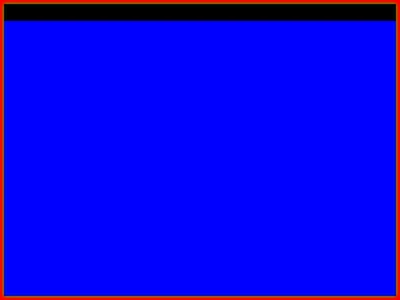
The red area is the <html> container itself. The blue box is the application content area (a simple <div>) and the black border with green shadow is a container <div> that is positioned absolute on the page. This black container is the application itself in my design.

As you can see the black border (around the blue box) has a subtle green shadow in the outer edges of the <html> page.

The problem is that because the <html> is the application in AIR it means that the application can never touch the edge of the screen due to the fact that AIR is treating the <html> as the application edge rather than the container <div> for the black border.

Any ideas on how to get around this? The only thing I could think of was some crazy JavaScript that could offset the application somehow.... Anyone else had this problem?

This topic has been closed for replies.

2 replies

Known Participant
February 10, 2014

I use this function to center the window on the screen. Could I use any parts of this to perhaps always offset the window to handle the spacing around the chrome div?

function centerWindow(instance){
                    //default bounds of nativeWindow
                    var applicationBounds = instance.nativeWindow.bounds;
                    //determine which screen we're located on
                    var screens = air.Screen.getScreensForRectangle(instance.nativeWindow.bounds);
                    var screenBounds = (screens.length > 0) ? screens[0].visibleBounds : air.Screen.mainScreen.visibleBounds;
                    //get initial position
                    x = (screenBounds.width - applicationBounds.width) / 2;
                    y = (screenBounds.height - applicationBounds.height) / 2;
                    //adjust for offset x or offset y (multi monitors)
                    x = screenBounds.x + x;
                    y = screenBounds.y + y;
                    instance.nativeWindow.x = x;
                    instance.nativeWindow.y = y;
               }
Known Participant
February 10, 2014

Does everyone understand the question? Was hoping for more replies than none

Thanks