
Adobe Air installation fails on Windows 8.1
Hi,
I downloaded the latest version of Adobe Air and when I try to open the AdobeAIRInstaller.exe file (also tried as administrator) nothing is done. I can see the installer file being opened on the Task Manager, but the CPU is not being used. The installation log goes like this:
[2014-07-12:18:13:16] Runtime Installer begin with version 14.0.0.110 on Windows 8 x86
[2014-07-12:18:13:16] Commandline is:
[2014-07-12:18:13:16] No installed runtime detected
[2014-07-12:18:40:39] Runtime Installer begin with version 14.0.0.110 on Windows 8 x86
[2014-07-12:18:40:39] Commandline is:
[2014-07-12:18:40:39] No installed runtime detected
[2014-07-12:18:46:55] Runtime Installer begin with version 14.0.0.110 on Windows 8 x86
[2014-07-12:18:46:55] Commandline is:
[2014-07-12:18:46:55] No installed runtime detected
...
It keeps giving me the same message. By the way I have no other installation issues. It's only with Adobe AIR. Don't know if it's a common failure, but couldn't find any solution on the internet.
EDIT:
Yay i Fixed the Problem  , here is the solution :
1. Open a command window, elevated as administrator
2. Navigate to the AdobeAIRInstaller.exe file
3. Run the command "AdobeAIRInstaller.exe -silent"
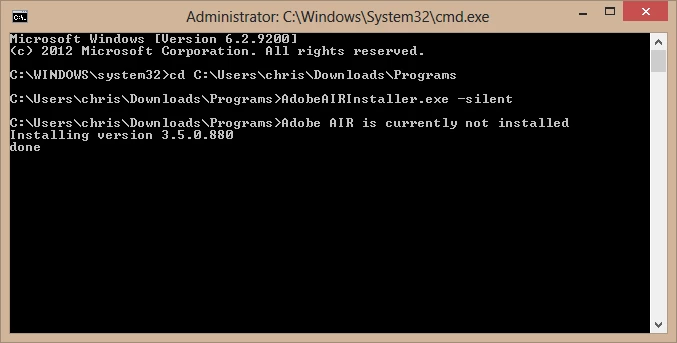
Hope it 'll help.


 AdChoices