
Participating Frequently
May 12, 2016
Question

Air 21 causing ios submission issue with icons

  • May 12, 2016
  • 3 replies
  • 1565 views

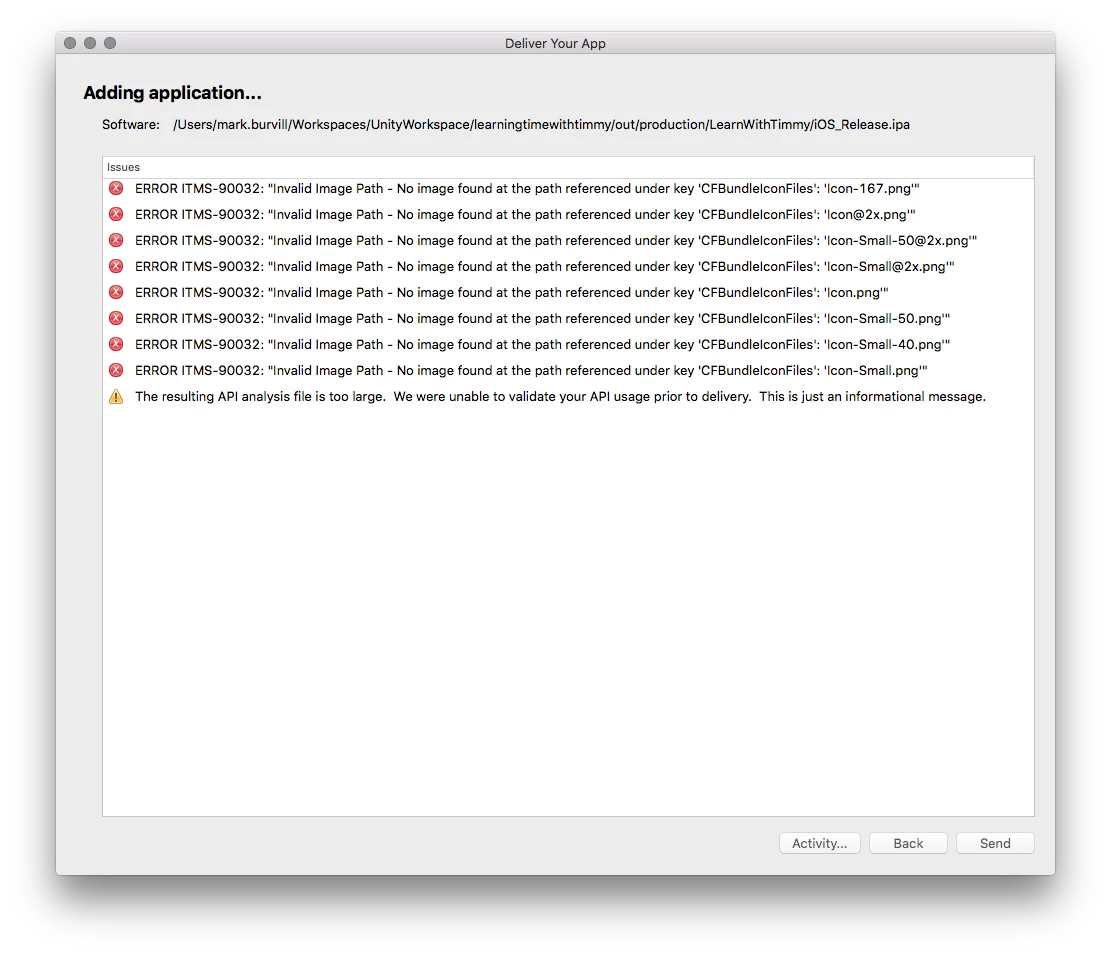
I'm trying to submit an updated version of an iOS app to Apple using Application Loader, and it's complaining about icons missing (see screenshot). Previous versions of the app have been submitted many times before without this issue, and we've made no changes to the icons or to the part of the app descriptor that lists them.

This version of the app is the first one that's been built with Air21. If I build with Air20, I get no such warnings (I do want to use Air21 though).

Any ideas?
This topic has been closed for replies.

3 replies

Inspiring
April 13, 2017

I was using Flash Builder with AIR 25. Solved the issue by renaming the icons to nonstandard names and moving them to a subdirectory. Maybe it stops the compiler from overwriting existing icons.

Inspiring
April 8, 2017

This is still a problem. This is ridiculous. I'm going to try switching to FlashDevelop.

Colin Holgate
Inspiring
April 8, 2017

What were you publishing in at the moment? Are you still using AIR 21?

Adobe Animate lets you pick iPad Pro icons, even under AIR 23. So, using AIR 23 or later might help.

Shweta_B
Adobe Employee
Adobe Employee
May 13, 2016

Hi,

Thanks for reporting the issue.

Could you please use the proper naming convention for the icons being used. Also, try uploading the app with the latest AIR SDK 22 and let us know in case you still face this issue.

Regards,

Adobe AIR Team

markburvsAuthor
Participating Frequently
May 13, 2016

I am using the proper naming convention according to table 5 here for universal app icon requirements:

Technical Q&A QA1686: App Icons on iPad and iPhone

^^ that table doesn't include the iPad Pro size of 167 which is a bit weird, but I tried renaming my 167 icon to "Icon-83.5@2x.png" anyway but it didn't help.

In the end, I removed some of the icons for settings and spotlight (which I don't think I need), and it seems happy now and I've uploaded without errors.

Here's the icons node from my manifest now:

        <image120x120>Icon-60@2x.png</image120x120>

        <image180x180>Icon-60@3x.png</image180x180>

        <image76x76>Icon-76.png</image76x76>

        <image152x152>Icon-76@2x.png</image152x152>

        <image80x80>Icon-Small-40@2x.png</image80x80>

        <image167x167>Icon-83.5@2x.png</image167x167>

I'm still suspicious that I had to remove the 58, 29 and 40 sizes for it to work though. Feels wrong. At least all the main ones are there though.

Didn't try with AIR 22 as I don't want to submit with beta software.

Shweta_B
Adobe Employee
Adobe Employee
May 16, 2016

Could you please let us know the xcode version that you are using?

Probably that might help us investigate the issue.

Thanks,

Adobe AIR Team