
AIR Android : text overlaps near line 750 and after in a text.flash.TextField (spark.skins.mobile.TextAreaSkin)
Hello,
On my Nexus 5, the text overlaps in a spark Textarea with spark.skins.mobile.TextAreaSkin (use flash.text.TextField) near line 750 and after (ScrollBar near 25% height)
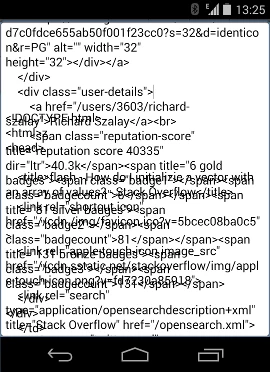
<?xml version="1.0" encoding="utf-8"?>
<s:Application xmlns:fx="http://ns.adobe.com/mxml/2009"
xmlns:s="library://ns.adobe.com/flex/spark"
creationComplete="creationCompleteHandler(event)"><fx:Script>
<![CDATA[
import mx.events.FlexEvent;
private function creationCompleteHandler(event:FlexEvent):void
{
var urlLoader:URLLoader = new URLLoader();
var request:URLRequest = new URLRequest("http://www.adobe.com/products/air.html");
urlLoader.addEventListener( Event.COMPLETE, chargementComplet );urlLoader.load( request );
}
private function chargementComplet(pEvt:Event):void {
myTextField.text = pEvt.target.data;
}
private function skbAct( event:Event ):void
{
myTextField.height=800;
}
private function skbDeact( event:Event ):void
{
myTextField.height=1600;
}
]]>
</fx:Script>
<fx:Style>
@namespace s "library://ns.adobe.com/flex/spark";
s|TextArea{skinClass: ClassReference("spark.skins.mobile.TextAreaSkin");
}
</fx:Style>
<s:TextArea width="800" height="1600" id="myTextField" softKeyboardActivate="skbAct(event)" softKeyboardDeactivate="skbDeact(event)"/>
</s:Application>
I don't know if it's a flash bug or a flex bug but the Apache Flex team says : "This looks like a bug with Flash, which Apache Flex does not have control over. Creating a bug with Adobe would be best."
Thanks


 AdChoices