


AIR application Installation failed from badge
Im unable to install the Air application using the Adobe Air badge for browser. I developed the desktop app using Flash builder 4.5 with AIR 3.0 OS- windows 7.0.
Im able to install it manually and also able to download it directly via browser. But the installation from adobe air badge fails. with the error "The application could not be installed because the installer file is damaged. Try obtaining a new installer file from the application author".
I tried uninstalling and installing AIR again it failed; even if that succeeds its not a wise idea to suggest all the end user to follow the same.
When i click install from the badge I get the following error
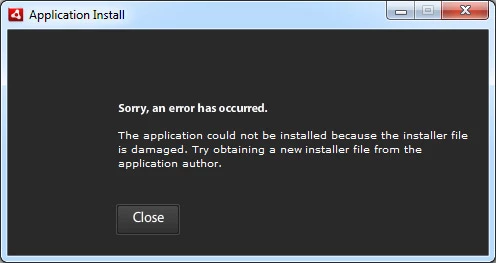
You can find the Badge here:- http://www.imano.com/virgin_recorder/badge/badge.html
I have a requirement of installing and upgrading the app from the browser need help to sort this issue thanks.
Log file shows
[2011-11-30:12:33:51] Application Installer begin with version 3.1.0.4880 on Windows 7 x86
[2011-11-30:12:33:51] Commandline is: -playerVersion=11,1,102,55 -sandboxType=remote -securityDomain=airdownload.adobe.com
-https=false -fromUserEvent=true -- -url http://www.imano.com/virgin_recorder/badge/VirginTvioSocket.air
[2011-11-30:12:33:51] Installed runtime (3.1.0.4880) located at c:\Program Files (x86)\Common Files\Adobe AIR
[2011-11-30:12:33:51] Begin air file download from http://www.imano.com/virgin_recorder/badge/VirginTvioSocket.air
[2011-11-30:12:33:51] Download destination is C:\Users\hari\AppData\Local\Temp\flaF8E0.tmp
[2011-11-30:12:33:52] Received download status 200
[2011-11-30:12:33:52] Response URL is http://www.imano.com/virgin_recorder/badge/VirginTvioSocket.air
[2011-11-30:12:33:52] Download success
[2011-11-30:12:33:52] Downloaded file at C:\Users\hari\AppData\Local\Temp\flaF8E0.tmp is not an air file
[2011-11-30:12:34:01] Application Installer begin with version 3.1.0.4880 on Windows 7 x86
[2011-11-30:12:34:01] Commandline is: -playerVersion=11,1,102,55 -sandboxType=remote -securityDomain=airdownload.adobe.com
-https=false -fromUserEvent=false -- -isinstalled VirginTvioSocket adobe.com:air0.28878541104495525 onApplicationVersion
[2011-11-30:12:34:01] Installed runtime (3.1.0.4880) located at c:\Program Files (x86)\Common Files\Adobe AIR
[2011-11-30:12:34:01] Application Installer end with exit code 0
[2011-11-30:12:34:11] Application Installer begin with version 3.1.0.4880 on Windows 7 x86
[2011-11-30:12:34:11] Commandline is: -playerVersion=11,1,102,55 -sandboxType=remote -securityDomain=airdownload.adobe.com
-https=false -fromUserEvent=false -- -isinstalled VirginTvioSocket adobe.com:air0.9435358457267284 onApplicationVersion
[2011-11-30:12:34:11] Installed runtime (3.1.0.4880) located at c:\Program Files (x86)\Common Files\Adobe AIR
[2011-11-30:12:34:11] Application Installer end with exit code 0
[2011-11-30:12:34:21] Application Installer begin with version 3.1.0.4880 on Windows 7 x86
[2011-11-30:12:34:21] Commandline is: -playerVersion=11,1,102,55 -sandboxType=remote -securityDomain=airdownload.adobe.com
-https=false -fromUserEvent=false -- -isinstalled VirginTvioSocket adobe.com:air0.5425116359256208 onApplicationVersion
 AdChoices