

AIR don't occupy whole screen on new Samsung galaxy devices
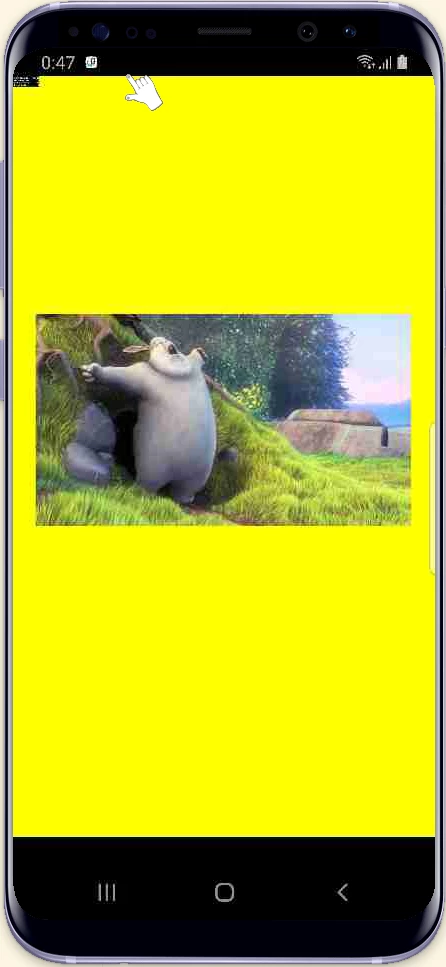
On some Samsung devices (galaxy s8/s8+ for example AIR don't occupy whole screen. It has black space below AIR container (see pic).
Even if I activate "iPhone X Gesture style" without navigation bar. Even in IMMERSIVE mode.
Reported resolution is 1090*2009.
App xml:
<?xml version="1.0" encoding="utf-8" standalone="no"?>
<application xmlns="http://ns.adobe.com/air/application/32.0">
<id>com.den.test</id>
<filename>TEST</filename>
<name>Test</name>
<versionLabel>0.0.1</versionLabel>
<versionNumber>0.0.1</versionNumber>
<initialWindow>
<content>[This value will be overwritten by Flash Builder in the output app.xml]</content>
<renderMode>direct</renderMode>
<softKeyboardBehavior>pan</softKeyboardBehavior>
<autoOrients>true</autoOrients>
<fullScreen>false</fullScreen>
</initialWindow>
<android>
<containsVideo>true</containsVideo>
<manifestAdditions> <![CDATA[
<manifest android:installLocation="auto">
<uses-sdk
android:minSdkVersion="15"
android:targetSdkVersion="26" />
<uses-permission android:name="android.permission.INTERNET"/>
<uses-permission android:name="android.permission.ACCESS_FINE_LOCATION"/>
<uses-permission android:name="android.permission.ACCESS_COARSE_LOCATION"/>
<uses-permission android:name="android.permission.CAMERA"/>
<application android:enabled="true"
android:hardwareAccelerated="true"
android:largeHeap="true"
android:allowClearUserData="true"
android:name="android.support.multidex.MultiDexApplication">
</application>
<supports-screens android:smallScreens="true"
android:normalScreens="true"
android:largeScreens="true"
android:xlargeScreens="true"
android:anyDensity="true"/>
</manifest>
]]></manifestAdditions>
</android>
</application>


 AdChoices