
Known Participant
February 4, 2015
Question

Air iOS buttons overlays status bar

  • February 4, 2015
  • 3 replies
  • 561 views

Hi,

I'm using the fullscreen mode for an Air iOS 8 app.

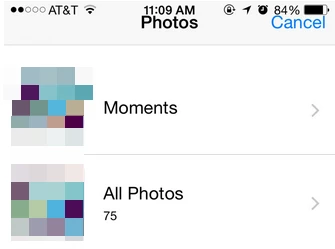
If a user imports an image from the CameraRoll, the "Photos" title and "Cancel" button overlays the status bar.

Example:
This is from my iOS app.xml:

<initialWindow>

<systemChrome>none</systemChrome>

<fullScreen>true</fullScreen>

</initialWindow>

Is that a know issue, how to fix that?

Thanks

This topic has been closed for replies.

3 replies

Known Participant
February 5, 2015

How did you get your app to look exactly like a regular app? I had to find templates online and import them in from photoshop. Is there another way?

Btw FULL_SCREEN_INTERACTIVE works for me.

User Unknow
Legend
February 5, 2015

Actually it's iOS8 bug that was never fixed on Apple side so you must use workaround like jadams602 suggest.

jadams602
Inspiring
February 4, 2015

Yes, if your app originally is designed not to show the status bar content at all, this does end up showing after you use the camera roll in iOS 8. Not seen a new AIR SDK that fixes this automatically, but one trick people are using to fix this is calling:

stage.displayState = StageDisplayState.FULL_SCREEN_INTERACTIVE;

each time after you are done using the camera roll and have returned to your app code. This should make the status bar content disappear again.