
Inspiring
October 20, 2016
Answered

AIR/IOS Wrong resolution and Status Bar problem - Adobe Air 23.0.0.257, IOS 10, Simulator

  • October 20, 2016
  • 1 reply
  • 808 views

Hi!

I try to build default Flex Mobile App for IOS with Apache Flex 4.15, Adobe Air 23.0.0.257 and iPhone 7 Simulator with IOS 10 and IOS 10 SDK.

Something goes wrong... This result below.  What could be the reason?  Any help with that?
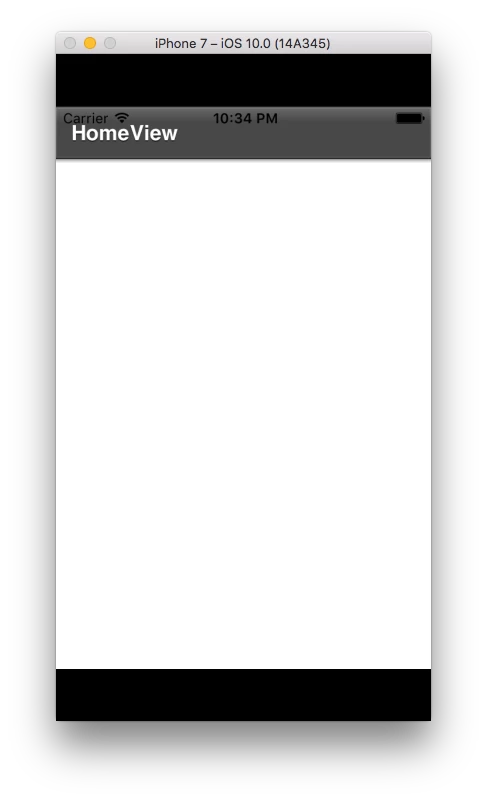
Best regards,

Piotr

This topic has been closed for replies.
Correct answer Colin Holgate

From iPhone 5 onwards you have to include a 9:16 ratio splash screen, so that iOS knows you don't want it to work like on iPhone 4.

Add a splash screen that is 640x1136 (if your app is landscape, take your 1136x640 landscape splash screen and rotate it 90 degrees clockwise to make the 640x1136). The file needs to be named Default-568h@2x.png. Once you have added that to your package the app will then fill the height of the screen.

1 reply

Colin Holgate
Colin HolgateCorrect answer
Inspiring
October 20, 2016

From iPhone 5 onwards you have to include a 9:16 ratio splash screen, so that iOS knows you don't want it to work like on iPhone 4.

Add a splash screen that is 640x1136 (if your app is landscape, take your 1136x640 landscape splash screen and rotate it 90 degrees clockwise to make the 640x1136). The file needs to be named Default-568h@2x.png. Once you have added that to your package the app will then fill the height of the screen.

Inspiring
October 20, 2016

Thank you! Ratio is now ok... but still have problem with "y / top" value of scene.  Do you know solution for that?

Best regards,

Piotr

Inspiring
October 20, 2016

I've checked that important is that "Default-568h@2x.png" file should be in default package, not for example assets or any other...  I'm not sure what should be proper applicationDPI, but I assume that it will be depends later on project inside.