
Inspiring
May 8, 2014
Answered

AIR to iOS release build freezes

  • May 8, 2014
  • 1 reply
  • 498 views

What am I using:

Mac OS X version 10.7.5

Flash Pro CC and AIR 14.0.0.78 for iOS

The application works in debug build on my iPad2, everything works great. I am using sharedObject to store the users’ preferences.

On the release build, the application starts up normal. I am able to browse through the different screens and use other parts of the application with no problems. When I get to a configuration screen there is an edit and an add button. When clicking on the Edit button no abnormally occurs, when clicking on the Add button, the application freezes. Adobe community, need help with this issue!

Is there a work around, before I change all the sharedObject codes.

Issues:

  • Under the iOS deployment type Ad hoc or Apple App Store I believe the application freezes with the code below:
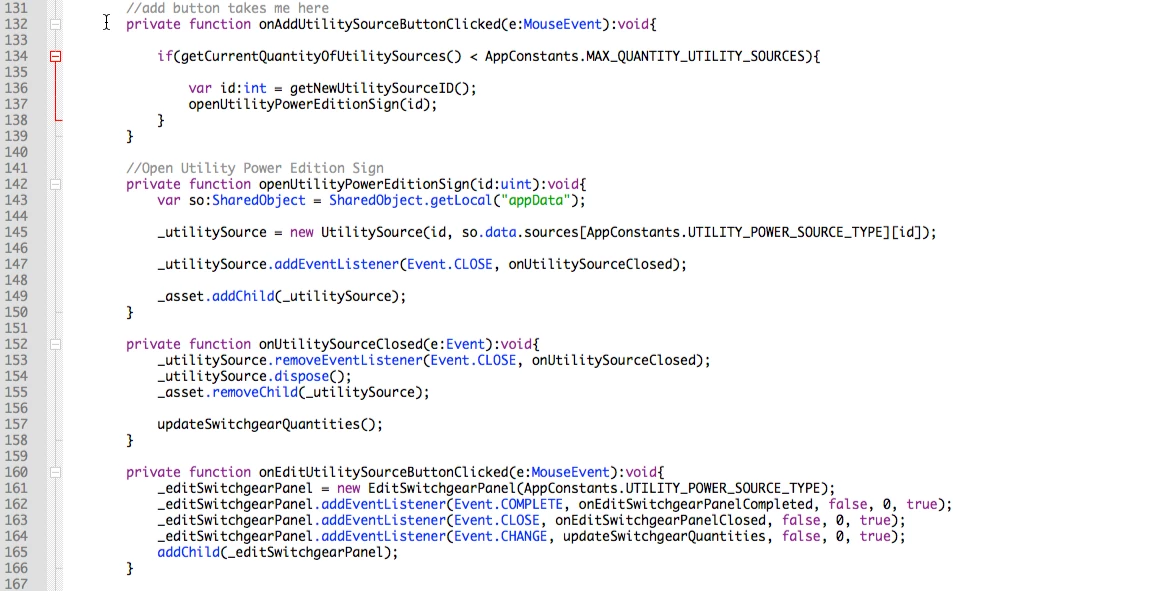
  • No errors displaying why the application freezes on my iPad
  • Apple Store Approved the application and also no errors through the Application Loader

This issue is a follow up from this post:

https://forums.adobe.com/message/6336759#6336759

  I believe there should be more support from Adobe.

This topic has been closed for replies.
Correct answer Wilson_s-yh6twV

I found the solution, sharedObjects had to be reconfigured and is now working. The app is on the App Store.

1 reply

Wilson_s-yh6twVAuthorCorrect answer
Inspiring
May 16, 2014

I found the solution, sharedObjects had to be reconfigured and is now working. The app is on the App Store.

Faisal Zaheer
Participating Frequently
May 19, 2014

Hello, good to know you problem is solved, However adobe recommends not to use Shared Objects instead there are other sophisticated options to save your game data. Reason is shared objects sometimes becomes messy, data lost and the main reason is on app update your won't find your SharedObject and users data will be lost. Search around web and you will find people already experienced these issues. I have also moved by saved data to Files in my two running projects for client. I have just write all of my data in a small .dat file which is saved in applicationStorageDirectory. The plus point is, this directory data won't be lost in case of app update but only be deleted when app is uninstalled/deleted. I recommend you to move away from Shared Object if your data is sensitive and something you cannot tolerate with your users/clients.

Thanks,

Muhammad Faisal Zaheer,

Sr. Software Engineer, Team Lead, Cubix Labs

Inspiring
May 21, 2014

Thanks Faisal,

I have searched around the web and it seems most people don't have problems with Shared Objects on updates, but yes is something we need to keep in mind. I do believe I will be doing all future projects with other saving methods (not so).

Best regards.

Wilson