

Android L with Beta - AIR 15.0.0.289
Hey,
We are running into a problem with the Android L developer preview and beta AIR 15.0.0.289. It's an app for Android and iOS with multiple native extension for ads and offerwall.
Problem
After closing the native overlay displayed by an extension, our application rendering is bugged and displays artifacts. The problem occurs on Android L developer preview (razor-lpv79-preview-d0ddf8ce.tgz Nexus 7 Wifi "razor") with GPU render mode on.
Is this a known issue? If so, how can we fix this and will all Android L users be affected?
Flow
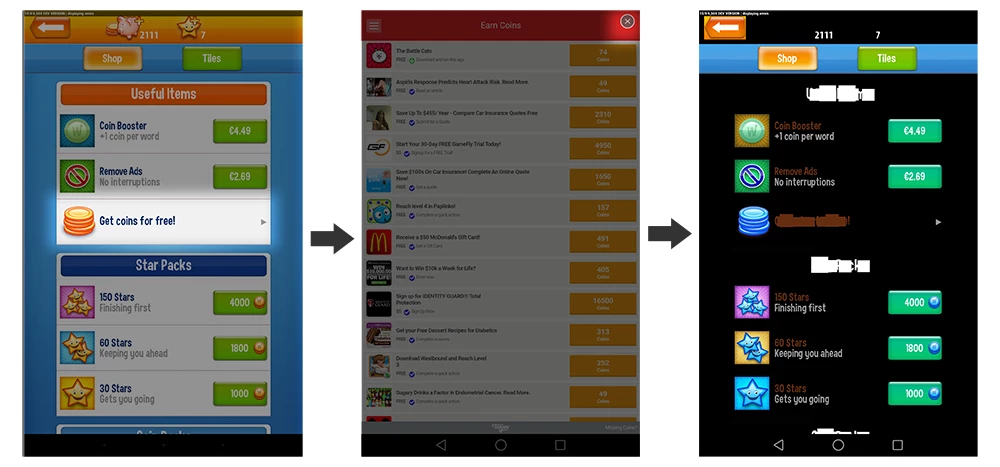
Logcat
W/UnimplementedWebViewApi( 4749): Unimplemented WebView method onKeyDown called from: android.webkit.WebView.onKeyDown WebView.java:2282)
I/am_finish_activity( 623): [0,900058684,22,air.com.flaregames.wordon/com.tapjoy.TJCOffersWebView,app-request]
I/am_pause_activity( 623): [0,900058684,air.com.flaregames.wordon/com.tapjoy.TJCOffersWebView]
I/am_on_paused_called( 4749): [0,com.tapjoy.TJCOffersWebView]
I/am_resume_activity( 623): [0,379306882,22,air.com.flaregames.wordon/.AppEntry]
D/[CoreMobileEx]( 4749): Restart.
D/[PushNotifyEx]( 4749): Restart.-
D/[GVExtension]( 4749): Resume->activate publish
D/[CoreMobileEx]( 4749): Resume.
D/[PushNotifyEx]( 4749): Resume.
D/[CoreMobileEx]( 4749): Canceled 1943748
D/[CoreMobileEx]( 4749): Canceled 1943749
I/am_create_service( 623): [0,413666469,.AdvertisingIdService,10007,2289]
I/am_on_resume_called( 4749): [0,air.com.flaregames.wordon.AppEntry]
W/art ( 4749): Thread[25,tid=5915,Native,Thread*=0xb9d6f7f0,peer=0x785d40e0,"Thread-838"] attached without supplying a name
D/audio_hw_primary( 193): select_devices: out_snd_device(2: speaker) in_snd_device(0: )
D/ACDB-LOADER( 193): ACDB -> send_afe_cal
I/art ( 2289): Heap transition to ProcessStateJankPerceptible took 84.747314ms saved at least -314KB
I/am_destroy_service( 623): [0,413666469,2289]
E/ActivityThread( 4749): Failed to find provider info for com.facebook.katana.provider.AttributionIdProvider
I/am_destroy_activity( 623): [0,900058684,22,air.com.flaregames.wordon/com.tapjoy.TJCOffersWebView,finish-imm]
E/chromium( 4749): [ERROR:aw_contents.cc(814)] Unable to free GL resources. Has the Window leaked?
W/Adreno-ES20( 4749): <core_glBindVertexArrayOES:288>: GL_INVALID_OPERATION
I/sf_frame_dur( 190): [air.com.flaregames.wordon/com.tapjoy.TJCOffersWebView,100,3,2,0,1,0,1]
W/Adreno-EGL( 4749): <qeglDrvAPI_eglCreateWindowSurface:1027>: EGL_BAD_ATTRIBUTE
W/art ( 4749): Thread[25,tid=5943,Native,Thread*=0xb9ea4940,peer=0x785d4140,"Thread-839"] attached without supplying a name
W/art ( 4749): Thread[27,tid=5942,Native,Thread*=0xb9ecce90,peer=0x785da0e0,"Thread-840"] attached without supplying a name
W/Adreno-ES20( 4749): <core_glUseProgram:1526>: GL_INVALID_VALUE
W/Adreno-ES20( 4749): <core_glUseProgram:1526>: GL_INVALID_VALUE
W/Adreno-ES20( 4749): <core_glUseProgram:1526>: GL_INVALID_VALUE
I/art ( 2289): Heap transition to ProcessStateJankImperceptible took 60.241699ms saved at least 317KB
D/WifiService( 623): acquireWifiLockLocked: WifiLock{NlpWifiLock type=2 binder=android.os.BinderProxy@1c090246}
D/WifiService( 623): releaseWifiLockLocked: WifiLock{NlpWifiLock type=2 binder=android.os.BinderProxy@1c090246}
I/wpa_supplicant( 2496): wlan0: CTRL-EVENT-SCAN-STARTED
I/WifiHAL ( 623): Found some events!!!
I/WifiHAL ( 623): Found some events!!!
I/PowerUI.Notification( 1800): dismissing low battery warning: level=100
I/PowerUI.Notification( 1800): dismissing low battery notification
D/PowerUI.Notification( 1800): updateNotification mWarning=false mSaver=false mInvalidCharger=false
I/notification_cancel( 623): [10019,1800,com.android.systemui,100,low_battery,0,0,64,8,NULL]
I/wpa_supplicant( 2496): wlan0: CTRL-EVENT-SCAN-STARTED
I/WifiHAL ( 623): Found some events!!!
I/WifiHAL ( 623): Found some events!!!
I/PowerManagerService( 623): Going to sleep due to screen timeout...
I/power_sleep_requested( 623): 0
I/PowerManagerService( 623): Sleeping...
I/power_screen_broadcast_send( 623): 1
I/power_screen_state( 623): [0,3,0,0]
I/screen_toggled( 623): 0
I/am_pause_activity( 623): [0,379306882,air.com.flaregames.wordon/.AppEntry]
D/[CoreMobileEx]( 4749): Pause.
D/[PushNotifyEx]( 4749): Pause.
E/native ( 623): do suspend true
The above happened in GPU and CPU render mode but below only happens GPU render mode.
W/Adreno-ES20(13762): <core_glBindVertexArrayOES:288>: GL_INVALID_OPERATION
I/sf_frame_dur( 190): [air.com.flaregames.wordon/com.tapjoy.TJCOffersWebView,101,3,2,0,1,0,0]
W/Adreno-ES20(13762): <gl_draw_error_checks:580>: GL_INVALID_OPERATION
W/art (13762): Thread[37,tid=14108,Native,Thread*=0xb9bcb640,peer=0x783e53e0,"Thread-901"] attached without supplying a name
W/Adreno-ES20(13762): <gl_draw_error_checks:580>: GL_INVALID_OPERATION
W/Adreno-ES20(13762): <gl_draw_error_checks:580>: GL_INVALID_OPERATION
W/Adreno-ES20(13762): <gl_draw_error_checks:580>: GL_INVALID_OPERATION
W/Adreno-ES20(13762): <gl_draw_error_checks:580>: GL_INVALID_OPERATION
W/Adreno-ES20(13762): <gl_draw_error_checks:580>: GL_INVALID_OPERATION
W/Adreno-ES20(13762): <gl_draw_error_checks:580>: GL_INVALID_OPERATION
W/Adreno-ES20(13762): <gl_draw_error_checks:580>: GL_INVALID_OPERATION
W/Adreno-ES20(13762): <gl_draw_error_checks:580>: GL_INVALID_OPERATION
W/Adreno-ES20(13762): <gl_draw_error_checks:580>: GL_INVALID_OPERATION
W/Adreno-ES20(13762): <gl_draw_error_checks:580>: GL_INVALID_OPERATION
W/Adreno-ES20(13762): <gl_draw_error_checks:580>: GL_INVALID_OPERATION
W/Adreno-ES20(13762): <gl_draw_error_checks:580>: GL_INVALID_OPERATION
W/Adreno-ES20(13762): <gl_draw_error_checks:580>: GL_INVALID_OPERATION
W/Adreno-ES20(13762): <gl_draw_error_checks:580>: GL_INVALID_OPERATION
W/Adreno-ES20(13762): <gl_draw_error_checks:580>: GL_INVALID_OPERATION
W/Adreno-ES20(13762): <gl_draw_error_checks:580>: GL_INVALID_OPERATION
W/Adreno-ES20(13762): <gl_draw_error_checks:580>: GL_INVALID_OPERATION
W/Adreno-ES20(13762): <gl_draw_error_checks:580>: GL_INVALID_OPERATION
W/Adreno-ES20(13762): <gl_draw_error_checks:580>: GL_INVALID_OPERATION
W/Adreno-ES20(13762): <gl_draw_error_checks:580>: GL_INVALID_OPERATION
W/Adreno-ES20(13762): <gl_draw_error_checks:580>: GL_INVALID_OPERATION
W/Adreno-ES20(13762): <gl_draw_error_checks:580>: GL_INVALID_OPERATION


 AdChoices