


Application error
Hi,
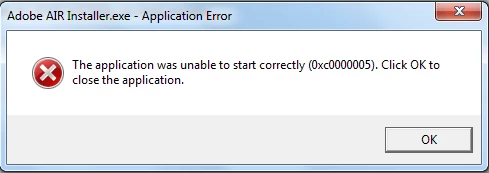
I'm a player of League of Legends and when I try to play it an application error comes up. When I went to the Reliability Monitor of my Windows 7, found out that it's an error regarding Adobe Air (source: Adobe AIR Debug Launcher). Also I cannot reinstall Adobe AIR because when I try to run the setup another application error comes up (image below). Same issue happens when I try to install the Microsoft NET.Framework. Also below there is the log file of the Adobe AIR installation. I'm really out of ideas and came here for hope of any help.
[2012-03-23:17:06:52] Runtime Installer begin with version 2.5.1.17730 on Windows 7 x86
[2012-03-23:17:06:52] Commandline is: -silent -eulaAccepted -programMenu AdobeHelp.air
[2012-03-23:17:06:52] No installed runtime detected
[2012-03-23:17:06:53] Invoking Application Installer for combined install
[2012-03-23:17:06:53] Launching subprocess with commandline C:\Users\Owen\AppData\Local\Temp\AIR339E.tmp\Adobe AIR\Versions\1.0\Adobe AIR Application Installer -runtime C:\Users\Owen\AppData\Local\Temp\AIR339E.tmp -silent -withRuntime -url -programMenu -eulaAccepted file:///C:/Users/Owen/Desktop/ps/Adobe%20Photoshop%20CS5.1%20Extended%20Edition/SOFTWARE/payloads/AdobeHelp/AdobeHelp.air
[2012-03-23:17:06:53] Application Installer begin with version 2.5.1.17730 on Windows 7 x86
[2012-03-23:17:06:53] Commandline is: -runtime C:\Users\Owen\AppData\Local\Temp\AIR339E.tmp -silent -withRuntime -url -programMenu -eulaAccepted file:///C:/Users/Owen/Desktop/ps/Adobe%20Photoshop%20CS5.1%20Extended%20Edition/SOFTWARE/payloads/AdobeHelp/AdobeHelp.air
[2012-03-23:17:06:53] No installed runtime detected
[2012-03-23:17:06:54] Unpackaging file:///C:/Users/Owen/Desktop/ps/Adobe%20Photoshop%20CS5.1%20Extended%20Edition/SOFTWARE/payloads/AdobeHelp/AdobeHelp.air to C:\Users\Owen\AppData\Local\Temp\fla55ED.tmp
[2012-03-23:17:07:02] Application signature verified
[2012-03-23:17:07:02] Unpackaging/validation complete
[2012-03-23:17:07:02] Converting unpackaged application to a native installation package in C:\Users\Owen\AppData\Local\Temp\fla74B4.tmp
[2012-03-23:17:07:06] Native installation package creation succeeded
[2012-03-23:17:07:06] Starting silent combined runtime and app install.
Installing runtime version 2.5.1.17730.
Installing app chc.4875E02D9FB21EE389F73B8D1702B320485DF8CE.1 version 3.4.980 to C:\Program Files (x86)\Adobe using the source file at file:///C:/Users/Owen/Desktop/ps/Adobe%20Photoshop%20CS5.1%20Extended%20Edition/SOFTWARE/payloads/AdobeHelp/AdobeHelp.air
[2012-03-23:17:07:06] Installing msi at C:\Users\Owen\AppData\Local\Temp\AIR339E.tmp\setup.msi with guid {46C045BF-2B3F-4BC4-8E4C-00E0CF8BD9DB}
[2012-03-23:17:07:10] Installing msi at C:\Users\Owen\AppData\Local\Temp\fla74B4.tmp\setup.msi with guid {1E9362FB-5844-A463-42F9-F45B29B11024}
[2012-03-23:17:07:17] Application Installer end with exit code 0
[2012-03-23:17:07:17] Subprocess app installer succeeded
[2012-03-23:17:07:17] Runtime Installer end with exit code 0
[2012-03-24:16:27:58] Launching subprocess with commandline C:\Program Files (x86)\Common Files\Adobe AIR\Versions\1.0\Resources\Adobe AIR Updater -updatecheck
[2012-03-24:16:27:59] Runtime Installer begin with version 2.5.1.17730 on Windows 7 x86
[2012-03-24:16:27:59] Commandline is: -updatecheck
[2012-03-24:16:27:59] Installed runtime (2.5.1.17730) located at C:\Program Files (x86)\Common Files\Adobe AIR
Thanks.
 AdChoices