
Mr. Baker the Shoe Maker
Inspiring
July 9, 2015
Question

Auto-orientation not working on iOS 9 on iPhone 6 plus

  • July 9, 2015
  • 3 replies
  • 5566 views

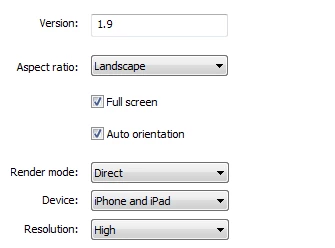
I recently tested landscape auto-orientation in my app (for iOS 9 beta) on iPad, iPad mini, and iPhone 6 plus. Auto-orientation works on every device except the iPhone 6 plus. Nothing happens when the device is turned upside down.

Flash CC

Windows 7 64-bit

Air 18.0.0.144

iOS 9 beta

Waiting for a fix, if there is one already.

Air for iOS setting tab screen shot:
This topic has been closed for replies.

3 replies

Participant
September 30, 2015

I'm using iOS9 public release on iPad 2. Since the OS upgrade orientation not working and the soft keyboard comes up on wrong side of screen. I compiled build with AIR 19.0. Any workarounds besides quitting the app?

Adobe Employee
October 1, 2015

Hello,

Could you please try out the issues after changing <autoOrients> tag in application.xml to "true", this should resolve the issue, soft-keyboard coming up from wrong side of screen.

However, we are unable to observe any issue with application orientation not working on iOS 9. Kindly, provide us a sample application with which we can reproduce this issue at our end.

Thanks for your support,

Adobe AIR Team

Participant
September 18, 2015

I am using the final release of iOS 9 on an iPhone 4s and the orientation sensor does not work at all.  Wish I had not upgraded.

Adobe Employee
July 10, 2015

Hi,

Thanks for reporting the issue.

We verified this at our end but could not reproduce the problem, Auto-Orientation of landscape application is working fine.

I could rotate my application in both Rotated-left and Rotated-right position when AO is true on iPhone 6 plus. Also verified with other AO and AR combinations but could not reproduce the issue.

May I know which iOS 9 beta build you are using ?

Regards,

Adobe AIR Team

Mr. Baker the Shoe Maker
Inspiring
July 10, 2015

iOS9 beta 3

Adobe Employee
July 13, 2015

We are also using the same beta build but could not reproduce the issue.

Please watch the small video uploaded at Dropbox - IMG_0207.MOV‌ to demonstrate what we are doing. if you think something is missing from our end please let us know.

We will be happy to help you.

Thanks,

Adobe AIR Team