
gonMiguel
Inspiring
April 2, 2014
Answered

Best Way to get part of a image

  • April 2, 2014
  • 1 reply
  • 880 views

Hi , i´m trying to achieve a behaviour with bitmaps but a little bit confused.

Objective:

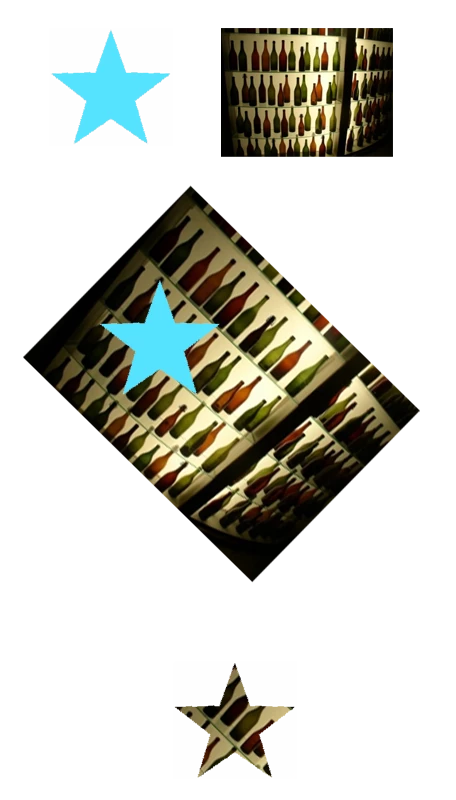
(As shown in image attached)

I have a Movieclip with a static Shape on Stage ( Let´s say ... a star)

I would like to load a image(img1) , then i would be able to, rotate, zoom , and pan the image(img1).

Then i would have only the star but filled with the part of the image that fitted that star.

I was trying to  get bitmapData from the image, then draw the star on the image.... And at end, compare color pixels and only getting the ones i want to.... but i get a big mess with the rotations, scale and position of star to be exactly on the place it should be draw...

Something tell´s me that i´m missing a point and it should be easier...

Can anyone give me directions ?

It´s a kind of masking, but i want to save that image only then...

Thanks in advance!
This topic has been closed for replies.
Correct answer Projectitis

I would:

1) Move and translate your image clip

2) Set the star as the mask

3) Once the mask is applied, use BitmapData.draw to draw the masked image to a new bitmap data

4) TADA!

As far as I am aware, 'draw' should respect masks? If it doesn't then you may need to put clip+mask inside another DisplayObject and draw that.  Some psuedo code (not tested, and simplified):

// Parent object

var canvas : Sprite = new Sprite();

canvas.addChild( clip );

canvas.addChild( star );

// Manipulate your image

clip.rotation = 35;

clip.scaleX = clip.scaleY = 1.2;

// Set mask and position it

clip.mask = star;

star.x = 40;

star.y = 20;

// Create a bitmap data and draw to it

bitmapData = new BitmapData( Math.ceil(canvas.width), Math.ceil(canvas.height), true, 0x00000000 );

bitmapData.draw( canvas, ...... );

// You may need to use canvas.getBounds and create a matrix to get 'canvas' positioned correctly on the bitmapData

Hope it helps,

Peter

1 reply

Projectitis
ProjectitisCorrect answer
Inspiring
April 2, 2014

I would:

1) Move and translate your image clip

2) Set the star as the mask

3) Once the mask is applied, use BitmapData.draw to draw the masked image to a new bitmap data

4) TADA!

As far as I am aware, 'draw' should respect masks? If it doesn't then you may need to put clip+mask inside another DisplayObject and draw that.  Some psuedo code (not tested, and simplified):

// Parent object

var canvas : Sprite = new Sprite();

canvas.addChild( clip );

canvas.addChild( star );

// Manipulate your image

clip.rotation = 35;

clip.scaleX = clip.scaleY = 1.2;

// Set mask and position it

clip.mask = star;

star.x = 40;

star.y = 20;

// Create a bitmap data and draw to it

bitmapData = new BitmapData( Math.ceil(canvas.width), Math.ceil(canvas.height), true, 0x00000000 );

bitmapData.draw( canvas, ...... );

// You may need to use canvas.getBounds and create a matrix to get 'canvas' positioned correctly on the bitmapData

Hope it helps,

Peter

gonMiguel
gonMiguelAuthor
Inspiring
April 3, 2014

Hi Pea ! Thanks a Million, i knew that i should look from other prespective !  I was complicating to much and not getting results !

I was drawing into the rotated and scalated image, and this really help things !

Actually i had to make minor changes to obtain what i wanted to achieve:

var bitmapData = new BitmapData( Math.ceil(star.width), Math.ceil(star.height), true, 0x00000000 );

var mx:Matrix = new Matrix();

mx.translate(-star.getBounds(canvas).x,-star.getBounds(canvas).y)

bitmapData.draw( canvas,mx);

So that i got only bitmapdata of the size of the mask, and the translation, to move it to (0,0) of bitmapData .

Pea

You Rock !

Projectitis
Inspiring
April 3, 2014

Great solution! Not a problem. Glad I could help.