
Inspiring
October 26, 2011
Answered

Can someone tell me what I am doing wrong when creating a native extension for iPad? (Very detailed)

  • October 26, 2011
  • 11 replies
  • 33534 views

My company is developing a game for the iPhone and iPad devices using Flash cs5.5 and Air3.0

The client requires that certain features be supported - such things like GameCenter, Rating system, etc... none of which is currently supported by flash for the iOS.

However, they did provide us with a bunch of xCode sample files on how they want things to work.

My idea was to bridge the gap in functionality by creating a native exention that utilized the xcode source that was given to me, thus giving me the functionality that is required.

But first, I need to actually CREATE a native extension, even just a basic echo/hello world... I have followed all the steps from various guides and tutorials and I have managed to create an ipa and put it on my iPad2 to test, but when the program starts up, nothing happens, I am left with a black screen. When I comment out the lines of code that intialize the extension, it fires up just fine.

(and yes, I even tried to put things in try blocks in case there was an error - no luck)

So I am hoping that someone can read through the process of what I am doing below and point out what I am doing wrong, or what I am missing.

What I am using:

Mac Mini running OSX 10.7.2 - this is used to run xCode 4.1 build 4B110

PC - Windows 7 home 64bit - Running Flash CS5.5 (version 11.5.1.3469) with the AIR 3.0 SDK inside it. I also have the AIR 3.0 sdk in a seperate folder for command line running. (This is my primary developement platform)

The PC does have flash builder installed, but I have never really used it, nor do I know how to use it... everything that has been built to date has been done using Flash CS5.5

So, this is what I have done.

The first thing I do is create a .a static library on the mac.

I open xcode and create a new project.

  • Select iOS Framework and Library, then select "Cocoa touch Static Library"
  • Give it a name, in this case "EchoExtension" and put it in a folder.
  • I then delete the EchoExtension.h file as all the samples I have seen to date don't use it.
  • I then add "FlashRuntimeExtension.h" to the project from the AIR3.0 sdk frameworks folder on my PC
  • I then delete everything in my .m file and, following several different examples and tutorials, type up the following code:

//

//  EchoExtension.m

//  EchoExtension

//

#include "FlashRuntimeExtensions.h"

FREObject echo(FREContext ctx, void* funcData, uint32_t argc, FREObject argv[]) {

    return argv[0];

}

//----------- Extention intializer and finalizer ------------------------------------------------------------------------------------------------------------------------------------------------------------------------------------

// A native context instance is created

void ContextInitializer(void* extData, const uint8_t* ctxType, FREContext ctx, uint32_t* numFunctionsToTest, const FRENamedFunction** functionsToSet) {

    // setup the number of functions in this extention

    // for easy reference, set the number of function that this extention will use.

    int FunctionCount = 1;

    // set the pointer reference to the number of function this extention will use.

    *numFunctionsToTest = FunctionCount;

    // create an array to store all the functions we will use.

    FRENamedFunction* func = (FRENamedFunction*)malloc(sizeof(FRENamedFunction)*FunctionCount);

    // create an array entry for each function

    func[0].name = (const uint8_t*)"echo"; // the name of the function

    func[0].functionData = NULL;                    // the data type

    func[0].function = &echo;             // reference to the actual function

    // save the array in a pointer.

    *functionsToSet = func;

}

// A native context instance is disposed

void ContextFinalizer(FREContext ctx) {

    return;

}

// Initialization function of each extension

void ExtInitializer(void** extDataToSet, FREContextInitializer* ctxInitializerToSet, FREContextFinalizer* ctxFinalizerToSet) {

    *extDataToSet = NULL;

    *ctxInitializerToSet = &ContextInitializer;

    *ctxFinalizerToSet = &ContextFinalizer;

}

// Called when extension is unloaded

void ExtFinalizer(void* extData) {

    return;

}

  • I then go "Product", "Build" and it creates libEchoExtension.a
  • I copy this .a file over to my PC.

I am now finish with that god foresaken mac (*shudders*)
Back on my PC, I create a folder for my test project. For all intents an purposes, let's call this "D:\src\EchoExtension" I then create 2 folders, one called "lib" and one called "app". Lib is where I will create the actionscript source for my extension.

  • In my lib folder, I create a new fla in flash cs5.5 called "EchoExtension.fla"
  • I create in my lib folder, the following:
    • com\extensions\EchoExtension\EchoExtension.as
    • a folder called "Build" in which I place my libEchoExtension.a file.
  • in my EchoExtension.as file, I place the following code:

package com.extensions.EchoExtension

{

    import flash.events.EventDispatcher;

    import flash.events.IEventDispatcher;

    import flash.external.ExtensionContext;

    public class EchoExtension extends EventDispatcher

    {

        protected var _extensionContext:ExtensionContext;

        /**

         * Constructor.

         */

        public function EchoExtension()

        {

            super();

            // Initialize extension.

            _extensionContext = ExtensionContext.createExtensionContext( "com.extensions.EchoExtension", "main" );

        }

        public function echo(Prompt:String):String

        {

            return _extensionContext.call( "echo" ) as String;

        }

    }

}

  • In my main fla, on the first layer of the time line, I simply put the following code to make sure that the as file get's included when I publish the swc.

import com.extensions.EchoExtension.EchoExtension;

var ext:EchoExtension = new EchoExtension();

stop();

  • I then open up my fla's publish settings, turn off the swf - which I don't need, and check the swc and make sure that it outputs into my build folder.  "./Build/EchoExtension.swc"
  • I also set the player to Air 3.0 (which I can do since I have successfully integrated AIR 3.0 along side my AIR 2.6 and can build both without any problems)
  • I then publish the swc. So far, so good. No problems.
  • I then make a copy of the swc and rename it to EchoExtension.swc.zip, at which point I extract the library.swf file from it and also place it in my build folder.
  • I then create extension.xml in by build folder which contains the following code:

<extension xmlns="http://ns.adobe.com/air/extension/2.5">

  <id>com.extensions.EchoExtension</id>

  <versionNumber>1</versionNumber>

  <platforms>

    <platform name="iPhone-ARM">

        <applicationDeployment>

            <nativeLibrary>libEchoExtension.a</nativeLibrary>

            <initializer>ExtInitializer</initializer>

            <finalizer>ExtFinalizer</finalizer>

        </applicationDeployment>

    </platform>  

  </platforms>

</extension>

  • Now, at this point I am a little wary, because I am building for the iPad2... the platform is iPhone... I thought that may be a problem and at one point I tested the same build on the iPhone4 and had the same results. I have also tested it using the platform name of iPad-ARM and got the same results... So I don't think that is the problem, but I am unsure.
  • Now, to make things easier, I created a batch file called "buildane.bat" in my build folder. This is what I will use to create my .ane file and it contains the following command line:

D:\SDKs\AirSDK30\bin\adt -package -target ane EchoExtension.ane extension.xml -swc EchoExtension.swc -platform iPhone-ARM library.swf libEchoExtension.a

  • I then open a command prompt and run buildane.bat and poof. My ane is created. My build folder has the following files in it now:
      • buildane.bat
      • EchoExtension.ane
      • EchoExtension.swc
      • EchoExtension.swc.zip
      • extension.xml
      • libEchoExtension.a
      • library.swf

Now that I have my swc, ane, and all that, it's time to create my sample application that will be used to test my new extension.

  • I go back to my D:\src\EchoExtension folder and go into the app folder I created ealier.
  • I then create a new flash project called EchoExtensionTester.fla
  • I open the action script settings, library paths, and add the swc that I created in my D:\src\EchoExtension\lib\build folder to my project.
  • On my stage, I create an input text field called txtInput, a dynamic text field called txtEcho, and a couple of buttons called btnClear, btnRuntime, and btnEcho
  • I open up the first layer in the time line and place the following code:

// basic imports.

import flash.desktop.NativeApplication;

import flash.events.MouseEvent;

import flash.text.TextField;

// import the extension from our swc.

import com.extensions.EchoExtension.EchoExtension;

// set our input text field to need the softkeyboard

txtInput.needsSoftKeyboard = true;

// add the event handlers to our buttons.

btnEcho.addEventListener(MouseEvent.CLICK, btnEcho_Click);

btnClear.addEventListener(MouseEvent.CLICK, btnClear_Click);

btnRunTime.addEventListener(MouseEvent.CLICK, btnRunTime_Click);

// create our extension variable.

var ext:EchoExtension;

try

{

    // initialize our echo extension.

    ext = new EchoExtension();

} catch (e:Error) {

    txtEcho.text = "Error trying to create new EchoExtension:\n\n" + e;

}

stop();

// clear the echo text field

function btnClear_Click(e:MouseEvent):void

{

    txtEcho.text = "";

}

// just for testing, put the current version of air runtime into our text field so we can make sure we are running air 3.0

function btnRunTime_Click(e:MouseEvent):void

{

    txtEcho.text += "\nRuntime version = " + NativeApplication.nativeApplication.runtimeVersion;

}

// call the extension, passing it whatever is in the input text field and have it return it and place it in our echo text field

function btnEcho_Click(e:MouseEvent):void

{

    txtEcho.text += "\n";

    try

    {

        txtEcho.text += ext.echo(txtInput.text);

    } catch (e:Error) {

        txtEcho.text += "\nError calling ext.echo: " + e;

    }

}

  • I then save the project, Open the Air for iOS settings and set the following:  (but yes, I know... I am going to have to use adt to do the build, but I need to create the swf first)
    • Output file: EchoExtensionTester.ipa
    • Appname: EchoExtensionTester
    • Version 1.0
    • Landscape
    • Fullscreen On
    • Auto orientation is off
    • rendering GPU
    • device: iPad and iPhone
    • Res: High
    • Deployement: I use my certificate and provisionging profile that I use for my Primary project (which work) and set for device testing.
  • I close the window and save again... but before I publish, I open  newly created "EchoExtensionTester-app.xml" that is in my app folder.
  • I add <extensions>    <extensionID>com.extensions.EchoExtension</extensionID>  </extensions> to the xml file so now it looks like this:

<?xml version="1.0" encoding="UTF-8" standalone="no" ?>

<application xmlns="http://ns.adobe.com/air/application/3.0">

  <extensions>

    <extensionID>com.extensions.EchoExtension</extensionID>

  </extensions>

  <id>EchoExtensionTester</id>

  <versionNumber>1.0</versionNumber>

  <filename>EchoExtensionTester</filename>

  <description/>

  <!-- To localize the description, use the following format for the description element.<description><text xml:lang="en">English App description goes here</text><text xml:lang="fr">French App description goes here</text><text xml:lang="ja">Japanese App description goes here</text></description>-->

  <name>EchoExtensionTester</name>

  <!-- To localize the name, use the following format for the name element.<name><text xml:lang="en">English App name goes here</text><text xml:lang="fr">French App name goes here</text><text xml:lang="ja">Japanese App name goes here</text></name>-->

  <copyright/>

  <initialWindow>

    <content>EchoExtensionTester.swf</content>

    <systemChrome>standard</systemChrome>

    <transparent>false</transparent>

    <visible>true</visible>

    <fullScreen>true</fullScreen>

    <aspectRatio>landscape</aspectRatio>

    <renderMode>gpu</renderMode>

    <maximizable>true</maximizable>

    <minimizable>true</minimizable>

    <resizable>true</resizable>

    <autoOrients>false</autoOrients>

  </initialWindow>

  <icon/>

  <customUpdateUI>false</customUpdateUI>

  <allowBrowserInvocation>false</allowBrowserInvocation>

  <iPhone>

    <InfoAdditions>

      <![CDATA[<key>UIDeviceFamily</key><array><string>1</string><string>2</string></array>]]>

    </InfoAdditions>

    <requestedDisplayResolution>high</requestedDisplayResolution>

  </iPhone>

</application>

  • I save the changes to the xml and go back to flash. I then publish.
  • The swf is created as it should be, but then I get the error message:

Error creating files.

An implmentation for native extension 'com.extensions.EchoExtension' required by the application was not found for the target platform.

  • Now, while this is a pain in the rear, I new this was going to happen because in my reading of tutorials and samples, they all said that you must use adt to build the ipa... but that's fine... all I wanted anyway was the swf, which I now have in my app folder.
  • I close down flash as I don't need it anymore and I create a new batch file: (note: I change the names of the cert, provision profile, and password for this post)

cls

"D:\SDKs\AirSDK30\bin\adt" -package -target ipa-ad-hoc -storetype pkcs12 -keystore "D:\src\mycert.p12" -storepass MYPASSWORD -provisioning-profile "D:\src\myprovfile.mobileprovision" "EchoExtensionTester.ipa" "EchoExtensionTester-app.xml" "EchoExtensionTester.swf" -extdir ../lib/Build

set /p dummy=

echo done

  • I then open a command window in my app folder and run build.bat...
  • I wait about 2 minutes....
  • ...
  • ...
  • YAY! My ipa file has been created with no errors reported so far.... Time to copy this bad boy to the iPad and see what happens.
  • I open iTunes, drag "EchoExtensionTester.ipa" over to the Apps, then sync my device....
  • ...
  • YAY! iTunes has successfully installed the ipa on the device... and there is by bright and shiney blank icon for Echo Extension Tester...
  • I open the app.... and.....
  • nothing.
  • I wait
  • still nothing.
  • I go to the bathroom.
  • I get back... still nothing... just a black screen.
  • I press the iPad home button, the app minimized, I restore it... nothing... black screen.

hrm. Time to do a little trial and error to see if I can figure out where the break down is.

  • As a test, I open my fla and I comment out the following lines:
    • ext = new EchoExtension();
    • txtEcho.text += ext.echo(txtInput.text);
  • I then rebuild the swf... get the same error (don't care)... I then rebuild the ipa using the batch file.... and re-install it on the device when it's done.
  • The exact same thing....
  • I open the xml file... and remove the <extensionID>com.extensions.EchoExtension</extensionID> line, save and re-run the batch file again... wait for the ipa to finish, and run it on the device.
  • I fire up the program on the iPad and it launches perfectly... except for the commented line of code to actually create and call the extension, everything works as it should. The runtime on the device is reporting as 3.0.0.4080
  • As a test, I open the .fla back up and uncomment the 2 lines I commented out above... keeping the extensionID out of the xml file, I re-publish the ipa.... of course, this time, it actually creates the ipa from flash because the extension id is not in the xml.
  • I put the ipa file with the extension code in place on the ipad... Fire it up and put some text into the txtInput and press the echo button. I get the following error:
    • Error calling ext.echo: TypeError: Error #1009
  • I suspect that is because I failed into include the extension in the descriptor... but when I build it with the extensionid in the xml, I just get a black screen. I am 99% sure that the extension context in the ext object is null (because that is what happens when I run it in flash debug without the extension lines in the xml)

And here I am stuck.

Can anyone tell me what I am doing wrong or what I have forgotten to do?

Thanks.
This topic has been closed for replies.
Correct answer

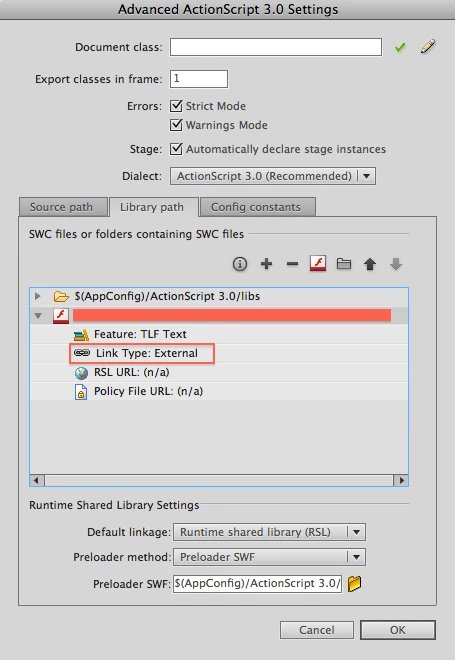
Hi Can you check if the SWC of the native extension is linked as external?

Following image can help locate and change the SWC link type.

The issue that many people face here (i.e. extension works in fast/interpreter mode and doesnt when packaged as standard mode) happens only when the SWC of the NE is not externally linked.

I hope this helps.

Regards,

Saumitra Bhave

AIR iOS

11 replies

Participant
July 29, 2014

We've had a similar issue to the original post.

Implementing the Correct Answer from this post partially sorted out our problem, but we seem to run to another issue on the top of it when using more than one ANE.

ip-ad-hoc freezes AIR Application when using ANE

Any help would be very appreciated.

Known Participant
March 18, 2012

rusty was right.. the only solution found was re-installing xCode 4.1... now it work

Hope adobe come soon with better solution.

Known Participant
March 16, 2012

I got the same problem when trying to make a extensions that use a AVAssetWriter... any update on this problem ? we will install xcode 4.1 to see if this solution work but i hope something else is possible.

EDIT : i got the same problem as rusty ...

compile with shared library YES return type 9 error

Shared library to NO return

"ld: absolute addressing (perhaps -mdynamic-no-pic) used

We use Xcode 4.3, Air 3.2 , all the latest sdk and i don't use -platformsdk as i work on a pc.

other important notice... if i try to set shared librarie to NO while targeting IOS 4.0... it make a build fail! if i target IOS 4.1 it work.. with error absolute addressing (perhaps -mdynamic-no-pic) used ......

We are kind of lost with this bug.... we tried every solution giving on the subject.

Last solution is Xcode 4.1 just like rusty said... i'll write if it work.

Known Participant
May 20, 2013

Same Problem for me:

Error occurred while packaging the application:

ld: absolute addressing (perhaps -mdynamic-no-pic) used in _ASDemoGetStringLength from /var/folders/5f/3xcbv8v96gd6_rq6kbmj13900000gp/T/aa9bb7be-0f0e-4e79-85df-cc835b7dc2cf/libde.das3.ane.CalendarANE.a(CalendarANE.o) not allowed in slidable image. Use '-read_only_relocs suppress' to enable text relocs

Compilation failed while executing : ld64

Build stops completly with this warning.

Flash Buidler 4.7 on Mac OS 10.7.5

Tried with AIR SDK 3.5 and AIR SDK 3.7.

Called Function:

FREObject ASDemoGetStringLength( FREContext ctx, void* funcData, uint32_t argc, FREObject argv[])

{

    NSLog(@"+++ ASDemoGetStringLength +++" );


    const uint8_t * stringArgument = NULL;

    uint32_t strLength = 0;


    FREResult status = FREGetObjectAsUTF8(argv[ 0 ], &strLength, &stringArgument);

    int32_t value = [ [NSString stringWithUTF8String:(char *) &stringArgument] length ];


    FREObject intValue = NULL;


    status = FRENewObjectFromInt32(value, &intValue);


    return intValue;

}

( line which is reponsible for the error is bold and this demo-code is no vodoo magic ).

"Enabled Linking with shared Libraries" is set to no in XCode.

Any solution from Adobe for this?

This "bug" occurs since 10 months for many devs, like we can see with in this thread.

The problem behind is also known.

But there is no fix for this?

Known Participant
May 21, 2013

Okay,

I've found a fix for this "error/warning":

In Flash Builder 4.7 update the embedded AIRSDK to version 3.5 or greater like described here:

http://helpx.adobe.com/flash-builder/kb/overlay-air-sdk-flash-builder.html

ADDITIONAL:

Replace the embedded AIR SDK in the linked Flex-SDK like described under this link:
http://helpx.adobe.com/x-productkb/multi/how-overlay-air-sdk-flex-sdk.html

Hint: The AIR SDK version for step 1 and step 2 should be exactly the same.

Now update the plattform namespace in your an descriptor files (ANE_NAME-platformoptions.xml and ANE_NAME-extension.xml) to:

<platform xmlns="http://ns.adobe.com/air/extension/3.5">


(Should be the same like AIR SDK version)

And last but not least update your "app-description-XML" (APPNAME-app.xml) to the used AIR SDK version:

<application xmlns="http://ns.adobe.com/air/application/3.5">

That should fix the problems ...

Hope that helps someone.

Happy Cooding!

Participant
December 14, 2011

Putting this up here,  the suggestions on this site helped me fix my problem

http://www.liquid-photo.com/2011/10/30/common-native-extension-issues/

Hope it can help someone

Participating Frequently
November 29, 2011

Finally update. So reverting to XCode 4.1 and iOS SDK 4.3 fixed the problem. I am now able to link against the Security framework as a shared library. Not sure if the problem was due to the compilers in XCode 4.2, building against 5.0 SDK (using the -platformsdk option), or something else. I'll pass more info on to Adobe to see if they can get help get to the bottom of it. At least I'm up and running now, I don't really need any features from 5.0.

Participant
January 16, 2012

Hello

Is there any update? I have exactly the same problem with the security Framework.

I'm using Xcode 4.2 and AIR 3.1 and need to write a native Extension with keychain group access.

Thank you

Christoph

Participating Frequently
November 28, 2011

One correction. Actually, using NSMutableDictionary is working fine, so it's not the Foundation framework. It's when I add a constant from the Security framework that's getting me stuck. If I add this line:

CFTypeRef ref = kSecClassGenericPassword;

I get the "ld: absolute adressing .." error and'm unable to link. Guess I'll bang on it a bit more.  Security framework should also be included with the default optoins, and I am pointing to the latest iPhoneOS5.0.sdk.

November 29, 2011

Hi rusty:

Can send us the projects which can reproduce the issue on sbhave [at] adobe [  dot ] com.

November 9, 2011

Hello,

It seems like I've been down your road for about a week ago too. So I thought I provide some tips and also see if they can lead to

som clarity of my current problem. (I'm also quite new on the mac/ios/extensions development, but with the complete developing chain included,

it's one of the hardest things I've done so far). I guess that what you get when you using new technologies (like extensions) that no one had the time to test

or tutorialize properly.

Some things then:

- I made a test-app in the imac just to test my library. That way I can test the lib with a much shorter cycle, with xcode debugging (NSLog an such).

  Since all FREObjects won't work this way I had to make a sub-lib that is used by the "FRE-lib" and test that sub-lib instead.

- I had to use FlexBuilder4.6 (beta) to be able to compile natives (or start the flex debugger) when using ane files. But apart from the debugger I'm using

  command line mxmlc and adt so far.

- The Ipad has to be on the same subnet as my dev-computer, at least to my knowledge, just to minimize problems with firewalls and such.

- At some point I had to use the "http://ns.adobe.com/air/application/3.1" namespace in the app-descriptor xml file (and the extensions.xml) with the latest air sdk       (3.1.0.4720, thats what my adt reports)

- I benefited greatly on comparison to the public iBattery and Vibration projects/tutorials.

- I still have to figure out how to use resources (like icons) in the native library since the .a file doesn't seem to be able to pack such files. I guess I have to pack in      a resource bundle with adt, but I'm not sure.

- I have only tested interpreted code, and had it working.

- I have not been able to build .a files with LLVM3 or LLVM GCC 4.2. I get another format of the .a file, and cannot get any native results with them. I had to use the     plain GCC 4.2 setting for any succes. It seems like the GCC4.2 .a files starts with a 48 byte header before the "!<arch>" continues. I have not yet figured

    out what is the difference of the files or if the start of the file matters.

- Finally:  I upgraded the dev-ipad to IOS5 and then I also had to go to xcode 4.2, and now I can't use the GCC4.2 anymore.

I get "Unsupported compiler 'GCC 4.2' selected for architecture 'armv7'". Can anyone point me in the right direction for this?

/Ola

Participating Frequently
November 9, 2011

@Dave: glad to know you solved your problem! Out of curiosity, were you able to use a native library compiled with llvm-gcc/clang or you just kept using gcc-4.2 ?

@OlaLofberg:

The problem I encountered is not with the library headers, but with the compiled objects themselves. I dug around a bit with otool -r and it seems that unlike plain GCC, the LLVM backend for ARMv7 emits a kind of relocation (type 9, HALF_DIF) which the linker in the AOT compiler cannot handle.

Therefore, when the native library is compiled with llvm-gcc or clang, the adt -package invocation produces a number of  "ld warning: unexpected srelocation type 9" messages and the packaged application crashes on extension initialization.

Given that the generation of half-word relocations for ARMv7 in LLVM cannot be turned off, and that all of the iOS native libraries in the example extensions I could find online appear to have been compiled with gcc-4.2, I'd like to know if I'm doing something wrong or if compilers using the LLVM backend are in fact not currently supported in AIR.

The iPhone 5.0 SDK that comes with XCode 4.2 only has clang and llvm-gcc. Until these issues are sorted out you have to uninstall it and go back to  the 4.3 SDK (which means XCode 4.0 on Snow Leopard or 4.1 on Lion).

andrea

Inspiring
November 10, 2011

My alert view extension was set to GCC 4.2... I did try setting it back to LLVM GCC 4.2 and rebuild the .a file, then the ane, then the project without any errors... I put the device on the iPad and it ran without any problems.

As for xcode 4.2 - I tried to update my 4.1 but the it doesn't seem to want to take... I hate macs... sheesh...

The only problem I am having now is when I try to run 2 extensions in the same project.... one works, and the other gives me Error #3500: The extension context does not have a method with the name
If I add a third extension, only 1 will work and the other two will give me Error #3500: The extension context does not have a method with the name when I try to call functions in them

I don't know why.

Correct answer
November 4, 2011

Hi Can you check if the SWC of the native extension is linked as external?

Following image can help locate and change the SWC link type.

The issue that many people face here (i.e. extension works in fast/interpreter mode and doesnt when packaged as standard mode) happens only when the SWC of the NE is not externally linked.

I hope this helps.

Regards,

Saumitra Bhave

AIR iOS

Inspiring
November 9, 2011

well, I'll be damned! That was my problem.... actually, my problem was 2 things.


the first thing I was doing wrong was that I was not adding the SWC's to the project, but the ANE's directly.

The second thing I was doing wrong was that I was not individually setting each to Link Type:External

Once I replaced the ANE's with SWC's in the action script settings (I am still including the ANE files with the the -extdir FOLDER in ADT command line builder) and set each to external, I was then able to do an ad-hoc build with ADT and it fired up.

Thank you everyone that replied in this thread. I hope that other people having the same issue will find this and help them too.

Cheers everyone.

Participant
November 4, 2011

I'm having this same issue also. The app crashing right when ExtensionContext.createExtensionContext is called

Participating Frequently
November 1, 2011

Hello,

I am also struggling with a native extension crashing upon load on iOS. I think I found out what is going wrong in my case, although I have no idea about how to fix it.

Before concluding we're having the same problem, however, I'd like to confirm a couple of things:

1) are you getting any errors/warnings in the output of "adt -package -target ipa-ad-hoc" ?

2) could you please try to build, install and run a non-AOT version of your application (i.e. -target ipa-test-interpreter or -target ipa-debug-interpreter)?

3) what kind of architecture are you building the iOS static library for? armv6, armv7 or both? (It's one of the first lines under the build settings of the library target in XCode).

Thanks,

Andrea

Inspiring
November 2, 2011

Hi Andrea

Here are the answers to your questions in regards to my project.

1. I am not getting any warnings or anykind of errors when building... but I am using the command line tool to build it, not flash... right now, it's set to -package -target ipa-ad-hoc


2. I ran the following tests with some very surprising results!

-target ipa-test-interpreter ---- IT WORKED! - however, I am not happy about it being an interpreter mode. The extension is even echoing what I send it... it looks like it is doing exactly what it's supposed to do!

-target ipa-debug-interpreter ---- also worked... but again... interpreter mode...
-target ipa-ad-hoc ---- Black screen. Can not even get to my ui.
-target ipa-app-store ---- Same as adhoc - Black screen.

-target ipa-debug ---- the application starts, but then is ejected and crashes.
-target ipa-debug -connect  ---- prompted me for the ip address of my debugger (which flash was setup to be waiting for a connection)... once I entered the ip address, it connected to flash but then promptly crashed and terminated the flash debugger.

-target ipa-test ---- Same as ipa-debug... the app started and then crashed.


Here is the crash report for the ipa-debug and ipa-test modes:

Incident Identifier: 983D93E6-5AFF-482B-A0D7-A16DDD44354D

CrashReporter Key:   7a4dd56d46eb23a7701ad55245de2bca11c48b32

Hardware Model:      iPad2,2

Process:         EchoExtensionTester [13660]

Path:            /var/mobile/Applications/43145E6B-4A0C-4D48-B36D-0F212539A386/EchoExtensionTester.app/EchoExtensionTester

Identifier:      EchoExtensionTester

Version:         ??? (???)

Code Type:       ARM (Native)

Parent Process:  launchd [1]

Date/Time:       2011-11-02 10:45:27.858 -0300

OS Version:      iPhone OS 4.3.5 (8L1)

Report Version:  104

Exception Type:  EXC_BAD_ACCESS (SIGBUS)

Exception Codes: KERN_PROTECTION_FAILURE at 0x00000008

Crashed Thread:  0

3. My static library architecture is set to "Standard (armv6 armv7)" and "valid architectures" is "armv6 armv7"

I don't know if it will make any difference, C Language Dialect is set to "C99 [-std=c99]" and Compiler for c/c++/objective c is set to "LLVM GCC 4.2"


So it appears that native extensions only work in interepted mode for test and debug - which is alot further along than I was... but is still not acceptable.

Colin Holgate
Inspiring
November 2, 2011

Can you be sure that you're not using any external AS3 at all?

The fact that you're set to ARMv6 and ARMv7 seems unusual, as AIR requires ARMv7.