
Participant
November 28, 2012
Question

Cannot install Adobe AIR?

  • November 28, 2012
  • 3 replies
  • 6492 views

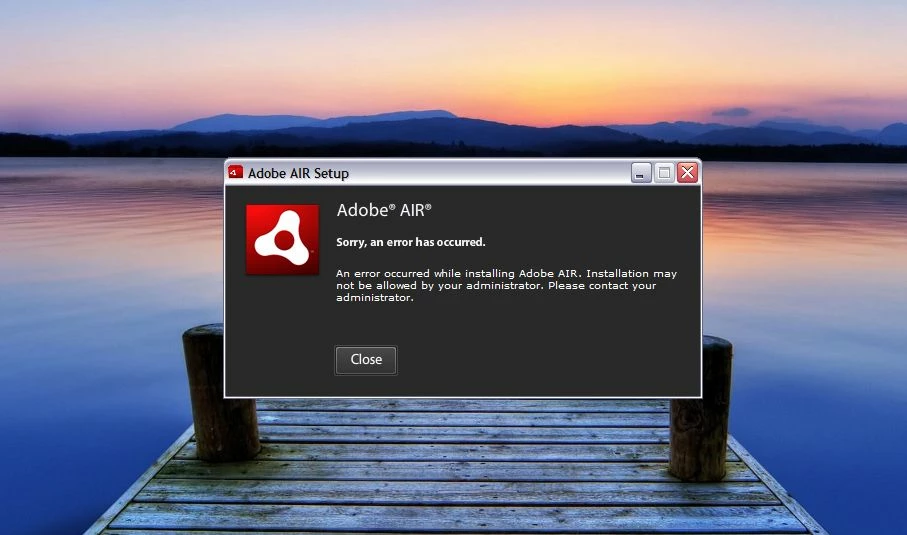
I am having huge problems with Adobe AIR. I couldn't update, so spent literally hours trying to uninstall v3.4 and finally got it uninstalled using IoBit. Now I can’t install v3.5. I keep being told “An error occurred while installing Adobe AIR. Installation may not be allowed by your administrator. Please contact your administrator.” I checked, and I am the only user and logged on as Administrator.

WinXP, SP3, 1.5Ghz
This topic has been closed for replies.

3 replies

Participant
November 1, 2015

I am having the same problem.  I was able to uninstall the old version using the Microsoft tool, but I am still getting the error message when trying to install the newer version.  Adobe support chat told me to post here, that they do not support Adobe Air.

Can someone please help me?

Participant
July 8, 2014

I just can't believe that one utility to solve troubleshoots made by microsoft actually worked. Thanks for the help.

chris.campbell
Community Manager
Community Manager
November 30, 2012

I'm sorry you're running into installation issues with AIR.  Microsoft has a utility that can help resolve installation problems.  Would you mind giving this a try and let us know how it works for you?  When running the Fix it, go through the uninstall process and try to remove Adobe AIR from your system.  Once finished, download the latest version of AIR and install again.

Microsoft Install and Uninstall Fix It

If you still encounter problems, we'll need to review the AIR installer log to better diagnose the issue.  Please post back with the log contents.  You can find instructions for finding these logs here:

AIR Installer Log Instructions

Participant
November 30, 2012

I downloaded and ran MS FixIt and that has now solved the problem. Adobe AIR has installed successfully.

Thank you for all your help.