This topic is closed to new replies. Start a new post to keep the conversation going.
User Unknow
User UnknowCorrect answer
Legend
Feb 17, 2015 6:54 PM UTC

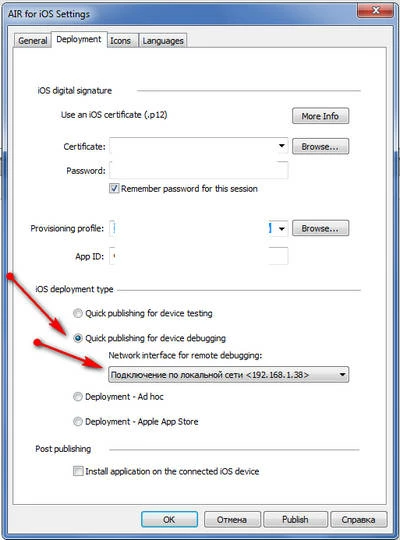
Go to publish settings:

- Select Quick publishing for device debugging and select your LAN/WIFI adapter IP from the list

- Install IPA to your device
- In Flash CS6 go to Debug panel -> Begin Remote Debug Session > ActionScript 3.0

You will see:

Waiting for Player to connect...

in the output panel

Now launch your application on your device. Be sure that you in the same WiFi network with your desktop. If Flash CS6 can't connect to the device and still waiting for it - try to disable firewall.

4 replies

User Unknow
Legend
Feb 17, 2015 3:23 PM UTC

Yes, this is possible. Also you can try to use Adobe Scout for this.

Translate
blogtomAuthor
Known Participant
Feb 17, 2015 6:29 PM UTC

What are the settings to debug iOS apps with Flash CS6?

Translate
User Unknow
User UnknowCorrect answer
Legend
Feb 17, 2015 6:54 PM UTC

Go to publish settings:

- Select Quick publishing for device debugging and select your LAN/WIFI adapter IP from the list

- Install IPA to your device
- In Flash CS6 go to Debug panel -> Begin Remote Debug Session > ActionScript 3.0

You will see:

Waiting for Player to connect...

in the output panel

Now launch your application on your device. Be sure that you in the same WiFi network with your desktop. If Flash CS6 can't connect to the device and still waiting for it - try to disable firewall.

Translate