Answered
Debug Air iOS app on device with Flash CS6?
Hi,
Is it possible to debug an Air iOS app on device to get all the trace() messages?
I'm using Flash CS6 with the AIR SDK 16.
Thanks

Hi,
Is it possible to debug an Air iOS app on device to get all the trace() messages?
I'm using Flash CS6 with the AIR SDK 16.
Thanks
Go to publish settings:
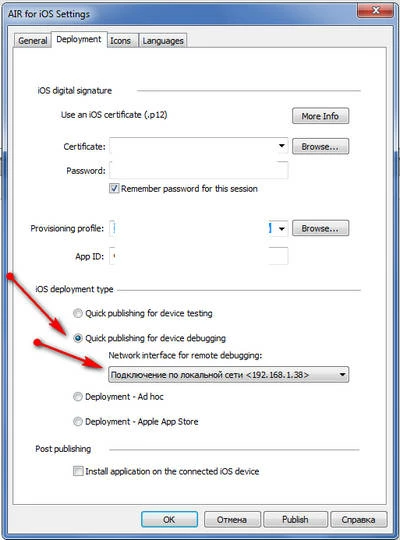
- Select Quick publishing for device debugging and select your LAN/WIFI adapter IP from the list
- Install IPA to your device
- In Flash CS6 go to Debug panel -> Begin Remote Debug Session > ActionScript 3.0
You will see:
Waiting for Player to connect...
in the output panel
Now launch your application on your device. Be sure that you in the same WiFi network with your desktop. If Flash CS6 can't connect to the device and still waiting for it - try to disable firewall.
Already have an account? Login
Enter your E-mail address. We'll send you an e-mail with instructions to reset your password.
 AdChoices