


Display difference between emulator and device
Hi, people.
I have a weird problem that is driving me nuts for a full week now.. Maybe someone has been through this before, so I´ll explain my problem shortly.
I´m working on an app for mobile devices, using the Flex 4.6 SDK. These are my xml settings:
<aspectRatio>landscape</aspectRatio>
<autoOrients>true</autoOrients>
<fullScreen>true</fullScreen>
<renderMode>gpu</renderMode>
The app is working perfect on the device, but when running in the ADL emulator, every single object appears to have a bottom gap, because they all appear upper than they should. The strange fact is that when I click in the area where the objects should be, they respond perfectly, as they really are where they must be. It´s only that they show at the wrong place.
I attach an screenshot to ilustrate the problem.
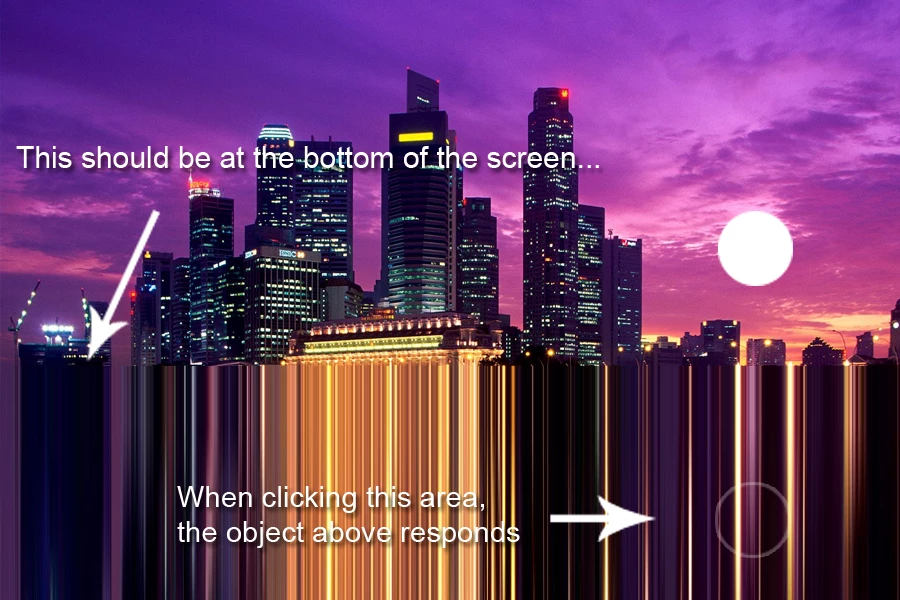
As you can see, the weird area is covered with some kind of stretched version of the image.. I don´t know even how to explain it.
NOTE: After reading something in this forum, I had just made a quick test, turning GPU mode to CPU, and everything is displayed well at the emulator.... But I really need it to be in GPU. Anyone knows anything about this problem with GPU settings?
Thanks in advance.

 AdChoices