



drawWithQuality() will not draw properly and Stage quality issues on Air 3.3
So today i tried to switch from draw to drawWithQuality and I noticed that it doesn't work if the image contains filters.
What happens is that the part drawn is only the part included between the getBounds of a Sprite, eve if you want to draw that image ona larger bitmapData, you will see cuts in the filters.
This doesn't happen if switching the stage quality from LOW to HIGH and using the normal draw() method.
Although doing this brings up a major flaws in Air 3.3, switching the stage quality from LOW to HIGH every time you have to draw drops the perfomance drstically.
Of course in Air 3.2 all works fine.
Opened a bug report for that https://bugbase.adobe.com/index.cfm?event=bug&id=3223291
Is Adobe going to fix drawWithQuality to draw also the filters?
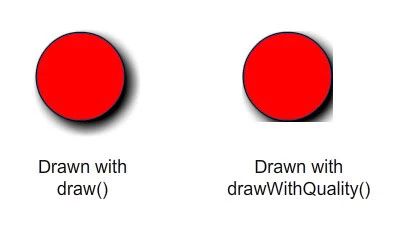
This is the code to reproduce the issue:
var mc:Sprite = new Sprite();
mc.graphics.beginFill(0xCC0000);
mc.graphics.drawCircle(0, 0, 100);
mc.graphics.endFill();
mc.filters = [ new DropShadowFilter(10, 45, 0, 1, 10, 10, 5) ];
var bmp:Bitmap = new Bitmap( new BitmapData(500, 500, true, 0) );
addChild(bmp);
var mat:Matrix = new Matrix();
mat.translate(100, 100);
bmp.bitmapData.drawWithQuality(mc, mat, null, null, null, true, StageQuality.BEST);
 AdChoices