Participant
September 27, 2014
Answered

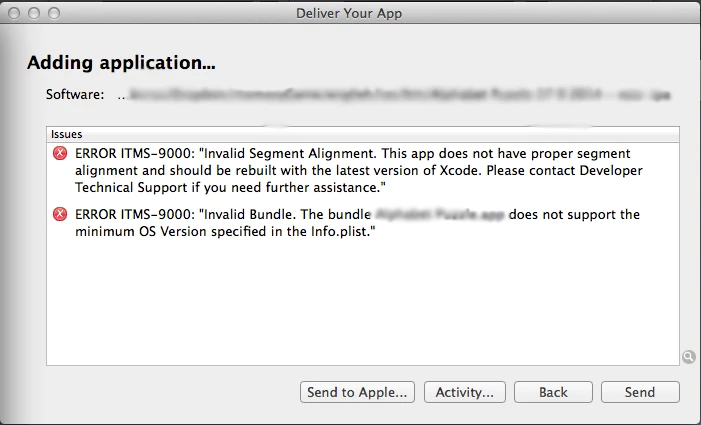
ERROR ITMS-9000: Invalid Bundle.

  • September 27, 2014
  • 1 reply
  • 2588 views

Hi,

I tried to upload my app to IOS store, but this message comes up each time 'ERROR ITMS-9000: Invalid Bundle.'

I used

- AIR 15.0.0.289 beta from adobe lab

- Xcode 6

- Application loader 3

- I built  new certificate and provisioning

what should I do to solve this problem.

This topic has been closed for replies.
Correct answer FlashProz

A new SDK with a fix was published: Re: No longer able to submit app to iTunes.

1 reply

Participant
September 28, 2014

I also have the same problem!!!

FlashProzCorrect answer
Participant
September 28, 2014

A new SDK with a fix was published: Re: No longer able to submit app to iTunes.

Pahup
Adobe Employee
Adobe Employee
September 29, 2014

All,

If you are you looking to get the patched Windows AIR SDK and facing the download error (509), try this link: https://t.co/C5G23nMPnq


And what you have to do is copy the /lib/aot/bin/ld64 folder from that version to the same folder on your current AIR build. Doing that, and also adding <key>MinimumOSVersion</key> <string>6.0</string> to your <InfoAdditions> in your XML


Thanks to @oliver_joyce


The beta SDK provided does automatically set the 6.1 as MinimumOSVersion in info.plist of the resulting IPA.

Here are the alternate links.

Mac - https://dh8vjmvwgc27o.cloudfront.net/airsdk_ld64/archive_air_15.0_with_asc2_drm_sdk.tbz2

Win - https://dh8vjmvwgc27o.cloudfront.net/airsdk_ld64/archive_air_15.0_with_asc2_drm_sdk.zip

Thanks

-Pahup

Adobe AIR Team