
ajcampa
Known Participant
Sep 10, 2014 4:19 PM UTC
Question

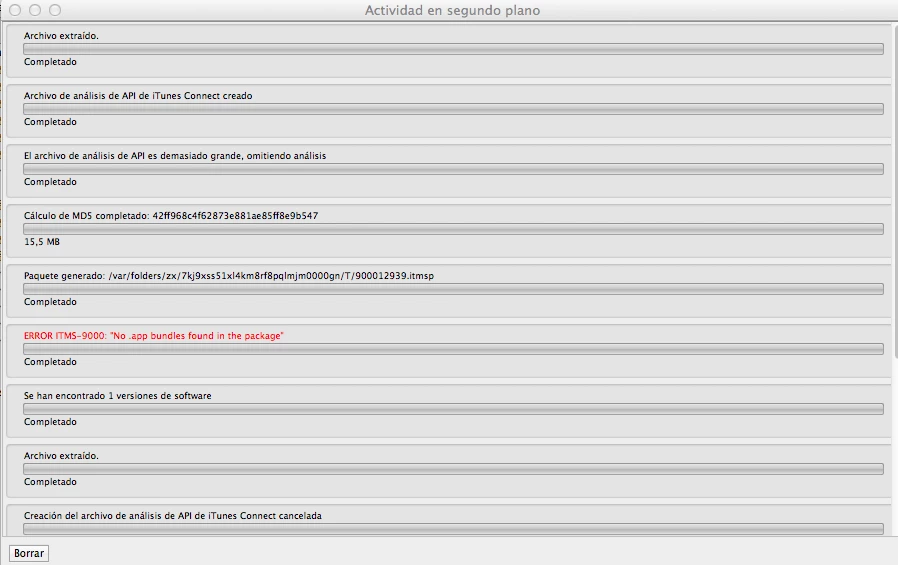
ERROR ITMS-9000: "No .app bundles found in the package"]

Hi,

I've been trying to upload my ipa generating Flash Builder using the Application Loader, unsuccessfully, more than a month.

I tried to generate all certificates again and I have not gotten results.

The error is "ERROR ITMS-9000:" No .app bundles found in the package "]" attached image for if you think of anything to anyone. Any help will be very welcome.

I have also tried to unzip the ipa file, access the Payload folder and compress .app inside.

Does anyone have idea what can it be?

If you need anything more than information only have to ask me.

Thanks in advance
This topic is closed to new replies. Start a new post to keep the conversation going.

47 replies

Paul Istoan
Participating Frequently
Dec 2, 2014 12:41 PM UTC

I'm simply compiling the app with Apache Flex 4.13.0 FP15.0 AIR15.0 en_US and then using Application Loader I get "The package does not contain an info.plist"

Translate
User Unknow
Legend
Dec 2, 2014 1:34 PM UTC

1) Your app developed using Flex or pure AS3?

2) open your *.ipa file as default ZIP file

3) find there info.plist file manually inside Payload\*-app-name.app\

Do you see it there?

Translate
Paul Istoan
Participating Frequently
Dec 2, 2014 2:00 PM UTC

1) Pure AS3

2) ?

3) It's there.

Translate
Paul Istoan
Participating Frequently
Dec 2, 2014 9:21 AM UTC

I have the same problem. Any fixes?

Translate
User Unknow
Legend
Dec 2, 2014 9:28 AM UTC

I received too much often similar issues. But they all on developer side, not on Adobe AIR.

Write here step by step how you producing IPA fle and could you upload this IPA to your ad-hoc device?

Translate
ajcampa
ajcampaAuthor
Known Participant
Nov 4, 2014 5:11 PM UTC

Hi,

Any idea about the error "the package not contain info.plist"?? The error is with the Application Loader 3.0.

Somebody use Flash Builder?

Thanks

Translate
ajcampa
ajcampaAuthor
Known Participant
Nov 7, 2014 7:34 PM UTC

Hi,

I updated the Application Loader to 3.0 version. I have a new error. "The package does not contain info.plist".

I searched in internet and i found that this error, is possible, it is for CFBundleVersion in info.plist. Is this possible?

this is my app.xml

<?xml version="1.0" encoding="utf-8" standalone="no"?>

<application xmlns="http://ns.adobe.com/air/application/15.0">

  <!-- A universally unique application identifier. Must be unique across all AIR applications. -->

  <!-- Using a reverse DNS-style name as the id is recommended. (Eg. com.example.ExampleApplication.) Required. -->

  <id>com.xxx.XXX</id>

  <!-- Used as the filename for the application. Required. -->

  <filename>XXX</filename>

  <!-- The name that is displayed in the AIR application installer.  -->

  <!-- May have multiple values for each language. See samples or xsd schema file. Optional. -->

  <name>XXX</name>

  <!-- A string value of the format <0-999>.<0-999>.<0-999> that represents application version which can be used to check for application upgrade. -->

  <!-- Values can also be 1-part or 2-part. It is not necessary to have a 3-part value.-->

  <!-- An updated version of application must have a versionNumber value higher than the previous version. Required for namespace >= 2.5 . -->

  <versionNumber>1.1.1</versionNumber>


  <!-- A string value (such as "v1", "2.5", or "Alpha 1") that represents the version of the application, as it should be shown to users. Optional. -->

  <versionLabel>1.1.1</versionLabel>

  <!-- Description, displayed in the AIR application installer. -->

  <!-- May have multiple values for each language. See samples or xsd schema file. Optional. -->

  <description>

  XXX

  </description>

  <!-- Copyright information. Optional -->

  <copyright>XXX 2014</copyright>

  <!-- Publisher ID. Used if you're updating an application created prior to 1.5.3 -->

  <!-- <publisherID></publisherID> -->

  <!-- Settings for the application's initial window. Required. -->

  <initialWindow>

  <!-- The main SWF or HTML file of the application. Required. -->

  <!-- Note: In Flash Builder, the SWF reference is set automatically. -->

  <content>[This value will be overwritten by Flash Builder in the output app.xml]</content>

  <!-- The title of the main window. Optional. -->

  <!-- <title></title> -->

  <!-- The type of system chrome to use (either "standard" or "none"). Optional. Default standard. -->

  <!-- <systemChrome></systemChrome> -->

  <!-- Whether the window is transparent. Only applicable when systemChrome is none. Optional. Default false. -->

  <!-- <transparent></transparent> -->

  <!-- Whether the window is initially visible. Optional. Default false. -->

  <visible>true</visible>

  <!-- Whether the user can minimize the window. Optional. Default true. -->

  <!-- <minimizable></minimizable> -->

  <!-- Whether the user can maximize the window. Optional. Default true. -->

  <!-- <maximizable></maximizable> -->

  <!-- Whether the user can resize the window. Optional. Default true. -->

  <!-- <resizable></resizable> -->

  <!-- The window's initial width in pixels. Optional. -->

  <!-- <width></width> -->

  <!-- The window's initial height in pixels. Optional. -->

  <!-- <height></height> -->

  <!-- The window's initial x position. Optional. -->

  <!-- <x></x> -->

  <!-- The window's initial y position. Optional. -->

  <!-- <y></y> -->

  <!-- The window's minimum size, specified as a width/height pair in pixels, such as "400 200". Optional. -->

  <!-- <minSize></minSize> -->

  <!-- The window's initial maximum size, specified as a width/height pair in pixels, such as "1600 1200". Optional. -->

  <!-- <maxSize></maxSize> -->

        <!-- The initial aspect ratio of the app when launched (either "portrait" or "landscape"). Optional. Mobile only. Default is the natural orientation of the device -->

        <!-- <aspectRatio></aspectRatio> -->

        <!-- Whether the app will begin auto-orienting on launch. Optional. Mobile only. Default false -->

  <autoOrients>true</autoOrients>

        <!-- Whether the app launches in full screen. Optional. Mobile only. Default false -->

        <fullScreen>true</fullScreen>

        <!-- The render mode for the app (either auto, cpu, gpu, or direct). Optional. Default auto -->

        <!-- <renderMode></renderMode> -->

  <!-- Whether or not to pan when a soft keyboard is raised or lowered (either "pan" or "none").  Optional.  Defaults "pan." -->

        <softKeyboardBehavior>none</softKeyboardBehavior>

    </initialWindow>

  <!-- We recommend omitting the supportedProfiles element, -->

  <!-- which in turn permits your application to be deployed to all -->

  <!-- devices supported by AIR. If you wish to restrict deployment -->

  <!-- (i.e., to only mobile devices) then add this element and list -->

  <!-- only the profiles which your application does support. -->

  <supportedProfiles>mobileDevice</supportedProfiles>

  <!-- Languages supported by application -->

  <!-- Only these languages can be specified -->

  <supportedLanguages>es</supportedLanguages>

  <icon>

  <image16x16>logo-XXX16x16.png</image16x16>

  <image29x29>logo-XXX29x29.png</image29x29>

  <image32x32>logo-XXX32x32.png</image32x32>

  <image36x36>logo-XXX36x36.png</image36x36>

  <image48x48>logo-XXX48x48.png</image48x48>

  <image50x50>logo-XXX50x50.png</image50x50>

  <image57x57>logo-XXX57x57.png</image57x57>

  <image58x58>logo-XXX58x58.png</image58x58>

  <image72x72>logo-XXX72x72.png</image72x72>

  <image76x76>logo-XXX76x76.png</image76x76>

  <image100x100>logo-XXX100x100.png</image100x100>

  <image114x114>logo-XXX114x114.png</image114x114>

  <image120x120>logo-XXX120x120.png</image120x120>

  <image128x128>logo-XXX128x128.png</image128x128>

  <image144x144>logo-XXX144x144.png</image144x144>

  <image152x152>logo-XXX152x152.png</image152x152>

  <image512x512>logo-XXX512x512.png</image512x512>

  <image1024x1024>logo-XXX1024x1024.png</image1024x1024>

  </icon>

    <iPhone>

        <InfoAdditions>

        <![CDATA[

        <key>UIDeviceFamily</key>

  <array>

  <string>1</string>

  <string>2</string>

  </array>

  <key>MinimumOSVersion</key>

  <string>6.1</string>

  <key>CFBundleURLTypes</key>

  <array>

    <dict>

        <key>CFBundleURLSchemes</key>

            <array>

                <string>xxxxxxxx</string>

             </array>

     </dict>

  </array> 

      <key>FacebookAppID</key>

      <string>xxxxxxx</string>         

      <key>UIRequiredDeviceCapabilities</key>

         <array>

             <string>gps</string>

             <string>camera-flash</string>

         </array>        

         <key>UIRequiresPersistentWiFi</key>

         <string>NO</string>        

         <key>UIBackgroundModes</key>

         <array>

            <string>location</string>

          </array>        

  ]]>

  </InfoAdditions>

        <requestedDisplayResolution>standard</requestedDisplayResolution>

    </iPhone>

  <extensions>

        <extensionID>com.freshplanet.AirImagePicker</extensionID>

    <extensionID>com.freshplanet.AirFacebook</extensionID>

    <extensionID>com.freshplanet.AirAlert</extensionID>

    </extensions>

</application>

Translate
Paul Istoan
Participating Frequently
Dec 6, 2014 6:43 PM UTC

, Have you found any solution to getting over the "The package does not contain an info.plist." problem?

Translate
ajcampa
ajcampaAuthor
Known Participant
Nov 3, 2014 10:28 PM UTC

yes i am, in other case, i think that i show me other errors, if i remember well...

Translate
ajcampa
ajcampaAuthor
Known Participant
Nov 3, 2014 10:09 PM UTC

i build all to generate the swf out in bin-debug folder. Then, i click in "project/export release build..." and i select the "export to folder:", the export as "Signed packages for each target platform", and i push in "next>". Then exporting release build, and show me, in a popup information "one o more warnings were found while buildend the release version. You may choose to ignore these warnings.". I see that it's a normal warnings, except, the next:

"The style 'cornerRadius' is only supported by type 'mx.core.Container' with the theme 'halo, spark'"

I click in ok button and i put the packaging settings and I click in Finish button.

If i see the package, into Payload directory and into .app package, i find the info.plist file...

Translate
Colin Holgate
Inspiring
Nov 3, 2014 10:13 PM UTC

Your message seemed to end early. If you're using Flex, are you sure you have the right version of AIR SDK? If you're editing the info.plist, why are you doing that?

Translate
ajcampa
ajcampaAuthor
Known Participant
Nov 3, 2014 10:22 PM UTC

In my manifest file i can see the air versión 15.0

I not edit the info.plist.

If i open the info.plist, i can see the CTAirSdkVersion is 15.0.0.249

Translate
ajcampa
ajcampaAuthor
Known Participant
Nov 3, 2014 9:02 PM UTC

I only rezip for i try others options... If i dont rezip, dont work too.

I will try to upload the application Loader to 3.0 version. Thanks.

Translate
ajcampa
ajcampaAuthor
Known Participant
Nov 3, 2014 9:29 PM UTC

i updated the Application Loader, and now, when i select the ipa, show me the next message:

"the package not contain info.plist"

Translate
Colin Holgate
Inspiring
Nov 3, 2014 9:43 PM UTC

How did you build the app?

Translate
ajcampa
ajcampaAuthor
Known Participant
Nov 3, 2014 7:56 PM UTC

Hi,

I need help, please. I don't know what to do now

If someone needs my project for to view what is the problem, please, you tell me and i send this for private message.

I tested, making a new project with different name. A new certs (mobile provision, p12 and app id) and the error it's there!!!

Please, please help.

"No .app bundle found in this package" if I try upload the .app rezip 

"The IPA is invalid. It does not include Payload directory" if I try upload the .ipa

Translate
Colin Holgate
Inspiring
Nov 3, 2014 8:02 PM UTC

Just thought of one thing, there have been problems in the past where the error was misleading, and the problem was some of the names that had been used.

What is the name of the app, and any other names in the XML? If there are any non-Roman characters in there it could lead to issue. Even accented characters may be a problem.

Translate
ajcampa
ajcampaAuthor
Known Participant
Nov 3, 2014 8:50 PM UTC

thanks for your answer, but in my XML I dont have any rare characters.. I checked

have you other idea?

Translate
Colin Holgate
Inspiring
Sep 10, 2014 4:22 PM UTC

Which version of Application Loader are you using?

Translate
ajcampa
ajcampaAuthor
Known Participant
Sep 10, 2014 4:41 PM UTC

Hi,

Does anyone have idea what can it be?


Thanks

Translate
ajcampa
ajcampaAuthor
Known Participant
Sep 15, 2014 8:14 AM UTC

nobody can help me?

Translate