
Scott Inglis
Inspiring
December 4, 2017
Answered

ERROR ITMS-90022/90023 When Submitting to Apple

  • December 4, 2017
  • 4 replies
  • 7201 views

I'm using the application loader to submit a new build of our app, I'm getting a bunch of alerts relating to missing icons:

ERROR ITMS-90022: "Missing required icon file. The bundle does not contain an app icon for iPhone / iPod Touch of exactly '120x120' pixels, in .png format for iOS versions >= 7.0."

ERROR ITMS-90023: "Missing required icon file. The bundle does not contain an app icon for iPad of exactly '76x76' pixels, in .png format for iOS versions >= 7.0."

ERROR ITMS-90023: "Missing required icon file. The bundle does not contain an app icon for iPad of exactly '152x152' pixels, in .png format for iOS versions >= 7.0."

I definitely have all of these file sizes included, both in the new Assets.car file and in my app-xml.

Any thoughts?
This topic has been closed for replies.
Correct answer Scott Inglis

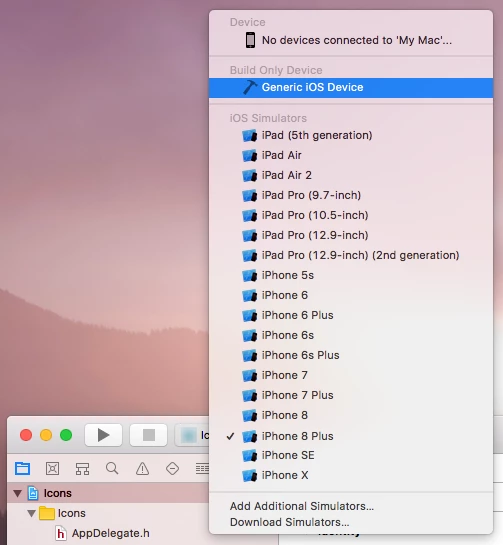
I was finally able to resolve it. I needed to select Generic iOS Device when exporting my icons project and Assets.car file.

4 replies

Participating Frequently
March 23, 2018

FWIW, I built an assets.car with this tool, and it went through. Not sure if it's approved yet, but at least it didn't get kicked back immediately.

Generate ios、android app ICON and Assets.car online

Participant
December 19, 2017

Hello, I m experiencing a similar issue. When I try to publish my application, I get the "Icon files missing" error in Adobe Flash Professional CS6.

I am including the Assets.car file, created according to the guidelines in air28 release notes, using Generic iOS Device as target for the Assets.car, and also including those three specific icons (76x76, 120x120, 152x152) in the application descriptor xml file.

If i do not include those three icons in the descriptor the application is published without any issues but it won't upload with Application Loader (I m getting the same errors as the OP).

What am I doing wrong? any suggestions?

Thanx in advance.

Participating Frequently
February 2, 2018

Yes, I'm having the same problem. I did the XCode hack to create an Assets.car. The icons are in the file. I can successfully upload to Apple with Application Loader, and then I get a automated email from them telling me that the icons aren't there.

We have discovered one or more issues with your recent delivery for "Bulldozer!". To process your delivery, the following issues must be corrected:

Missing required icon file - The bundle does not contain an app icon for iPhone / iPod Touch of exactly '120x120' pixels, in .png format for iOS versions >= 7.0.

Missing required icon file - The bundle does not contain an app icon for iPad of exactly '76x76' pixels, in .png format for iOS versions >= 7.0.

Missing required icon file - The bundle does not contain an app icon for iPad of exactly '152x152' pixels, in .png format for iOS versions >= 7.0.

pravishtis
Adobe Employee
Adobe Employee
February 5, 2018

Hi,

Can you please make sure you've selected 'Generic iOS Device' as the build target while creating Assets.car. Let us know if you still face any issues.

Thanks,

Pravishti | Adobe AIR Engineering

Scott Inglis
Scott InglisAuthorCorrect answer
Inspiring
December 5, 2017

I was finally able to resolve it. I needed to select Generic iOS Device when exporting my icons project and Assets.car file.

Anki_AG_
Adobe Employee
Adobe Employee
December 6, 2017
Scott Inglis
Inspiring
December 4, 2017

I went through and set up all the icons from scratch (re-exported, remade the assets.car, rewrote the <icon> and <image> tags in the app-xml and I managed to clear out the 60x60 pixel error. Still getting errors about missing 76 and 152.

I'm attaching screenshots of the raw PNG files, asset.car contents, and app.xml contents for reference. Icons blurred out.

Scott Inglis
Inspiring
December 4, 2017

Also, when I open up the ipa file I can see that the 76x76 and 152x152 versions of the file are properly packaged. They even got renamed to Icon-Ipad-76 and Icon-Ipad-152 correctly and they're both in the CFBundleIconFiles in the Info.plist. I dunno what more Apple expects...