Participant
October 18, 2013
Answered

Exporting release build error with AIR 3.9

  • October 18, 2013
  • 2 replies
  • 2294 views

When i attempt to export a release build with captive runtime i am thrown this error. I'm not sure what is meant by 'make sure your computer time is in sync' and my certificate is valid.
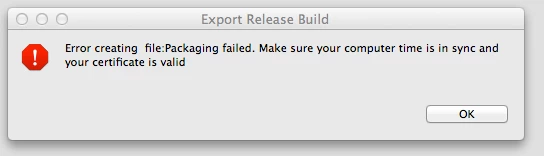

This topic has been closed for replies.
Correct answer chris.campbell

My application contains too much private data, I can't attach it. Just several notes about my problem:

1. It's not reproducible in the Flash Builder 4.6 on OSX 10.6.8

2. It's reproducible with ant build script

3. Error is gone when I removed all <icon></icon> elements from descriptor file.


Our QE department was able to reproduce this issue using the currently released build of AIR.  However, it appears to be fixed in our upcoming beta release (due out tomorrow afternoon.)  Can you give the beta a try and let us know how it works for you?

2 replies

cj_OCHWWAuthor
Participant
October 29, 2013

I can confirm the new SDK release fixes this issue. I just downloaded, installed and exported a release build with capitve runtime on mac OSX Mavericks.

chris.campbell
Legend
October 30, 2013

Thanks for the feedback!

October 24, 2013

The same problem with ant build script and "Flex 4.10 & AIR 3.9" SDK on OSX however on Windows it works fine.

chris.campbell
Legend
October 24, 2013

Have either of you entered a bug on this over at https://bugbase.adobe.com?  I'll ask the team to give this a try, is there a particular version of OSX that you're using?

October 25, 2013

I've tried on OSX 10.6.8 and OSX 10.9.

Also I've tried to generate new certificate via ADT tool from the latest SDK, I've got the same result.
