
Participating Frequently
August 13, 2014
Answered

Flash Pro CC 2014 Crashes When Publishing with Air

  • August 13, 2014
  • 8 replies
  • 3993 views

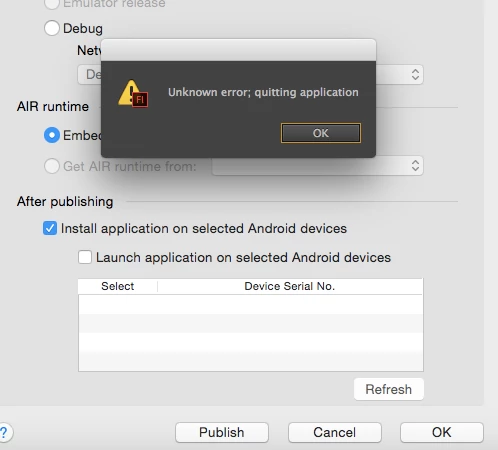
While trying to publish my app with Flash Pro CC 2014 the program crashes. I'm using the current Beta version of AIR 15 (previous version had the same results) on a Mac (Yosemite OSX 10.10 beta 5, Not the public beta) . When I publish to just a swf file there is no problems. If I publish to Android, iOS or Desktop then Flash crashes. When the Adobe crash scene comes up I do submit the reports to Adobe. At the end I get a message telling me Adobe found a solution for the recent crash and to "click here" for further details.  When I do it just goes to the Adobe home page with no help. Is there a solution or workaround? I've been using one of my other machines that has Mavericks on it for publishing for the time being.  I would like to work at one machine and not transferring back-and-forth. Any help will be great!
This topic has been closed for replies.
Correct answer Mukesh R Shah

Sorry for the delay in replying, I wanted to wait for another OS  X 10.10 beta to try again.  I tried to build the Air app with the command prompt several times with no success.  I ended up with a command prompt error (Unknown Error Occurred). I also tried selecting the "install application on selected Android devices", As soon as I select the check box Flash crashes.


hi,

This issue has been fixed internally and will be available in the next update of FlashPro CC 2014.

Rgds,

Mukesh

8 replies

ManuelDahm
Participant
October 20, 2014

I have just installed the latest version of Flash CC 2014 and it crashes on me as soon as I want to open the AIR target settings.

We have commercial apps in the store and need to update them asap - please assist in this matter.

Below the error dump

Dropbox - ErrorDumpSDK.rtf

Adobe Employee
October 20, 2014

Manueldahm, please update the Flash CC 2014 version you are using. The latest version is v14.1.0.96 released on Oct 6th 2014. The crash issue is fixed in the latest Oct update.

ManuelDahm
Participant
October 21, 2014

Thats great and thanks for answering so quick, but where can I find the update? Creative Cloud says its up to date, yet my version number is 14.0.0.110. And its not listed here: http://www.adobe.com/support/flash/downloads.html#flashCC

TKJSAuthor
Participating Frequently
October 6, 2014

The problem has been fixed. I no longer have a any issues. Now I can update all my Macs with Yosemite.  Thank you Adobe for your support! 

Known Participant
October 6, 2014

Just got an update this morning. It appears to be working correctly now. Thanks ADOBE

Known Participant
September 30, 2014

Still no response? This is killing me. I have apps in every app store that need updates. I am completely stuck until we get this fixed.

Known Participant
October 1, 2014

I spoke with someone on the Air team and he said they unfortunately don't have a date yet for the update.

I recommend partitioning your hard drive and re-installing Mavericks on the new partition. There are a bunch of tutorials on how to do this if you Google it. It's a huge pain and a bit ridiculous that Adobe isn't supporting it's software, but at least you'll be able to update your apps again. Hope that helps!

Known Participant
October 1, 2014

Yes I have done this but the workflow with keeping version correct, certificates, testing and rebooting is killing me. Yosemite is said to go live either Oct 14 or 21. I can't imagine that Adobe wait much longer to release this update.

Known Participant
September 24, 2014

I am also having this problem. I could really use an update. If you have this corrected, please release the update.

Known Participant
September 23, 2014

I ended up partitioning my machine and installing Mavericks just so we could compile again and submit to the app store.

Adobe, any word when the update will be out to fix this?

Known Participant
September 20, 2014

We're having this same issue and it is holding us up from submitting our iOS 8 update. We need to be running OS X 10.10 to be able to submit app preview videos for iOS 8.

Seriously Adobe you need to get your act together. You can't expect us to continue paying you each month when you wait a month to fix broken software, then not even push out an emergency update once you have a fix in place. And this isn't some minor bug either; it completely prevents your users from publishing! If you wonder why people keep saying that Flash is dead and Adobe doesn't care, it's because you do this to us time and time again.

Please....release an emergency update so we can publish our apps again!!!! We really want to love Flash and Adobe again, but you need to help us out here.

Adobe Employee
August 14, 2014

Can you please check whether you have Java installed on the system?

If yes, please let us know the Java version installed on your system.

TKJSAuthor
Participating Frequently
August 14, 2014

I checked and Java is installed.

Version:

java version "1.8.0_20-ea"

Java(TM) SE Runtime Environment (build 1.8.0_20-ea-b23)

Java HotSpot(TM) 64-Bit Server VM (build 25.20-b22, mixed mode)

Adobe Employee
August 14, 2014

Thanks for this information.

To debug this further, can you please try to build the AIR app from command prompt and let us know if you are able to create the app.

Please refer to Adobe AIR * ADT package command on how to build AIR app from command prompt.

Rgds,

Mukesh