
Inspiring
December 7, 2017
Question

Game continued Scrolling LAG Air For Android

  • December 7, 2017
  • 5 replies
  • 3575 views

Hello,

I develop a game for android and ios with animate cc and i have red a lot of discussions to improve performance on mobile but i have still a lag (drop framerate) when scrolling.

View my game like Flappy Bird or like a Runner game, obstacles which are scrolling continued to the left and a character wich jump.

FPS = 60 and i use last version of AIR SDK.

The game works perfectly on PC, on Galaxy S6 it works almost perfectly, but on Galaxy S4 and Smartphones less powerful, there are lags while scrolling.

So, i have made a test, with just two elements :

- An image (PNG)

- A button (made with PNG image)

When i tap on the button, the image move to the left by 5px each frame with "EventEnterFrame" .

With this test, the problem is the same. On Galaxy S6 no lag but on Galaxy S4 a random lag during the scroll.
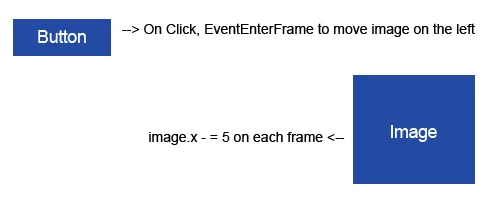
Here is the simply code :

----------------------------------------------------------------------------------------------------------------------------------------------------------------------------

// imports and settings

import flash.display.BitmapData;

import flash.display.Bitmap;

Multitouch.mapTouchToMouse = false;

Multitouch.inputMode=MultitouchInputMode.TOUCH_POINT;

stage.align = StageAlign.TOP_LEFT;

// create a bitmapdata with my image on library and place it on right of the screen

var bmpData:BitmapData=new MyImagePNG();

var bmp:Bitmap=new Bitmap(bmpData);

addChild(bmp);

bmp.y=200;

bmp.x=600;

// Add button listener

btn.addEventListener(TouchEvent.TOUCH_TAP,buttonFunction);

// function for the button

function buttonFunction(e:Event)

{

     btn.removeEventListener(TouchEvent.TOUCH_TAP,buttonFunction);

    // add a enterFrameEvent to move image

    addEventListener(Event.ENTER_FRAME, moveImage);

}

// moving image

function moveImage(e:Event)

{

    bmp.x-=5;

}

-------------------------------------------------------------------------------------------------------------------------------------------------------------------------------------

I don't understand why with just two elements the scrolling doesn't work perfectly...

Have you an idee or a trick to solve this ? Because Galaxy S4 is not so old and a lot of mobiles are less peforming than his, so the game will not problably work very good on a lot of mobiles...

Thanks !!!

This topic has been closed for replies.

5 replies

Inspiring
January 24, 2018

i have maybe found a solution, but for complete it, i need to know the time of execution of each frame.

does it exist an event in as3 or a method to know when the frame has executed the code and the rendering is finish ?

If you see a chart of adobe scout in one of my previous posts, this is the time of color bars that i want to know, before the gray bar and so the suspend time happens...

Colin Holgate
Inspiring
January 24, 2018

enterframe is what happens immediately after things are rendered. That's why I was saying to do everything you can in the enterframe listener function, because you get an entire frame's worth of time to do things. What you change during that time will be seen just before the next enterframe.

Timers and mouse events could happen at any time I think, which means there is a chance that you're doing code at the end of the frame's duration. In cases like that you extend the current frame, delaying the render, and making the frame rate slower.

I haven't gone this far with the idea, but thinking about it, if a mouse event might lead to a lengthy function that has to run, instead of doing that right away, just make a note that it needs doing, and do that in the enterframe function as well.

Inspiring
January 24, 2018

Colin, thanks for your answer

Yesterday, i have made a new test with your approach. I think that the problem is caused by the standby "Waiting for GPU" and "Waiting or next frame". I imagine that to wake up the processus there is a little time...this is why when i run the app with video recorder too, the GPU is almost never on standy...

So, my goal is to fill all the frame budget (17ms for 60fps). But this is here that i have a problem.

I want to make a script in the enterframe event with a "for" wich turn while the frame budget is not reaches.

This is my code :

===============================================================================

import flash.events.Event;

Multitouch.mapTouchToMouse = false;

Multitouch.inputMode=MultitouchInputMode.TOUCH_POINT;

import flash.utils.getTimer;

var BeginFrameTimer:Number=0;

var EndFrameTimer:Number=0;

var nb:Number=1000000;

var i:Number=0;

var frameBudget:Number=13; // for the test i put 13 instead of 17 because it begin after enterfram event

btn.addEventListener(MouseEvent.CLICK,buttonFunction);

function buttonFunction(e:Event)

{

     btn.removeEventListener(MouseEvent.CLICK,buttonFunction);

     seq.addEventListener(Event.ENTER_FRAME,move);

}

function move(e:Event)

{

     BeginFrameTimer=getTimer();

     seq.x-=5;

     for (i=0;i<nb;i++)

     {

          EndFrameTimer=getTimer();

          if (EndFrameTimer-BeginFrameTimer>=frameBudget)

          {

              i=nb;

          }

     }

}

====================================================================================

For just this test, it correct the problem of lag so the approach is good, but the time of execution code in loop is always the same. I still have a problem  to calculate the time between the begin of rendering and end of rendering.

With your information, now i know that the enterFrame event is the end of rendering (and i have confirmed that with a test).

So i have the time of end of rendering, now it miss just the time of the begin of rendering.

Here is a capture of AdobeScout to be more understandable :

So, in 2 after the red and green bars, this is the enterFrame event. I would like to know the time between 1 and 2 in enterFrame.

But which event is ? I think if AdobeScout can calculate it, we can too...

Can you help me ?

Thanks !!

Inspiring
January 24, 2018

I have found this post with a similar issue wich show that i'm not crazy ha ha

Oscillating performance problem in AIR for desktop

Rechut says :

One FASCINATING thing I have chanced upon is:

if I have chrome browser open in the background, everything is super smooth.

it is as if chrome (32 bit) opened up some mesterious proces that air is able to exploit

strange!!!!

Inspiring
January 24, 2018

Yeah but this is from 2013, so much has changed since then. You need to accept first that what you experience is not what everybody else experiences, if it was, AIR would have been dead long ago. If you can accept that then you can start to narrow down your problem and figure things out. I've seen people having all kind of problems with AIR and blaming AIR for this and that until they tried their build on another computer, and then another and then another, ect ... only to realize their computer was the sole problem all along.

My advice is this: Don't go for the easy blame (it's not a coincidence this is also what would requires the less work from you) and try to find clues as to blame AIR for your problem, turns out in most cases AIR is not to blame for coders' problems. Do a real investigation, do real comparisons and keep in mind everybody can do smooth motions/animations using AIR, everybody so it's simply near to impossible you have suddenly discover that AIR can't move object on screen smoothly while the thousands of developers that have used AIR in the past 10 years did not notice it.

It's just a fact AIR can move ONE object across the screen smoothly, period, the fact that you can't only means there's something in your code doing this or something related to your computer doing this. Again if AIR couldn't do that it would have been dead long long ago.

Inspiring
January 24, 2018

I agree, but i think it would be good if we can question directly an expert of adobe instead of searching during days while this is maybe a thing that can be resolved in 5 minutes...

Inspiring
January 23, 2018

Hello everyone,

Thanks for your answers !!

Sorry, i have not been enough accurate in my post but i'm already in GPU mode with only bitmaps. I have red a lot of discussions to improve perfomances and my game is not so bad, there is just this lag which is problemactic...the rest works very well even with animate CC.

For information, i have already test with Starling and the problem is the same...

But, after your answers, i have decided to make tests again and what i have discovered is VERY STRANGE...

At begining, i thought this was a performance problem, that is why i have made this test with just a button and a bitmap to verify that was not my game which was too massive.

After the test (button + bitmap), i had doubts because the lag was present with just two elements too...

Today, i have installed "DU RECORDER" app to record a video capture of my test in GALAXY S4 to show you the problem in video to make it easier and guess what ? With the video recorder activated in the mobile during the game, the lag is gone !!!

it's just amazing !! The only one explication that i see is that the lag is caused by a bug in the management of framerate and ressources...

I had ever seen in Adobe Scout that sometimes the framerate drops because a wait of gpu...furthermore, my game is at 60fps because i have not succeeded to make it fluid at a lower framerate.

I don't understand why the framerate is more stable at 60fps than at 30fps...

Here you can see the charts of just a rectangle in the scene at 30 and 60fps in adobe scout :

30 fps, we can see that the framerate is not stable...

And at 60fps, the framerate is more stable....

Now, it only remains to me to find the solution...if i follow the reasoning i have to weighing my game to simulate a second app that works in the same time ha ha !!

I will post videos as soon as possible, one video capture with my mobile camera and one with "DU RECORDER" to show you the difference...

Colin Holgate
Inspiring
January 23, 2018

There is a historic issue to do with browser plugins, where setting 31 fps was a lot better than 30 fps. I could imagine something like that going on.

But another culprit could be timers. With a timer anything that is done in the timer handler will delay the time to the next timer event. For example, if you had a timer at 30 fps (every 33 milliseconds), and the work it needed to done took say 17 milliseconds, your final frame rate would be 20 fps. With a timer at 60 fps the final frame rate would be 30 fps.

The easy fix to that is to do everything you possibly can on enter frame. You could have a 30 fps animation, and 33 milliseconds worth of stuff to do on every enterframe, and you would still get 30 fps, because all of that work is done during the period that the frame is being shown.

Inspiring
January 23, 2018

Thank you for your answer !

I think this is an issue of this style, i have tried with a framerate at 59 instead of 60 and the lag is amplified...

But now, the question is how to resolve this ? 60fps is the max, so i can't increase it. How to have exactly the necessary time in each frame ?

Colin Holgate
Inspiring
January 21, 2018

As an alternative to learning Stage3D or Starling, you can set the rendermode to GPU. Then the regular displaylist graphics are handled by the GPU, and you can get 60 fps scrolling.

It wouldn't be very hard to try loading so many images that the GPU gets filled up, and the app could crash. But that would be true with Starling as well.

Inspiring
January 19, 2018

No one to help me ?

Legend
January 20, 2018

You are using the classic displayList which was built long before mobile was a thing.

Stage3D was created (5+ years ago) to render on the GPU which better suits mobile devices.

You should look into using Starling which is an AIR framework which provides an API around Stage3D - you will achieve much better results.

https://gamua.com/starling/