
Green or blocky video on Radeon HD cards
I have developed an application in Adobe Air in which a number of user with Radeon HD cards are reporting issues with green/blocky video. I have published with both 2.5 and 3.2 SDK and the issue appears regardless.It appears that for some users, the application even crashes.These same users, however are able to access the same video content directly using VLC without this particular issue. Another interesting note is that the green/choppy video does not appear at the low bandwidth (~198k) video stream, but only on the medium (~678k) and high (~1756k) bandwidth streams.
The application uses MediaPlayerSprite and the Apple OSMF component at http://code.google.com/p/apple-http-osmf/ to display an Apple HTTP Live Stream.
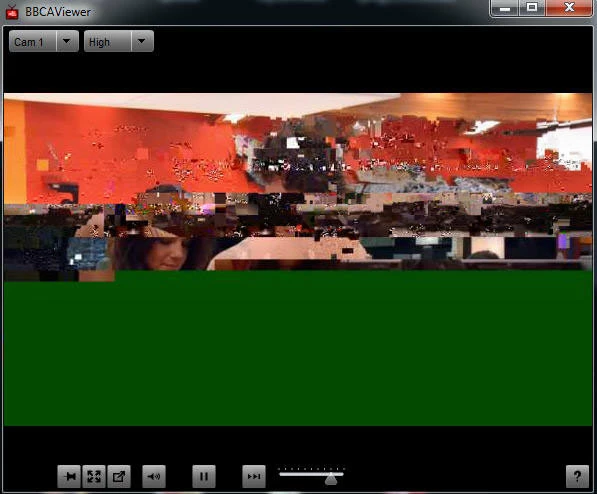
Users have reported the following video card/driver combinations and some have updated to very recent ATI/AMD drivers to no avail:
----------------
windows 7
ATI Radeon HD Series 4800
4/19/2011
version: 8.850.0.0
----------------------
AMD Radeon HD 7700 Series
1/20/2012
8.932.5.3000
-----------------
amd m88oG with ATI mobility Radeon HD 4250
9/19/2010
version 8.770.2.1000
-----------------------
Windows 7 x64
ATI Radeon HD 5700 Series
12/19/2012
Driver: 9.12.0.0
-----------------------
ATI Radeon HD 4650
Driver date: 9/7/2010
Version: 8.773.0.0
----------------
AMD Radeon HD 6530D
10/25/2011
version 8.9111.0.0
------------------
ATI Radeon HD 5450
Date: 12/01/09
Version: 8.682.0.0
If I leave the green choppy screen running in a few minutes I will get a message that says "Display Driver stopped resonding and has recovered."
----------------
I am unsure if the issue is related to ATI drivers, Adobe Air, the Apple OSMF component or something else.
Any help is appreciated.


 AdChoices