
Known Participant
April 9, 2015
Question

help. error itms-90451 when uploading to the appstore

  • April 9, 2015
  • 2 replies
  • 1229 views

I need urgent help, I am submitting my app to the AppStore and I get this error. (see pic)
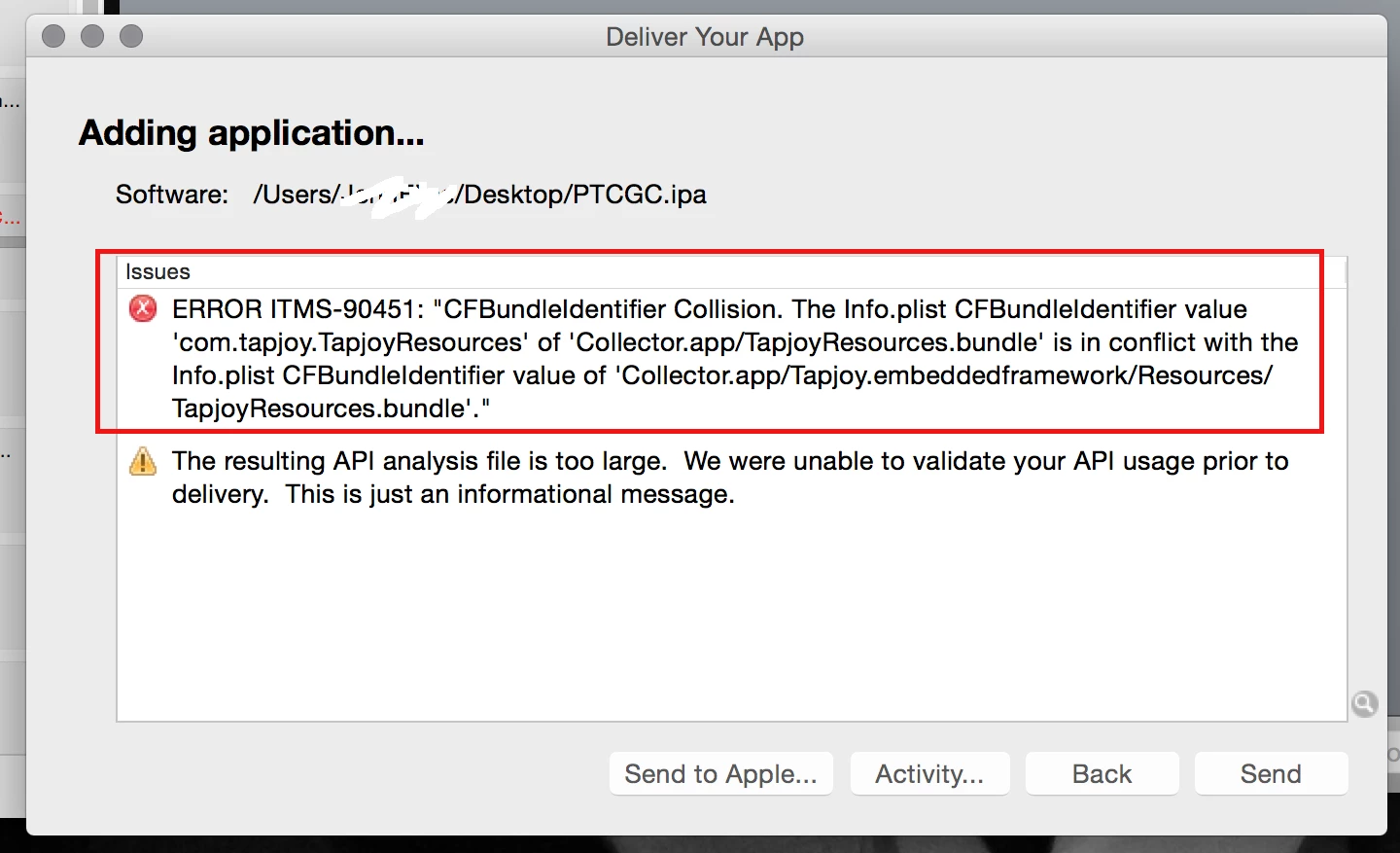
I uploaded a version of my app literally 2 days earlier and the only difference between that one and this one is that I missed a mouse event listener on a button. The first one went through fine but this one will not..

This topic has been closed for replies.

2 replies

Known Participant
April 11, 2015

I had to repackage Tapjoys ANE, and it went through ok now.

If anyone has this problem and doesn't know how to do it, message and I can send it to you.

Participant
April 13, 2015

I have a same problem.. and I don't know how to do it...

I want to know how you solve it.

And what is 'repackage' that you say..?

I'm a beginner of IOS. Please help me..T.T

swamp222
Inspiring
April 14, 2015

If you want to do it yourself next time here's how I repackaged the ane to work for tapjoy 10.2 on Windows:

- Unzip everything from the .ane file.

- Remove this folder: \META-INF\ANE\iPhone-ARM\Tapjoy.embeddedframework\Resources

- Rename and move to parent folder the platform.xml files inside iphone-ARM & android-ARM to android_platform.xml and ios_plaform.xml.

- Copy the .swc file inside the downloaded extension rar and paste it in the same location as the renamed xml files.

- Move everything to this folder inside the air sdk:

Open command prompt and run this from the bin folder:

adt -package -target ane TapjoyExtension.ane

extension.xml -swc TapjoyExtension.swc -platform iPhone-ARM -C iPhone-ARM -platf

ormoptions ios_platform.xml . -platform Android-ARM -C Android-ARM . -platform d

efault -C default library.swf

Perhaps you can define the directory for ADT to make it less messy, but I didn't bother.

Participant
April 10, 2015

Looks like you have duplicate resource bundles in your project which might cause this issue.  Let me know if this helps!

Known Participant
April 10, 2015

It says it right on it, the thing is I didn't change anything. How can I remove it and why is it an issue today but not yesterday.

Participant
April 10, 2015

Might be with the iOS 8.3 validation on the Apple server might be causing this.  However, you are right.  It did not happen before.