
Inspiring
December 18, 2013
Question

How to choose Google or Amazon Runtime?

  • December 18, 2013
  • 1 reply
  • 2054 views

Hi,

I just received my new MacBook last week and now some things aren't working as before - I guess I mised to change some settings. I would be glad i anyone could help.

I have OSX10.9.1 on my MacBook. Flash CC 13.1.0.217 and AIR 3.9.0.1380.

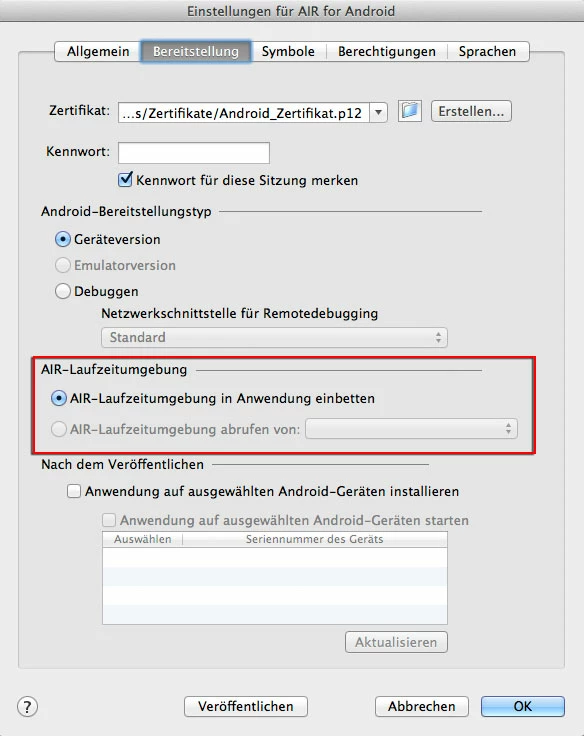
On my old MacBook I was able to choose the AIR-Runtime from GooglePlay or Amazon for my Android App.

Now I can't check this button anymore and I don't know what do do to make this "choosable" again 🙂

Would be great if anyone could help!

Best regards

Jan
This topic has been closed for replies.

1 reply

Chris W. Griffith
Community Expert
Community Expert
December 18, 2013

I think the runtimes are now always included in the apk, so there is no need to direct the end user where to download AIR from.

Chris

dasessigAuthor
Inspiring
December 18, 2013

Hi Chris,

hm - a customer told me one of my Apps crashed on his Amazon Kindle Fire HD7. He bought on the Google Play Store. I had a previous version of this App where I added the Amazon Runtime. So I gave him a direct link to this (old) Amazon Version and he said this one worked fine. It didn't crahs at startup.

So I guess it would still be good to have the opportunity to Add at least the Amazon Runtime for the Amazon Store.

Before - on my old Mac with OSX 10.7.5 I was able to choose the Runtimes - now I'm no longer able to click the button and to choose Google or Amazon.

Any ideas what might be mising on my new Mac / Flash?

cheers

Jan

EDIT: I also sent this customer a new Version (published on my new Mac, latest Flash CC, AIR 3.9.0.1380) He said this version also crashed on his Kindle Fire HD 7. ... so I must be able to choose the Amazon Runtime somehow.

Chris W. Griffith
Community Expert
Community Expert
December 18, 2013

If you install an older version of AIR, you should get that option back. I think the change occured with the 3.7 release.

Chris