


Participating Frequently
December 15, 2011
Question

How to solve the flash Builder 4.6 scroll view and textinput display problem?

  • December 15, 2011
  • 5 replies
  • 4558 views

I have a dynamic form application which worked well on flash builder 4.5, having display problems in flash builder 4.6 now. What I did is adding

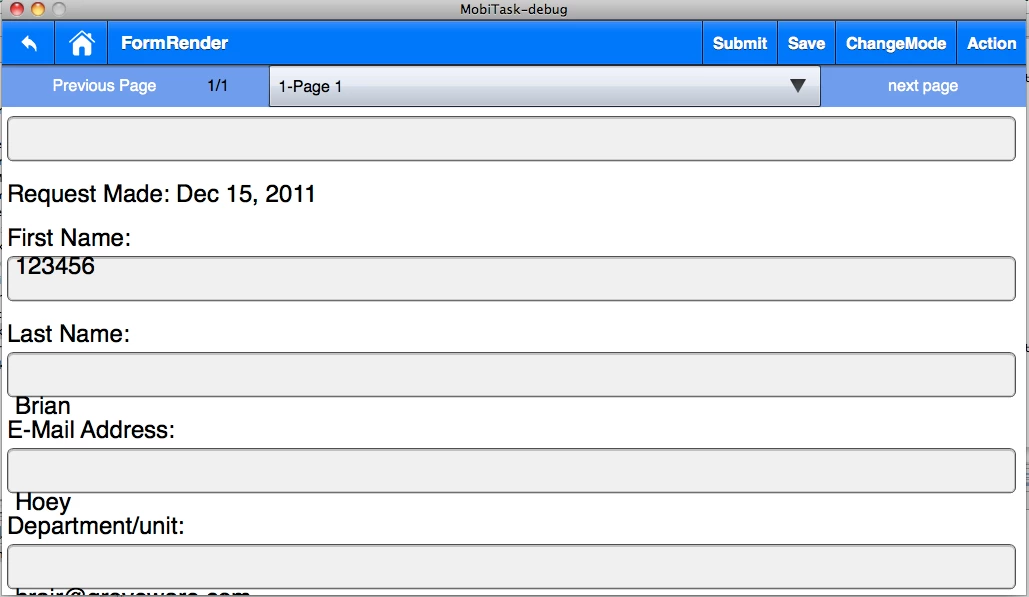
TextInput objects  to a scroll view and set the texts for them dynamically. Everything is fine after the screen loaded. But if I scroll down, sometimes the texts will be placed in wrong positions. I attached the screen copy of the wrong display. Does anybody know how to solve this problem? Thanks.
This topic has been closed for replies.

5 replies

Participant
March 23, 2012

Well actually it works fine using a syntax like:

myTextField.setStyle("skinClass", Class(TextInputSkin));

Participant
March 23, 2012

Hello,

I have the same issue.

I don't even seem to be able to use the skinClass="spark.skins.mobile.TextInputSkin" workaround because I am creating my TextInput programatically (out of an XML describing a form) and the compiler complains if I write something like myTextInpu.skinClass (Access of possibly undefined property).

Is this issue known to Adobe?

Are they going to fix the code?

Regards.

Inspiring
December 20, 2011

From what I know, that is the trade-off you have to deal with for now.

If you don't specify the skin, you can specify the softkeyboard etc... but you have the scrolling issue.

If you do specify the skin, then the text fields will scroll properly, but you will not have the control over the soft keyboard selection.

Can you work around this by putting the text fields at the top of a screen where they will not scroll?

December 20, 2011

I cannot work around the placement of the text fields. Do you know if there is a way to manually refresh the screen?

Participant
January 4, 2012

I'm also in this predicament. Any luck uglydawg?

December 19, 2011

I am also having this problem. Using the spark.skins.mobile.TextInputSkin is not an option because I need to specify the keyboard.

Inspiring
December 15, 2011

Try adding  skinClass="spark.skins.mobile.TextInputSkin" to all the TextInputs.

This will take care of the problem but you will lose the ability to specify the keyboard you want associated with those fields with softKeyboardType=""