
I can't compile for iOS anymore with Flex and AIR 3.8
Hi Adobe team and others,
I'm using Apache 4.10 Flex framework and adobe Air 3.8 for my business projects.
I always had some problems to compile and publish iOS application (with Air 3.5 before), but with AIR 3.8, that was a miracle, I could compile my projects without any errors on Windows ... until today.
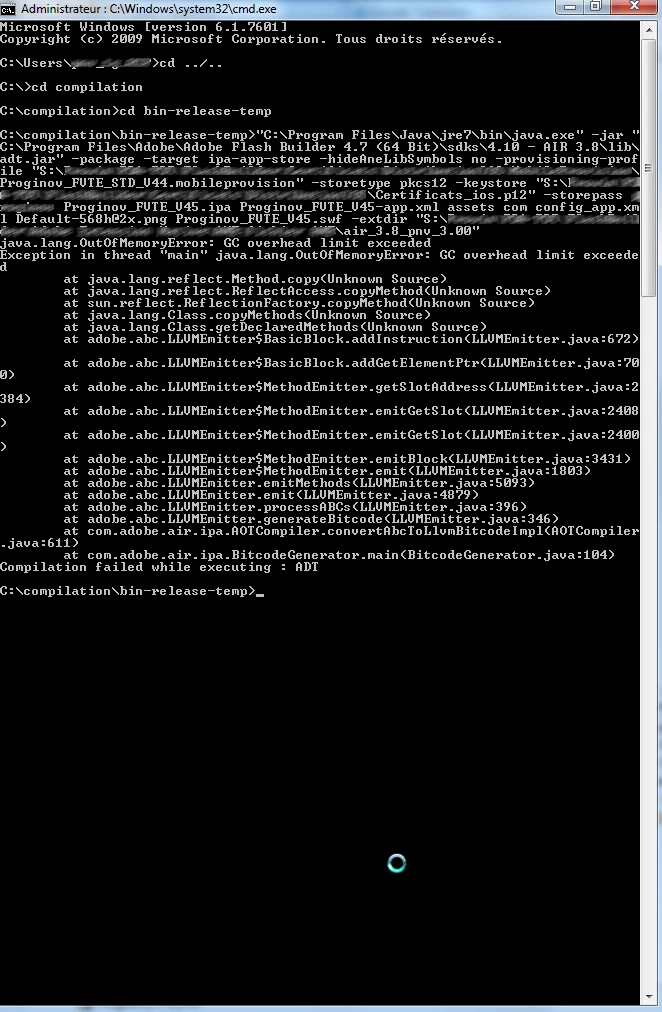
I'm executing this command in DOS to compile my project:
"C:\Program Files\Java\jre7\bin\java.exe" -jar "C:\Program Files\Adobe\Adobe Flash Builder 4.7 (64 Bit)\sdks\4.10 - AIR 3.8\lib\adt.jar" -package -target ipa-app-store -hideAneLibSymbols no -provisioning-profile "S:\Directory_to_MobileProvision.mobileprovision" -storetype pkcs12 -keystore "S:\Directory_to_Certificats_ios.p12" -storepass my_private_password Proginov_FVTE_V45.ipa Proginov_FVTE_V45-app.xml assets com config_app.xml Default-568h@2x.png Proginov_FVTE_V45.swf -extdir "S:/Directory_to_ANE/air_3.8_pnv_3.00"
And I'm getting this result after 1 hour compiling:
If you want, I can send you my bin-release-temp folder and ANE to try by yourself, but I need a private mail, because I don't want to publish my private project to everyone.
Thanks


 AdChoices