
Participant
March 6, 2018
Answered

I can't install a third party package (Error: Sorry, an error has ocurred)

  • March 6, 2018
  • 1 reply
  • 394 views

Hello there,

I currently cannot install an .air file because Adobe Air treats it as damaged. What can I do?

Backstory: I've bought via physical CD an English test program (ie. TEST.air) that requires Adobe Air to install (obviously). All was good and dandy when I first installed Adobe Air (I think it was about version 23 or so), then installed TEST.air in a desktop computer, and it worked perfectly. So I decided to copy this same file to 3 more PCs, located physically in the same room as the first one. I've installed the file in all four of them and used them with no problem at all.

Some time happened and I needed to upgrade the OS of my computers so I began with the first one. I installed Windows 10 Pro (since the other ones were Windows 7 Professional & Ultimate x64) and when I tried to install TEST.air in that upgraded PC, the little window of "Getting ready to install this package" appeared, and after loading, this error happened:
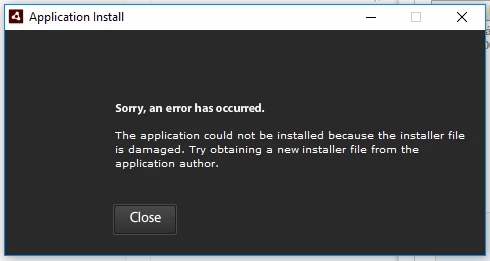
"Yikes, it must be a compatibility issue" I thought. So I went to the second PC and executed the TEST.air file that had originally when I first installed it, to see if I can install it in Windows 7, and nope, the same error. Big was my surprise that even in the laptop that I ripped the .air file and copied to the desktop computers, the same that I'm writing this right now, that even has the program installed, has a useless TEST.air because Adobe Air cannot install it as it thinks its damaged. I even bought a CD, totally brand new, with the same program, but no cigar.

I made sure it was not a virus problem since... I have no virus in any of my laptops or desktop computers. All my files are secured and protected by Windows Defender.

I stopped the maintenance I was giving to these PCs since I'm not even sure if I can install that program again. And I need that one installed and working no matter what.

I really hope you can help me. This is the only place I can ask this kind of problem (Adobe's chat and phone does not help).

Big thanks in advance.

Roberto,

This topic has been closed for replies.
Correct answer ridhij4208356012135538

Hi Roberto,

Your issue seems to be with the signature of the application. To confirm the same you can set system date to any date before 30th Oct 2017 and install the application. You would need to repackage the application using steps mentioned on Adobe AIR applications installation issue page else you can install latest AIR runtime available on Adobe - Adobe AIR and follow the steps mentioned under Workaround section on Adobe AIR applications installation issue page.

Thanks!

1 reply

ridhij4208356012135538
Adobe Employee
Adobe Employee
March 6, 2018

Hi Roberto,

Your issue seems to be with the signature of the application. To confirm the same you can set system date to any date before 30th Oct 2017 and install the application. You would need to repackage the application using steps mentioned on Adobe AIR applications installation issue page else you can install latest AIR runtime available on Adobe - Adobe AIR and follow the steps mentioned under Workaround section on Adobe AIR applications installation issue page.

Thanks!

RBustiosAuthor
Participant
March 6, 2018

@ridhijain​

Thank you so much for your response!

The solution that worked for me was changing the date and time (something like 06/03/2017) of the desktop computer. I've successfully installed and tested the program again, with (apparently) no issues. Then changed back the date and time, opened the now installed program, and it still works! I'm going to actively test and supervise it in case it shows some kind of weird behavior or issues.

The other two solutions (mentioned in the Workaround section of the link you gave me: keyboard shortcuts & new directive) didn't really work, since the installation error message appears again. And I can't re-sign the certificate since... you know... I'm not the application author

I can continue with my maintenance process! I want to give you a big thanks for this one. It really helped me a lot and I didn't know that was a solution for a seemingly weird error.

Thanks a lot!