

I'm getting different results on device and desktop for the stage. How do I fix this problem?
I am testing some screen issues I’ve having with the output on my device vs. my desktop. I have a simple file with two frames created in Animate CC. In the first frame there is a button (that takes the user to the 2nd frame), a text box with the number 1 in it, and a green background. Everything is on the stage and the stage is set at 2208 x 1242. In the second frame I, I have the same thing but background is changed at runtime. When I test I get different results on my desktop than on the actual device (see image). ANYONE KNOW HOW TO FIX THIS OR WHY I'M GETTING DIFFERENT RESULTS? I’m using Air 20 with Animate CC. Below is the code on both frames:
//The background stage is set to red.
// The green in frame 1 background is a green movieclip.
// The orange (mc) in frame 2 is a background that is set to the stage dimension at run time.
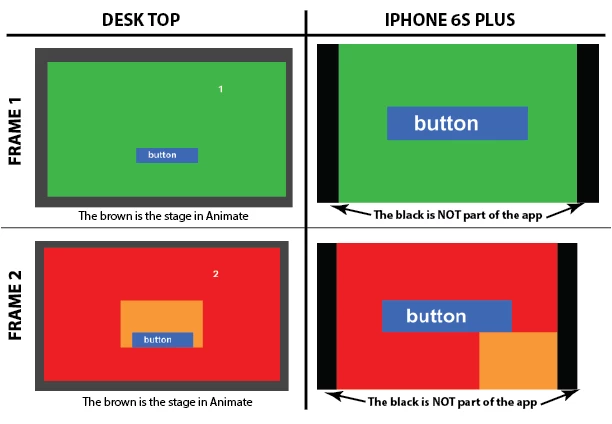
******Frame 1 ******:
stop();
import flash.events.Event;
import flash.display.StageAlign;
import flash.display.StageScaleMode;
bnt.addEventListener(MouseEvent.MOUSE_DOWN, goNext);
bnt.x = stage.stageWidth/2;
bnt.y = stage.stageHeight/2;
stage.scaleMode = StageScaleMode.NO_SCALE;
stage.align = StageAlign.TOP_LEFT;
function goNext(e: MouseEvent): void
{
gotoAndPlay(5);
}
trace (stage.stage.width);
trace (stage.stageHeight);
******Frame 2 ******:
stop();
stage.scaleMode = StageScaleMode.NO_SCALE;
stage.align = StageAlign.TOP_LEFT;
bnt1.x = stage.stageWidth/2;
bnt1.y = stage.stageHeight/2;
mc.width = stage.stageWidth;
mc.height = stage.stageHeight;
bnt1.addEventListener(MouseEvent.MOUSE_DOWN, goNext2);
function goNext2(e: MouseEvent): void
{
gotoAndPlay(1);
}
trace (mc.width);
trace (mc.height);


 AdChoices