
Participating Frequently
September 17, 2013
Question

i0S7 StatusBar Overlays stage, Adobe Air 3.9 Beta Bug? Is there a Workarround

  • September 17, 2013
  • 5 replies
  • 27247 views

Hi

I am using Adobe air 3.9 Beta. It seems that iOS7 give you the the possibility to style the Statusbar. But if you open an adobe air application the statusbar overlays the stage by default. It creates problems with my tabs.
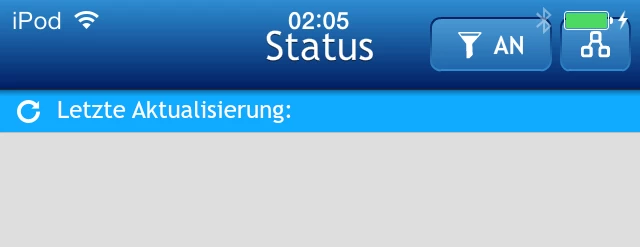
I tested the app with an iPod and IPhone, both with iOs7 Both have the Issues. If I compile the app with Adobe air 3.8 the Statusbar will be displayed correct.
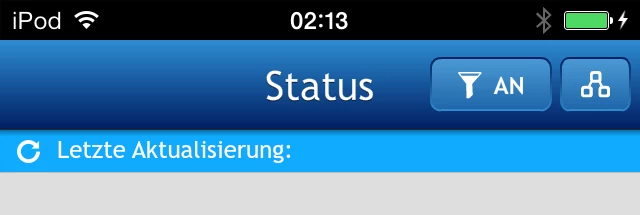
But I can't use air 3.8 because I need the new Icons 120x120 76x76 etc.

Other people have the same issue. See screenshots https://github.com/mutualmobile/MMDrawerController/issues/51

I think the solution is in the info.plist. There is an option for the info.plist UIViewControllerBasedStatusBarAppearance. We need this paramter to activate or deactivate the Statusbar overlay.

any Ideas?

This topic has been closed for replies.

5 replies

Participating Frequently
December 29, 2013
Santanu Karar
Known Participant
February 21, 2014

The bug seems persistent with AIR 4.0 as well. Though I'm not sure if Adobe could do something with API like CameraRoll etc. (beside waiting for Apple)

Inspiring
November 7, 2013

I am here only to give some confirmation because what I was looking for was spread across many posts and I wanted a solid answer.

My settings:

<fullScreen>false</fullScreen>

<renderMode>GPU</renderMode>

on iOS 6 with AIR 3.8 (there are no problems) - Rendered non-fullscreen with status bar seperate from the app at the top.

on iOS 7 with AIR 3.8 (there are no problems) - Rendered non-fullscreen with status bar seperate from the app at the top.

on iOS 7 with AIR 3.9 the app is being rendered fullscreen and the status bar is being overlayed on top.

This post was started in September 17th, it's now November 7th, 2013, AIR 3.9 is no longer beta.

This problem 100% still exists.

every solution/comment mentioned on this thread seems to help only "fullscreen" apps.... any workarounds for the non-fullscreen apps?

Participating Frequently
November 7, 2013

Call me crazy, but the status bar overlaying the header is how it is supposed to work in iOS 7 and is part of the new iOS developer guidlines. Have any of you even used any other apps optimized for iOS 7 on an iPhone. Look to them as an example, they all have the status bar overlaying the header (facebook, instagram, foursquare, etc).

To me, that means AIR 3.9 fixed the issue.

Inspiring
November 7, 2013

No, that is a feature of iOS 7, available to developers (and, in general, being used by most devs). That is not actually the default way it is handled (or at least it wasn't the last time I looked at Xcode). Additionally, if this is how Adobe means for it to work, that means they are requiring us to do the grunt work of figuring out if the user is running Android or iOS <7 and how to modify it. Generally, such a situation would be handled by leaving the previous method as the default and allowing us to manually change the color via the app.xml (Adobe consistently states not to use platform or OS version to determine interface).

Additionally, as has been stated, going fullscreen completely screws it up. If you go fullscreen and then return to non-fullscreen, the issue resolves itself and the app accounts for the height of the status bar. That alone designates at least part of this issue as a bug.

Inspiring
October 9, 2013

This issue was apparently not fixed in the final AIR 3.9 release yesterday. Still seeing the statusbar overlay over my apps. This is a fairly severe problem that really needs to be fixed (clients have mentioned it as a bug...)

Participating Frequently
October 9, 2013

+1 @Apocalyptic0n3

Inspiring
October 9, 2013

Here's how i got mine working

in the appDescriptor fullscreen is true

<key>UIViewControllerBasedStatusBarAppearance</key>

                              <false/>

in my constructor, and everytime i close the cameraUI, i call stage.displayState = StageDisplayState.FULL_SCREEN. And in my project settings (where I link the anes, i point to the SDK for iOS7 manually)

That was in 3.8

hope this helps

Participating Frequently
September 30, 2013

are there any news regarding this issue?

this is also happening when coding using xcode but there are fixes, as shown here: http://stackoverflow.com/questions/17763719/status-bar-wont-disappear/18747724#18747724

Inspiring
September 30, 2013

i added this in my descriptor for additional info and the bar is now gone!

                              <key>UIViewControllerBasedStatusBarAppearance</key>

                              <false/>

Participating Frequently
October 1, 2013

thanks for the tip, but if I add that key, the status bar becomes transparent and the info (carrier/clock/battery status) is still visible (all is black), and remains visible.

I'm using <fullScreen>true</fullScreen> in my photo-based app, and the status bar is not visible in the beginning. Right after I start the camera roll, the status info appears, and won't go away, overlaying the stage3D layer

we need to set the status bar hidden somehow after a photo is selected or when the user presses Cancel

Nimisha1
Participating Frequently
September 17, 2013

Hi Simon,

Which build are you using? 3.9.0.790? If yes then can you please download the AIR SDK & Compiler - with iOS7 Support: 3.9.0.1080 and give it a try as I can't repro this issue in a simple Hello World app with this build?

Also you can wait for the next beta build 3.9.0.880 which is to be released soon and that will be just one build which will have iOS7 support too.

Thanks,

Nimisha

Colin Holgate
Inspiring
September 17, 2013

My variation of the problem shows different results in 790 and 1080. Here's what I'm doing, and what's different:

When I ask the user to pick a photo from their album, the status bar appears (my app is full screen, and no status bar is showing at first).

With build 790, the status bar is opaque, black background, and it sits on top of the title banner of the picker (the word "PHOTOS" gets obscured). When I return to the app, the status bar remains there, and is sitting on top of my stage content. The picker is iOS 6 styled.

With build 1080 the behavior is identical to the above, except that the status bar is transparent, and the picker is iOS 7 styled. The status bar does not obscure the "Photos" word, that is further down the screen. On returning to the app I see the black text of the status bar sat transparent on top of the top part of my stage content.

If I build for 3.8.0.910, the behavior is the same as it is for 3.9.0.790.

This is with the GM version of iOS 7.

Overall, I think I'll build for 1080, and hope the client doens't notice the remnants of the status bar. Hopefully you will have added the new icons to the next iOS 7 AIR build, and found a way to hide the status bar after showing the picker.

jadams602
Inspiring
September 19, 2013

More users commenting on this as a bug:

https://bugbase.adobe.com/index.cfm?event=bug&id=3633422

Some seem to want the status bars to appear differently, but many like me and maybe Colin above, want fullscreen apps (like Stage3D based ones) to never show the status bar.

Now in iOS 7, when you use Camera Roll as an example, status bars appear and then won't go away (doesn't happen in earlier iOS versions for fullscreen AIR iOS apps).

The workaround by reseting displayState to fullscreen works, but the nasty side effect for any Stage3D based apps is that Context3D is lost each time, which is ugly.