
Participating Frequently
September 17, 2013
Question

i0S7 StatusBar Overlays stage, Adobe Air 3.9 Beta Bug VOTE this Bug

  • September 17, 2013
  • 2 replies
  • 1874 views

Hi

I am using Adobe air 3.9 Beta. It seems that iOS7 give you the the possibility to style the Statusbar. But if you open an adobe air application the statusbar overlays the stage by default. It creates problems with my tabs.
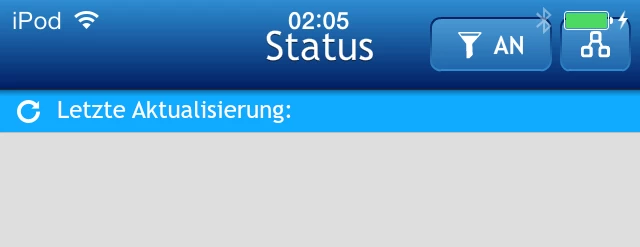
I tested the app with an iPod and IPhone, both with iOs7 Both have the Issues. If I compile the app with Adobe air 3.8 the Statusbar will be displayed correct.
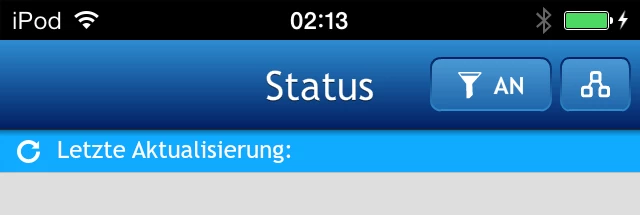
But I can't use air 3.8 because I need the new Icons 120x120 76x76 etc.

Other people have the same issue. See screenshots https://github.com/mutualmobile/MMDrawerController/issues/51

I think the solution is in the info.plist. There is an option for the info.plist UIViewControllerBasedStatusBarAppearance. We need this paramter to activate or deactivate the Statusbar overlay.

Please vote to fix this bug

https://bugbase.adobe.com/index.cfm?event=bug&id=3633422

any Ideas for an workarround?

p.s.

sorry for double post in Air Development section

This topic has been closed for replies.

2 replies

Participating Frequently
September 25, 2013

On a sidenote, there needs to be a way to set the status bar's text color.

I'm not sure why your screenshots show a white status bar, whilst mine is always black (iOS 7 on iPad with AIR 3.9 880).

Inspiring
November 24, 2013

I second that side note. I'm actually trying to get a white colored status bar but can only get it black.

User Unknow
Legend
November 26, 2013

I made half-solution. Go to bug base https://bugbase.adobe.com/index.cfm?event=bug&id=3633422 and get free ANE extension. It work prefect if you disable autorotate or limit it to portrait or landscape.

Stay tuned and let me know if this works for you.

ANE have buildint iOS version filter and work only in >= iOS 7. 0

Inspiring
September 17, 2013

Hi,

up until now, I think this might be a general issue, even Xcode (5) apps have this.

However, if you just need the new icons you shouldn't care too much about this, you nearly can't see the differences when you adjust your icons a little bit (no border on the edges etc.), so I would rather use 3.8 (fast, since you might not be able to upload an app without the icons after tomorrow) and update it once those issues have been fixed (I think that this might need a while, since there are some more problems with 3.9).