
Participant
June 17, 2015
Answered

iOS and Android performance

  • June 17, 2015
  • 2 replies
  • 1021 views

hi everyone! we develop app for iOS and Android, and as result we're getting iOS version much faster than for Android. also no Starling in our project, so if someone has any tips and ideas to improve performance - post here please. thanks!
This topic has been closed for replies.
Correct answer User Unknow

ASUS Zenfone 5 utilize Intel Atom Z2560 CPU. This is x86 arch and not ARM. Adobe AIR can be complied for ARM and X86 architecture.

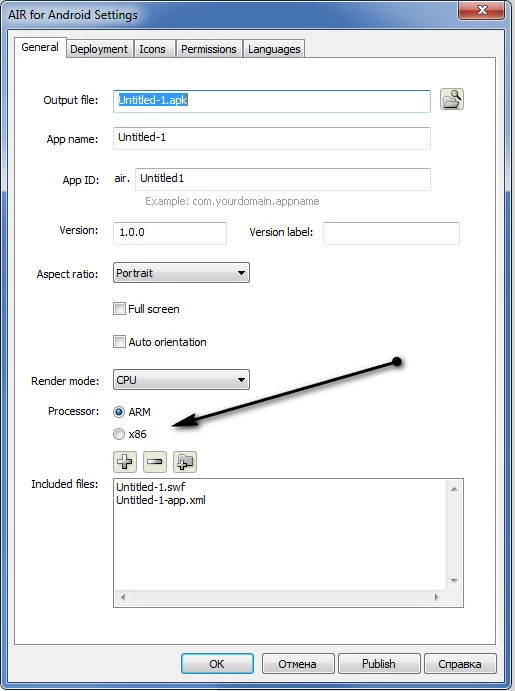
In Adobe Flash Professional CC 2015 (and older) you must put switcher to x86 and run this apk. Finally you must upload ARM or X86 APKs into Google Play market. Different devices will use appropriate APK's. If you don't use Flash IDE - you must setup compiler arguments.

2 replies

Colin Holgate
Inspiring
June 18, 2015

If the symbols in your app are not changing very much, try using the rendermode GPU instead of CPU or Direct.

Participant
June 18, 2015

of course I'm using GPU mode.

on Android - animations not smooth, some functions works slow (for example resizing big bitmaps), which freezes whole app etc.

I'm using iPhone 5C and ASUS Zenfone 5.

unfortunately app coded without Starling.

User Unknow
User UnknowCorrect answer
Legend
June 18, 2015

ASUS Zenfone 5 utilize Intel Atom Z2560 CPU. This is x86 arch and not ARM. Adobe AIR can be complied for ARM and X86 architecture.

In Adobe Flash Professional CC 2015 (and older) you must put switcher to x86 and run this apk. Finally you must upload ARM or X86 APKs into Google Play market. Different devices will use appropriate APK's. If you don't use Flash IDE - you must setup compiler arguments.

User Unknow
Legend
June 17, 2015

Hi,

Firstly what you mean "faster"? More FPS?

List to us your iOS/Android devices where you see the difference