
natural_criticB837
Legend
July 28, 2015
Answered

iOS Error ITMS-90478 and ITMS-90062 when uploading with Application Loader

  • July 28, 2015
  • 1 reply
  • 3025 views

Hello,

when trying to upload the latest versions of my apps to iTunes with application loader, I see these errors:
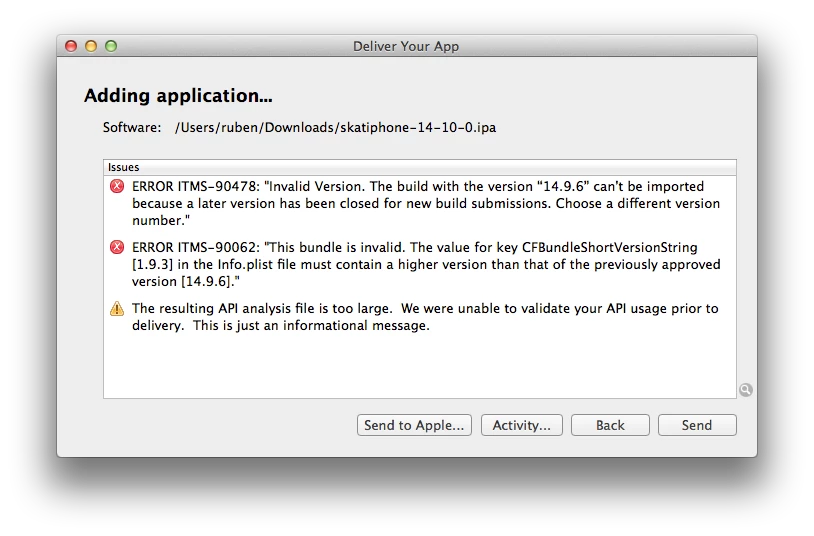
I unzipped the ipa and verified that the actual version number is in fact 14.10.0, so I do not know why this error pops up. I tried other version numbers as well without success. I see this error, with the respective build numbers, for 3 of my 4 apps. Those 3 apps have 32 Bits architecture right now, which I am trying to update to 64 Bits with this build. The 4th app was 64 Bits from the start and did not show this error, though I am not sure if it's related to the error.

I compile with the Windows Air SDK (18.0.0.180), if that makes any difference. Any ideas why this error keeps popping up?

Thanks

This topic has been closed for replies.
Correct answer Colin Holgate

The behavior of the two numbers was changed recently. Previously you could not increase the build number without increasing the version number, which when using Appl'e Test Flight system means that the beta has to go through approval each time. If you can keep the version number the same, but increase the build number, the new beta wouldn't have to go through approval.

Look at "Build Number in AIR iOS" in the release notes:

http://labsdownload.adobe.com/pub/labs/flashruntimes/shared/air18_flashplayer18_releasenotes.pdf

1 reply

natural_criticB837
Legend
July 31, 2015

So I found out what is wrong. The versionLabel ("1.9.3") has to be higher than the versionNumber from the previous build ("14.9.6"). This seems to be a new requirement and it does not seem to make sense to me why the versionLabel is connected to the versionNumber. But at least I got it working by setting both versionNumber and versionLabel to something higher like "15.0.0."

Colin Holgate
Colin HolgateCorrect answer
Inspiring
July 31, 2015

The behavior of the two numbers was changed recently. Previously you could not increase the build number without increasing the version number, which when using Appl'e Test Flight system means that the beta has to go through approval each time. If you can keep the version number the same, but increase the build number, the new beta wouldn't have to go through approval.

Look at "Build Number in AIR iOS" in the release notes:

http://labsdownload.adobe.com/pub/labs/flashruntimes/shared/air18_flashplayer18_releasenotes.pdf