
Inspiring
October 8, 2017
Answered

iPhone X - fullscreen Problem

  • October 8, 2017
  • 6 replies
  • 5893 views

Hi,

There is a problem at iPhone X, black strip. I have tried some different ways but it isn't solved.

Adding launch image (default-568h@2x.png) doesn't solve this problem at iPhone X.  However, default-568h@2x solves that problem at other devices (iPhone 7 and older).

Any idea about that problem?

Thank you.
This topic has been closed for replies.
Correct answer junous

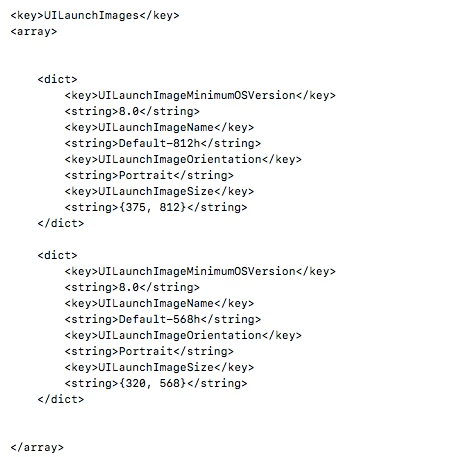
I have solved by adding launch images to the xml file.

6 replies

Inspiring
July 20, 2018

It scales and does not use safe area. How can safe area be enabled? I don't want to manually add some extra space for every new device

Known Participant
November 25, 2017

Hello Developers.

I have not made any updates to all my older iOS apps, which work for both the iPad and all previous versions of the iPhone (prior to the latest iPhone X). 

For the new iPhone X, will my app be filled in with a black space at the top and bottom of the iPhone screen, or will my app try to scale to the new screen dimensions? 

If it does automatically scale to the new screen dimensions, it will not look at all good.

Thank you,

Justin

natural_criticB837
Legend
December 13, 2017

Hi Justin,

apps will not scale to iPhone X resolutions automatically. Instead, they will use black bars as seen in the first screenshot. You need to package iPhone X splashscreens with Air 28 SDK if you want to use the native iPhone X resolution.

junousAuthor
Inspiring
October 10, 2017

I added it in main xml file (inside the <InfoAdditions> tag ) to add Property List (plist) file. By the way, I tested it at iPhone X (not released yet). I guess (not sure) the lastest AIR player (27.0.0.128) is not supported 64-bit for simulator yet.

ColbyFulton
Known Participant
January 13, 2019

I tried adding it to the .xml file, but the file seems to revert when I publish the app. How do I get the code to stay in there?

Colin Holgate
Inspiring
January 14, 2019

If you're using Adobe Animate you don't add it to the XML, you add the splash screen image to the General tab of iOS publish settings.

Participating Frequently
October 10, 2017

are you testing this in the iOS 11 Simulator? My app crashes on startup each time, how did you manage to install?

junousAuthorCorrect answer
Inspiring
October 9, 2017

I have solved by adding launch images to the xml file.

Colin Holgate
Inspiring
October 9, 2017

Which XML file, and how did you manage to test on iPhone X?

Colin Holgate
Inspiring
October 8, 2017

It should be a capital D, though I don't think that would stop it from working. The later iPhones need other sizes. Here's the set of images I would have for a landscape app:

Default-375w-667h@2x~iphone.png

Default-414w-736h@3x~iphone.png

Default-568h@2x.png

Default-568h@2x~iphone.png

Default-Landscape-414w-736h@3x~iphone.png

Default-Landscape@2x~ipad.png

Default-Landscape~ipad.png

Default@2x.png

Default~iphone.png

The 375w one is 750x1334, and the 414w is 1242x2208. I can't remember why I needed to have both Default-568h@2x.png and Default-568h@2x~iphone.png, but it fixed some obscure issue, maybe even the one you're seeing.

junousAuthor
Inspiring
October 8, 2017

I have tried but It didn't work.