
[ISSUE] Load external .swf into an AIR for iOS app
I want to load an external .swf which is included theme objects of the application. The loader class finishes loading but after this when I try to get objects in the swf I get this error.
Device is iPad v.2 iOS v5.1.
ReferenceError: Error #1065: Variable MenuHome is not defined.
at adaptive.controls.thememanager::ApplyTheme/applyStyle()
at adaptive.controls.thememanager::ApplyTheme/apply()
at adaptive.controls.thememanager::ThemeManagerSystem/checkIfAllLoaded()
at adaptive.controls.thememanager::ThemeManagerSystem/backgroundImageLoadHandler()
at adaptive.controls.thememanager::ThemeManagerSystem/backgroundImageLoadHandler()
at flash.events::EventDispatcher/dispatchEvent()
at adaptive.controls.thememanager::ThemeManagerImageLoader/loadImageCompleteHandler()
at adaptive.controls.thememanager::ThemeManagerImageLoader/loadImageCompleteHandler()
at flash.events::EventDispatcher/dispatchEvent()
at adaptive.controls.imageloader::ImageLoader/imageCompleteHandler()
at adaptive.controls.imageloader::ImageLoader/imageCompleteHandler()
Steps are:
1- Create a .fla file and one object in it (like below):
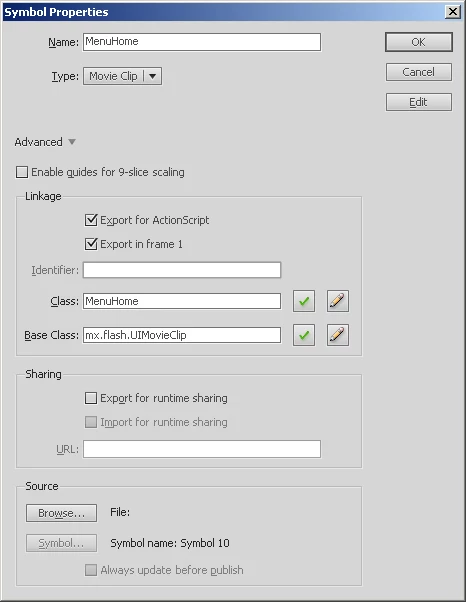
2- In Flash Builder 4.6
Load the external swf:
var swfLoader:Loader = new Loader();
var url:URLRequest = new URLRequest("themes/DefaultTheme/DefaultTheme.swf");
var loaderContext:LoaderContext = new LoaderContext(false, ApplicationDomain.currentDomain, null);
swfLoader.contentLoaderInfo.addEventListener(Event.COMPLETE, completeHandler);
swfLoader.contentLoaderInfo.addEventListener(IOErrorEvent.IO_ERROR, ioErrorHandler);
swfLoader.load(url, loaderContext);
private function completeHandler(event:Event):void
{
var evt:LoadThemeSWFEvent = new LoadThemeSWFEvent(LoadThemeSWFEvent.COMPLETE);
if (AdaptiveHelper.getInstance().platform == PlatformType.DESKTOP)
evt.swfLoader = SWFLoader(event.currentTarget);
else
evt.loader = Loader(event.currentTarget.loader)
dispatchEvent(evt);
// load is OK
}
private function ioErrorHandler(event:IOErrorEvent):void
{
}
After load is complete I tried to get the object from the swf file and use it as a skin class of a button.
cssSelector.setStyle(property, Class(content.loaderInfo.applicationDomain.getDefinition("MainMenu")));
I am stuck here. Any ideas what the problem is?
My Best,
Suat


 AdChoices