
Some_Dude
Known Participant
February 6, 2015
Answered

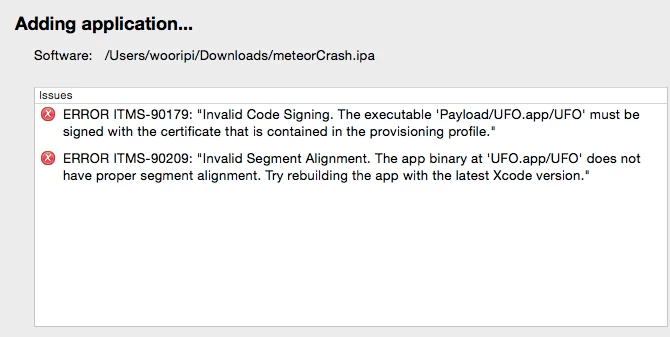
ITMS - 90179 Invalid Code Signing / ITMS - 90209 Invalid Segment Alignment
  • February 6, 2015
  • 3 replies
  • 5332 views

I've been getting these two errors no matter what I try. I've deleted all my profiles and certificates, remade them and even remade the App ID multiple times and nothing happened and still the same error. I've updated XCode too and still the same errors.

I used a Wildcard App to create my .ipa file in Flash Pro CC selecting the Apple App Store and tried to publish it through application loader.

Is there any solution to these two problems? Thanks.

This topic has been closed for replies.
Correct answer Colin Holgate

If you mean you use a wildcard app id, that's something you can't do for the store submission. The provisioning profile and the app id have to be full, and the same as each other.

3 replies

Inspiring
February 18, 2015

Exports the p12 from Xcode was the only way I could get mine to upload -

Participating Frequently
February 12, 2015

Just tried out the latest SDK 17 released today, using Flash Builder and I'm still unable to submit my app.

I have published and updated apps in the past, I understand how certs/keys/profiles work. This error is just really weird!

Has anyone been able to submit a iOS 64 bit with Air 17 or 16 yet over the past 2 weeks?

Some_Dude
Some_DudeAuthor
Known Participant
February 12, 2015

Please tell me if you find a solution.

Participating Frequently
February 12, 2015

So today I tried resigning the same IPA with the same provisioning profile as explained here:

build - Re-sign IPA (iPhone) - Stack Overflow

Now I get another error when submitting #90166

Anyone ever ran into this problem?

Colin Holgate
Colin HolgateCorrect answer
Inspiring
February 6, 2015

If you mean you use a wildcard app id, that's something you can't do for the store submission. The provisioning profile and the app id have to be full, and the same as each other.

Some_Dude
Some_DudeAuthor
Known Participant
February 7, 2015

Well, I'm still getting the same errors after switching to explicit app id. Is there any idea on how to resolve this error? Thanks.

Colin Holgate
Inspiring
February 7, 2015

Which version of AIR are you using? I think there was a segment alignment issue that was fixed a while ago.