

iTunes Connect Invalid Binary
I am developed app with AIR and trying to update application on App Store, successfully uploaded with Application Loader and after submit for review, refreshed page it says Invalid Binary.
does Apple changed something?
As I guess the app does't passes automatic validation on itunes connect server, but no mail regarding this incident.
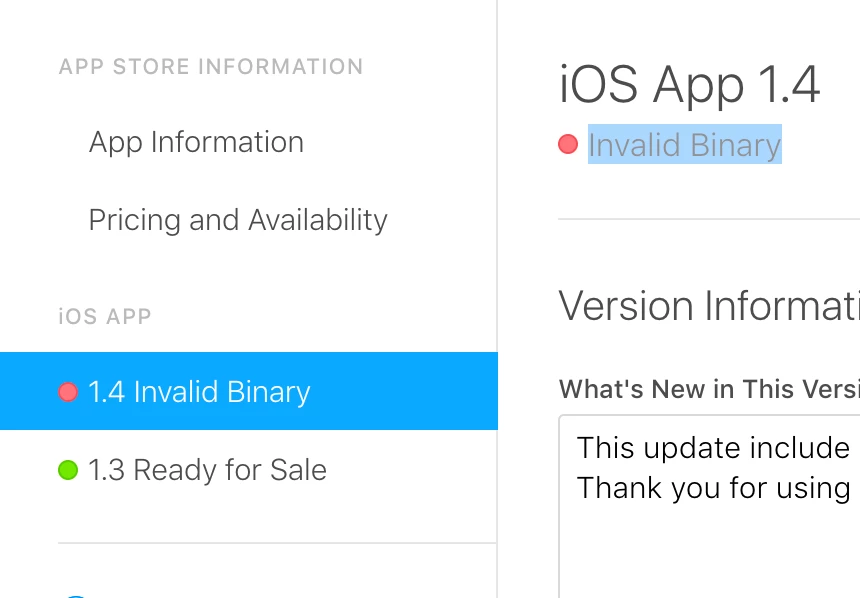
thing I only changed from prevues application xml is: <softKeyboardBehavior>none</softKeyboardBehavior>
<?xml version="1.0" encoding="utf-8"?>
<application xmlns="http://ns.adobe.com/air/application/25.0">
<id>ge.gpost</id>
<versionNumber>1.4</versionNumber>
<supportedProfiles>mobileDevice</supportedProfiles>
<filename>BuildCompile</filename>
<name>Gpost</name>
<iPhone>
<InfoAdditions><![CDATA[
<key>UIViewControllerBasedStatusBarAppearance</key>
<false/>
<key>NSLocationAlwaysUsageDescription</key>
<string>locate distance to service center</string>
<key>UIRequiresPersistentWiFi</key>
<string>NO</string>
<key>UIApplicationExitsOnSuspend</key>
<false />
<key>CFBundleLocalizations</key>
<array>
<string>en</string>
<string>ge</string>
<string>ru</string>
</array>
<key>LSApplicationQueriesSchemes</key>
<array>
<string>fb</string>
</array>
<key>UIDeviceFamily</key>
<array>
<string>1</string>
</array>
<key>MinimumOSVersion</key>
<string>8.0</string>
]]>
</InfoAdditions>
<requestedDisplayResolution>high</requestedDisplayResolution>
</iPhone>
<initialWindow>
<title>Gpost</title>
<content>app.swf</content>
<visible>true</visible>
<fullScreen>true</fullScreen>
<!--<autoOrients>false</autoOrients>-->
<!--<aspectRatio>landscape</aspectRatio>-->
<renderMode>direct</renderMode>
<depthAndStencil>true</depthAndStencil>
<!-- required for 3D -->
<systemChrome>standard</systemChrome>
<softKeyboardBehavior>none</softKeyboardBehavior>
</initialWindow>
<supportedLanguages>en ru</supportedLanguages>
<icon>
<image29x29>icons/icon29.png</image29x29>
<image48x48>icons/icon48.png</image48x48>
<image50x50>icons/icon50.png</image50x50>
<image57x57>icons/icon57.png</image57x57>
<image58x58>icons/icon58.png</image58x58>
<image72x72>icons/icon72.png</image72x72>
<image76x76>icons/icon76.png</image76x76>
<image87x87>icons/icon87.png</image87x87>
<image96x96>icons/icon96.png</image96x96>
<image100x100>icons/icon100.png</image100x100>
<image114x114>icons/icon114.png</image114x114>
<image120x120>icons/icon120.png</image120x120>
<image128x128>icons/icon128.png</image128x128>
<image144x144>icons/icon144.png</image144x144>
<image152x152>icons/icon152.png</image152x152>
<image180x180>icons/icon180.png</image180x180>
<image192x192>icons/icon192.png</image192x192>
<image512x512>icons/icon512.png</image512x512>
<image1024x1024>icons/icon1024.png</image1024x1024>
</icon>
<extensions>
<extensionID>com.distriqt.Dialog</extensionID>
<extensionID>com.distriqt.Application</extensionID>
<extensionID>com.sticksports.nativeExtensions.CanOpenUrl</extensionID>
<extensionID>com.distriqt.Core</extensionID>
<!--<extensionID>com.freshplanet.KeyboardSize</extensionID>-->
</extensions>
</application>
UPDATE:
finally I received mail from apple:
Dear developer,
We have discovered one or more issues with your recent submission for "Georgian Post". To process your submission, the following issues must be corrected:
Unsupported operation - Apps are not allowed to listen to device lock notifications.
Once these issues have been corrected, use Xcode or Application Loader to upload a new binary to iTunes Connect. Choose the new binary on the app’s Details page in My Apps on iTunes Connect, and click Submit for Review.
Regards,
The App Store team
I think this is related distriqt ANE


 AdChoices