


Inspiring
March 30, 2012
Question

Java error while publishing for iOS

  • March 30, 2012
  • 2 replies
  • 4452 views

Hi,

I keep receiving an error while trying to publish for iOS.

I already found a thread to this topic and tried to do what was marked there as solution (http://helpx.adobe.com/x-productkb/multi/overlay-air-sdk-flash-professional.html), though it didn't help.

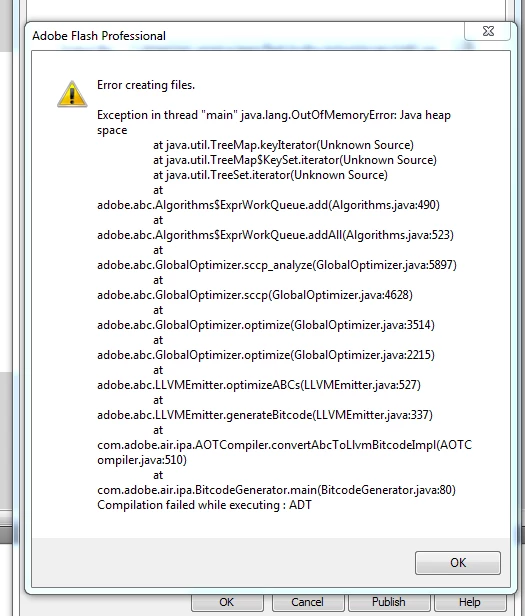
I snippingtooled the error into the screenshot. If anyone could help me find out what to do to fix this, it would be great.

Error text:
Thank you very much,

gdDept

This topic has been closed for replies.

2 replies

Pahup
Adobe Employee
Adobe Employee
April 2, 2012

Hi Sol,

Thanks for reporting the issue, we would like to investigate it at our end.

Would it be possible for you to share the swf and xml which reproduces the issue.

Also, what version of AIR SDK you're using.

-Thanks

Pahup

Inspiring
April 2, 2012

Hello Pahup,

thank you very much for your interest in this matter. Unfortunately I can't make the decision if I can hand out the project data

myself - I will have to discuss the matter with my superior first, who is away at the moment. You will receive an answer most likely at the end of the week.

Thank you again for you interest and your patience - it is highly important to me to be able to solve this problem and therefore any help is appreciated.

As for the version, after receiving the error I made all the necessary procedures to get everything onto the latest state. I reinstalled Flash CS5.5 and applied the latest updates.

The error remained unchanged. According to http://helpx.adobe.com/air/kb/determine-version-air-runtime.html the exact version of my AIR is 3.2.0.2070.

Regards,

gdDept

April 3, 2012
March 31, 2012

Hi Sol,

I do not know if your problem is related to this:

http://helpx.adobe.com/flash/kb/large-flash-applications-compile-incorrectly.html

Try and let us know

Inspiring
March 31, 2012

Thank you for your answer, BaronKarza, though unfortunately it still didn't help. When I changed the memory to 256 first, I received an error which looks similar to the first one though a bit different.

Error text:

I thought that maybe 256 memory is still not enough and changed it to 512. The error I received then exactly matched the first one. It's actually kind of weird. But I hope it somehow helps the analysis of the problem source.

gdDept

March 31, 2012

Does it happens always or only when creating the ipa for that project?

Have you tried to create a new empty project (that  writes on screen hello world) and to create an ipa from that?