lumenmedia
Inspiring
June 17, 2014
Answered

loadFilePromise() method unavailable in the Loader class using FB 4.7 (target iOS)

  • June 17, 2014
  • 1 reply
  • 369 views

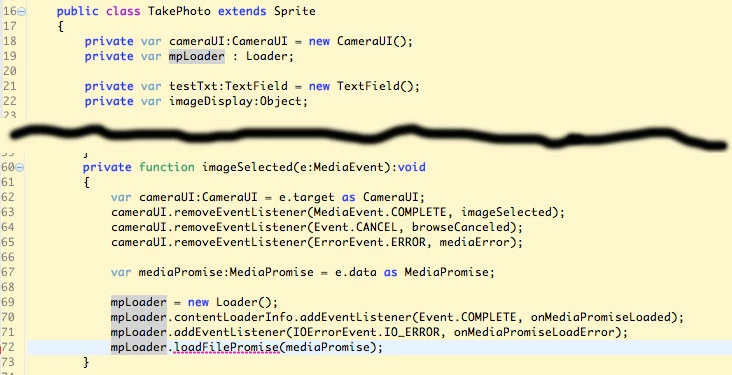
Here's my code:

Note that mpLoader is declared as a Loader class, yet when I try to use the loadFilePromise() method, it won't accept it syntactically.

Is there a reason for this?  I've checked and triple checked in the online docs ... It just shows me examples where  loadFilePromise() obviously works ...

What's wrong with this code? Why won't it work?

This topic has been closed for replies.
Correct answer lumenmedia

I took this code directly from an Action Script 3 example on the Adobe website, but it didn't work.

Here was my new solution after 6 days of trial and error (mostly error)


public class TakePhoto extends Sprite

  {

       private var cameraUI:CameraUI = new CameraUI();

       private var cameraRoll:CameraRoll = new CameraRoll();

       private var dataSource:IDataInput;

       private var eventSource:IEventDispatcher;

       private var testTxt:TextField = new TextField();

       public function TakePhoto()

       {

            if( CameraUI.isSupported )

            {

                 testTxt.text = "CameraUI Initializing ...";

                 cameraUI.addEventListener( MediaEvent.COMPLETE, imageSelected );

                 cameraUI.addEventListener( Event.CANCEL, browseCanceled );

                 cameraUI.addEventListener( ErrorEvent.ERROR, mediaError );

                 cameraUI.launch( MediaType.IMAGE );

            }

            else

            {

                 testTxt.text = "CameraUI is not supported.";

            }

         }

         private function imageSelected(e:MediaEvent):void

            {

                 trace( "Media selected..." );

                 testTxt.text =  "Media selected...";

                 // Create a new imagePromise

                 var imagePromise:MediaPromise = e.data;

                 // Open our data source

                 dataSource = imagePromise.open();

                 if (imagePromise.isAsync )

                 {

                      trace("Asynchronous");

                      var eventSource:IEventDispatcher = dataSource as IEventDispatcher;

                      eventSource.addEventListener( Event.COMPLETE, onMediaLoaded );

                 }

                 else

                 {

                      trace("Synchronous");

                      readMediaData();

                 }

             }

            private function onMediaLoaded( event:Event ):void

            {

                 trace("Media load complete");

                 readMediaData();

            }

             private function readMediaData():void

             {

                 testTxt.text = "Read Media Data";

                 trace("Read Media Data");

                 var imageBytes:ByteArray = new ByteArray();

                 dataSource.readBytes(imageBytes);

                 var loader:Loader = new Loader();

                 loader.loadBytes(imageBytes);

                 loader.contentLoaderInfo.addEventListener(Event.COMPLETE, imageAddToCamRoll);

                 loader.contentLoaderInfo.addEventListener(ErrorEvent.ERROR, onMediaLoadError);

               }

            protected function imageAddToCamRoll(event:Event):void

            {

                 var loaderInfo:LoaderInfo = LoaderInfo(event.target);

                 var bmpData : BitmapData  = new BitmapData(loaderInfo.width, loaderInfo.height, false, 0xFFFFFF);

                 bmpData.draw(loaderInfo.loader);

                 try

                 {

                      cameraRoll.addBitmapData(bmpData);

                      trace( "image added to cameraRoll" );

                      testTxt.text = "Image added to cameraRoll";

                 }

                 catch (e:Error) {

                      trace( "Caught :: " + e );

                      testTxt.text = "Image failed to add to cameraRoll";

                 }

  }


This worked. Now I can take photos and store them in the Camera Roll.

1 reply

lumenmedia
lumenmediaAuthorCorrect answer
Inspiring
June 23, 2014

I took this code directly from an Action Script 3 example on the Adobe website, but it didn't work.

Here was my new solution after 6 days of trial and error (mostly error)


public class TakePhoto extends Sprite

  {

       private var cameraUI:CameraUI = new CameraUI();

       private var cameraRoll:CameraRoll = new CameraRoll();

       private var dataSource:IDataInput;

       private var eventSource:IEventDispatcher;

       private var testTxt:TextField = new TextField();

       public function TakePhoto()

       {

            if( CameraUI.isSupported )

            {

                 testTxt.text = "CameraUI Initializing ...";

                 cameraUI.addEventListener( MediaEvent.COMPLETE, imageSelected );

                 cameraUI.addEventListener( Event.CANCEL, browseCanceled );

                 cameraUI.addEventListener( ErrorEvent.ERROR, mediaError );

                 cameraUI.launch( MediaType.IMAGE );

            }

            else

            {

                 testTxt.text = "CameraUI is not supported.";

            }

         }

         private function imageSelected(e:MediaEvent):void

            {

                 trace( "Media selected..." );

                 testTxt.text =  "Media selected...";

                 // Create a new imagePromise

                 var imagePromise:MediaPromise = e.data;

                 // Open our data source

                 dataSource = imagePromise.open();

                 if (imagePromise.isAsync )

                 {

                      trace("Asynchronous");

                      var eventSource:IEventDispatcher = dataSource as IEventDispatcher;

                      eventSource.addEventListener( Event.COMPLETE, onMediaLoaded );

                 }

                 else

                 {

                      trace("Synchronous");

                      readMediaData();

                 }

             }

            private function onMediaLoaded( event:Event ):void

            {

                 trace("Media load complete");

                 readMediaData();

            }

             private function readMediaData():void

             {

                 testTxt.text = "Read Media Data";

                 trace("Read Media Data");

                 var imageBytes:ByteArray = new ByteArray();

                 dataSource.readBytes(imageBytes);

                 var loader:Loader = new Loader();

                 loader.loadBytes(imageBytes);

                 loader.contentLoaderInfo.addEventListener(Event.COMPLETE, imageAddToCamRoll);

                 loader.contentLoaderInfo.addEventListener(ErrorEvent.ERROR, onMediaLoadError);

               }

            protected function imageAddToCamRoll(event:Event):void

            {

                 var loaderInfo:LoaderInfo = LoaderInfo(event.target);

                 var bmpData : BitmapData  = new BitmapData(loaderInfo.width, loaderInfo.height, false, 0xFFFFFF);

                 bmpData.draw(loaderInfo.loader);

                 try

                 {

                      cameraRoll.addBitmapData(bmpData);

                      trace( "image added to cameraRoll" );

                      testTxt.text = "Image added to cameraRoll";

                 }

                 catch (e:Error) {

                      trace( "Caught :: " + e );

                      testTxt.text = "Image failed to add to cameraRoll";

                 }

  }


This worked. Now I can take photos and store them in the Camera Roll.