

MacOS Gatekeeper
Hi!
I use Animate 2020 to develop Apps. With Harman it works great for all platforms and I use the Captive Runtime on Windows and on MacOS.
But when installing on Catalina the Gatekeeper refused to install my APP.
With the CTRL key pressed users can then overwrite the Gatekeeper to install
What I want is that my APP is accepted by Gatekeeper. So my bundle has to be signed and notarized by Apple.
What I did!
1. Generate a Apple Certificates on the Apple Portal certificates

2. So i tried to sign my Adobe Animate APP on the MAC with the latest Adobe SDK from Harman.
I downloaded the Developer ID Application certificate, double clicked to get it in my Kexchain on my Mac and exported to .p12 certificate.
I opened my project on the Mac in Animate 2020 put the new certificate into the settings and tried to execute.
But there was an error on my Animate saying
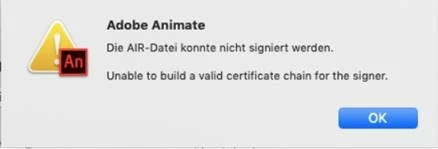
Unable to build a valid certificate chain for the signer. First time I saw that
So i am Stuck exactly here.
3. After that what i intent is to package the Mac Captive runtime bundle with PKGBUILD on Mac
4. I will then sign the install Package with the Developer ID installer certificate, which I tried and which works.
5. I will notarize the PKG installer Package. with the Ycode ALtool.
This one I tried already but got back that the APP could not be notarized.
Please help me. If there is somebopdy out there. I assume that lot of developer want this solution so Gatekeeper lets the install to Mac clients.
When everything works i will give a detailed description of all the Steps
Thanks Michael


 AdChoices