
Main AIR Desktop Application cannot refresh child Application
Hello Everybody I would like to relate one issue I have when I load a normal Application SWF Module
from an external and add it to the main AIR WindowedApplication.
I have one WindowedApplication which goes like this :
<?xml version="1.0" encoding="utf-8"?>
<s:WindowedApplication xmlns:fx="http://ns.adobe.com/mxml/2009"
    xmlns:s="library://ns.adobe.com/flex/spark"
    xmlns:mx="library://ns.adobe.com/flex/mx"
    skinClass="skin.Skin" showStatusBar="false">

  <fx:Script>
  <![CDATA[

          .................. HERE IS THE CODE TO LOAD THE SWFLOADER
  ]]>
  </fx:Script>

</s:WindowedApplication>
The skin of the main WindowedApplication goes like this ...
<?xml version="1.0" encoding="utf-8"?>
<s:SparkSkin xmlns:fx="http://ns.adobe.com/mxml/2009"
  xmlns:s="library://ns.adobe.com/flex/spark"
  xmlns:mx="library://ns.adobe.com/flex/mx">
  <!-- host component -->
  <fx:Metadata>
  [HostComponent("spark.components.Application")]
  </fx:Metadata>

  <s:states>
  <mx:State name="normal" />
  <mx:State name="disabled" />
  <mx:State name="normalAndInactive"/>
  <mx:State name="disabledAndInactive"/>
  </s:states>


  <s:Rect top="0" left="0" bottom="0" right="0" radiusX="10" radiusY="10">
  <s:fill>
  <mx:SolidColor color="#FFFFFF"/>
  </s:fill>
  <s:stroke>
  <mx:SolidColorStroke color="#000000"/>
  </s:stroke>
  </s:Rect>

  <s:Group id="contentGroup" top="0" bottom="0" left="0" right="0"/>
  <!-- <s:Image bottom="5" right="5" mouseDown="onResizeImageClicked(event)" source="@Embed(source='assets/resize.png')" /> -->
</s:SparkSkin>
I have an Application module like this :
<?xml version="1.0" encoding="utf-8"?>
<s:Application xmlns:fx="http://ns.adobe.com/mxml/2009"
    xmlns:s="library://ns.adobe.com/flex/spark"
    xmlns:mx="library://ns.adobe.com/flex/mx"
    name="core" skinClass="skin.Skin" resize="onResize(event)">
  <fx:Declarations>
  <!-- Place non-visual elements (e.g., services, value objects) here skinClass="skin.MainSkin" -->
  </fx:Declarations>

  <s:layout>
  <s:VerticalLayout/>
  </s:layout>


  <s:Button id="cool" width="100%" height="100%" verticalCenter="0" horizontalCenter="0" label="COOL!"/>

</s:Application>
The skin of that application :
<?xml version="1.0" encoding="utf-8"?>
<s:SparkSkin xmlns:fx="http://ns.adobe.com/mxml/2009"
  xmlns:s="library://ns.adobe.com/flex/spark"
  xmlns:mx="library://ns.adobe.com/flex/mx">
  <!-- host component -->
  <fx:Metadata>
  [HostComponent("spark.components.Application")]
  </fx:Metadata>

  <s:states>
  <s:State name="normal" />
  <s:State name="disabled" />
  <s:State name="normalAndInactive"/>
  <s:State name="disabledAndInactive"/>
  </s:states>


  <fx:Script>
  <![CDATA[
  import mx.core.FlexGlobals;

  import spark.components.Application;

  protected function onResizeImageClicked(event:MouseEvent):void
  {
  var st:Stage = FlexGlobals.topLevelApplication.stage;
  //this.stage.nativeWindow.startResize(NativeWindowResize.BOTTOM_RIGHT);
  st.nativeWindow.startResize(NativeWindowResize.BOTTOM_RIGHT);
  }

  ]]>
  </fx:Script>

  <s:Rect top="0" left="0" bottom="0" right="0" radiusX="10" radiusY="10">
  <s:fill>
  <mx:SolidColor color="#FBF793"/>
  </s:fill>
  <s:stroke>
  <mx:SolidColorStroke color="#000000"/>
  </s:stroke>
  </s:Rect>
  <s:Image bottom="5" right="5" mouseDown="onResizeImageClicked(event)" source="@Embed(source='assets/resize.png')" />
  <s:Group id="contentGroup" left="0" right="0" top="10" bottom="25"/>
</s:SparkSkin>
The problem I have is really simple ... When the whole thing is launching and showing the main WindowedApplication everything is going fine.
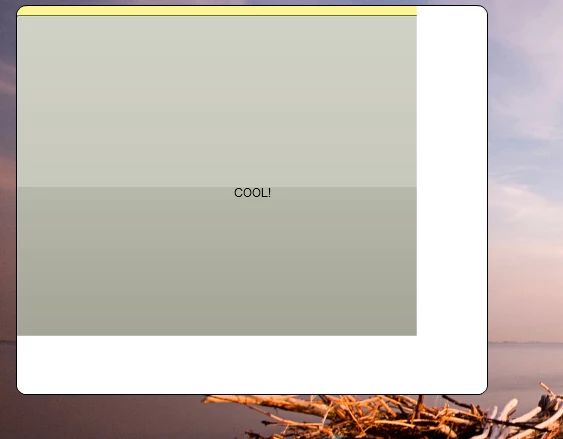
The problem is when I scale down the size of the window by clicking the Image this is the artifact that is shown by the main WindowedApplication.
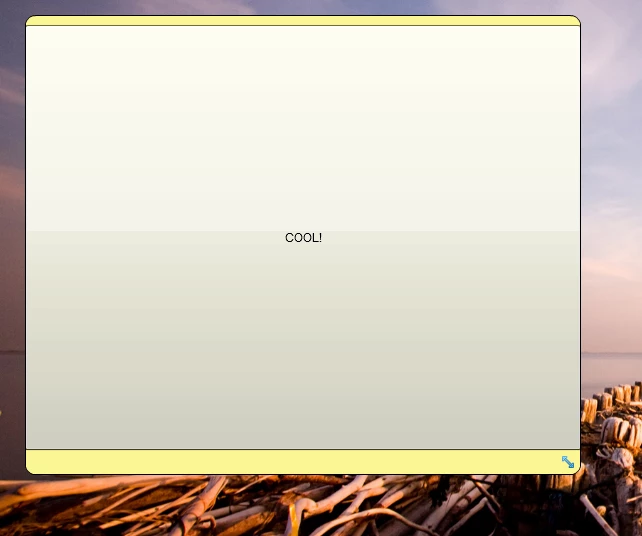
When I scale down It goes like this
When I minimize the WindowedApplication with the icon on the taskbar of the OS the main window disapear.
When I reclick the icon on the taskbar the window reappear and the bug is gone. I guess that Flash is triggering
some kind of general refresh of the whole app because it was not visible.
Note : this bug only happens when I scale down the size os the window.
How can I fix this bug or how can I simulate the minimize and show like I did when I clicked the app icon from the taskbar?


 AdChoices