SangHee
Known Participant
January 14, 2015
Answered

Networkinfo.ane does not support iOS 64bit?

  • January 14, 2015
  • 4 replies
  • 2818 views

I get the following error when packaging using AIR SDK 16.0.0.272.
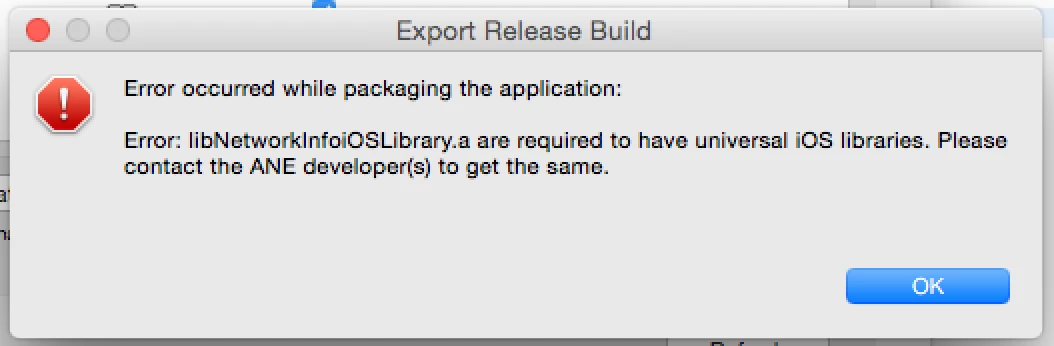
I used com.adobe.extension.Networkinfo.ane to check the network state.

When is Networkinfo.ane updated?

Anyone who knows?

This topic has been closed for replies.
Correct answer Abhinav_Dhandh

Hi

We would like to confirm that our team is working on the same. The updated ANE's should be available sometime soon.

Regards

Abhinav

4 replies

yoonesm68067284
Participating Frequently
December 9, 2017

thank you for your information

but in this page:

NetworkInfo native extension sample

where can I found download link ?!

Participant
February 25, 2015

I just checked: the ANE has been updated in the source and in the binaries download. Thanks so much for doing this!

see: NetworkInfo native extension sample | Adobe Developer Connection to download.

Participant
February 2, 2015

Hi All,

I have update Adobe NetworkInfo to support running on iOS Simulator, here‌ you can find the Universal/Fat .ane file. Also included ant build.xml script to build entire projects and package in single command.


Thanks,

GP

Participant
January 15, 2015

I have been experiencing the same problem with the NetworkInfo.ane.

From these threads I know that all ANEs you use must also support 64-bit.

https://forums.adobe.com/message/6850282#6850282

https://forums.adobe.com/message/6850180#6850180

The ANEs that Adobe supply on http://www.adobe.com/devnet/air/native-extensions-for-air/extensions/networkinfo.html haven't been updated since 2011. So I attempted to recompile them myself. I downloaded the original source from Adobe then recompiled the .a file from XCode with Architectures set to Standard architectures (arm7, arm64).

If I check that the binary is a universal one with lipo -info I get "Architectures in the fat file: libNetworkInfoiOSLibrary.a are: i386 x86_64"

I then tried generating the ANE via two methods

- via shell script as explained here http://www.lorenzonuvoletta.com/how-to-create-your-own-ane-for-ios-using-adobe-air/

- via the ANEBuilder GUI Air App http://as3breeze.com/anebuilder/

Both techniques result with the error

"Error: Apple App Store allows only universal applications. This ANE must have a universal iOS binary. Please change build settings in Xcode project to "Standard Architecture" to create universal library."

This is the same error that is discussed in this thread.

https://forums.adobe.com/thread/1660929

I have triple checked every step myself and got my workmates to review my work. Can anybody see what I am doing wrong? Am I even doing anything wrong or is this something that can't be remedied without Adobe fixing something on their end? I hoped that when Adobe released AIR 16 they would also release updates to their ANEs. Does anyone know if they will have a chance to work on/update them anytime soon?

Abhinav_Dhandh
Adobe Employee
Abhinav_DhandhCorrect answer
Adobe Employee
January 16, 2015

Hi

We would like to confirm that our team is working on the same. The updated ANE's should be available sometime soon.

Regards

Abhinav

nicopowa
Participant
January 21, 2015

hello !

i tried compiling the ane file too but i get an error saying that swf version must be 13 or lower

i used air16 sdk and last xcode version

any idea ?

thanks !