
Known Participant
February 23, 2016
Answered

No network in iOS

  • February 23, 2016
  • 2 replies
  • 2410 views

I'm recompiling an iOS app with Animate CC and Adobe Air SDK 20.0.0.260 and the app cannot access the network.

This is pretty serious and completely breaks my app. I have tried it in iOS 9.1 and 9.2.1 on 2 different devices. And yes the device is connected to Wifi.

The code works fine when testing on computer. When debugging on device URLMonitor reports no network available and URLLoader event HTTPStatusEvent.HTTP_RESPONSE_STATUS never fires (which makes sense since the app thinks it has no network).

I've tried using a previous version of Adobe Air SDK but Animate CC won't let me add previous versions.
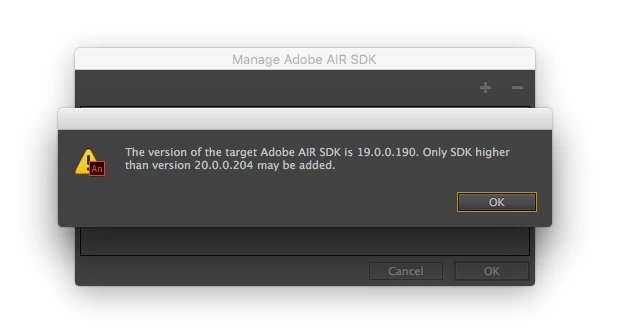
I'm installing the previous version of Flash Pro and will report back.

This topic has been closed for replies.
Correct answer Roshan Chhetri

Hi,

This is not a AIR bug but this is due to new feature introduced on iOS 9+ devices.

Please add the following in your app's iPhone info-additions and check if the issue is solved.

you can replace www.abcd.com with the url you are trying to access.

<key>NSAppTransportSecurity</key>

<dict>

<key>NSExceptionDomains</key>

<dict>

<key>www.abcd.com</key>

<dict>

<!--Include to allow subdomains-->

<key>NSIncludesSubdomains</key>

<true/>

<!--Include to allow HTTP requests-->

<key>NSTemporaryExceptionAllowsInsecureHTTPLoads</key>

<true/>

<!--Include to specify minimum TLS version-->

<key>NSTemporaryExceptionMinimumTLSVersion</key>

<string>TLSv1.1</string>

</dict>

</dict>

</dict>

2 replies

Adobe Employee
February 24, 2016

Also, Can you please confirm if you are trying with 20.0.260 build?

Lars Laborious
Legend
February 24, 2016

Roshan, woudn't it be enough with just adding:

<key>NSAppTransportSecurity</key>

  <dict>

    <key>NSAllowsArbitraryLoads</key>

    <true/>

  </dict>

I have an app that does a few http requests and by adding just these lines in the info-additions, I get it to work in AIR 20+.

Or will Apple require us to specify the domains?

Adobe Employee
February 24, 2016

Hi @Lars Laborious,

You can definitely add it , but this will enable your app's connection to all http URL's and Apple does not require us to specify domains ( as per my knowledge).


However, It is always advisable to add the known http url's in your xml such that it communicates only to the url's that developer knows.

-Roshan

MonicaMPAuthor
Known Participant
February 23, 2016

So I installed the last version of Flash Pro and was able to get network on device by compiling with SDK 19.

Compiled with SDK 20.0.0.206 = No network

Compiled with SDK 19.0.0.180 = Network OK

I think it's fair to say this is Adobe Air 20 bug.

Roshan ChhetriCorrect answer
Adobe Employee
February 23, 2016

Hi,

This is not a AIR bug but this is due to new feature introduced on iOS 9+ devices.

Please add the following in your app's iPhone info-additions and check if the issue is solved.

you can replace www.abcd.com with the url you are trying to access.

<key>NSAppTransportSecurity</key>

<dict>

<key>NSExceptionDomains</key>

<dict>

<key>www.abcd.com</key>

<dict>

<!--Include to allow subdomains-->

<key>NSIncludesSubdomains</key>

<true/>

<!--Include to allow HTTP requests-->

<key>NSTemporaryExceptionAllowsInsecureHTTPLoads</key>

<true/>

<!--Include to specify minimum TLS version-->

<key>NSTemporaryExceptionMinimumTLSVersion</key>

<string>TLSv1.1</string>

</dict>

</dict>

</dict>

MonicaMPAuthor
Known Participant
February 23, 2016

If that's the case why does it work when compiling with SDK 19 without modifying info-additions ?